
QuickSigner
QuickSigner simplifies eSigning with secure, legally binding signatures in seconds, enhancing your workflow and protecting your privacy.
Visit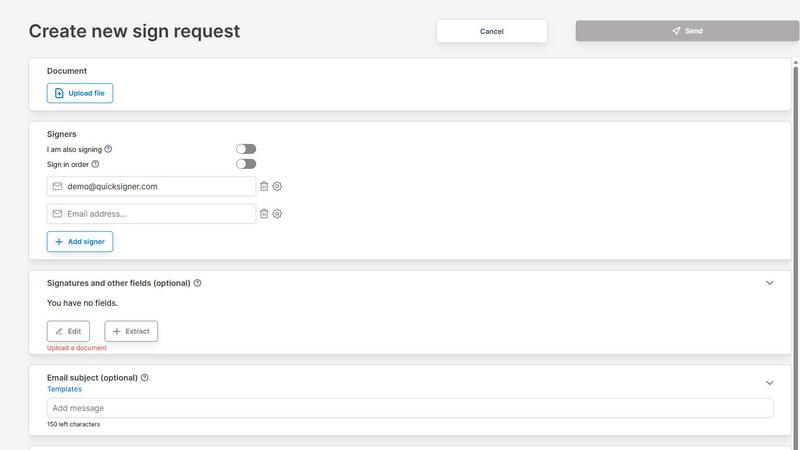
About QuickSigner
QuickSigner is an innovative online platform designed to revolutionize the way individuals and businesses handle document signing. By simplifying the signing, sending, and finalizing of documents, QuickSigner transforms what traditionally takes days of back-and-forth communication into mere minutes. It is equipped with Adobe Approved Trust List (AATL) electronic signatures, ensuring that all signatures are legally binding and secure. Ideal for small teams, freelancers, and businesses across various industries, QuickSigner elevates operational efficiency through its user-friendly interface and robust functionality. With ISO 27001 certification, QuickSigner prioritizes security and privacy, making it a trustworthy partner for your document management needs. The platform is API ready, allowing for seamless integration into existing workflows, further enhancing its adaptability and effectiveness.
Features of QuickSigner
Easy Document Upload
QuickSigner allows users to effortlessly upload documents by simply dragging and dropping files into the platform. It supports popular formats such as PDF and Word, making it easy to get started without any hassle.
Customizable Signature Fields
Users can personalize their documents by adding signature, date, and text fields exactly where they are needed. This feature ensures that signers know precisely where to sign, reducing confusion and speeding up the process.
Secure Online Signing
Recipients can sign documents from any device using a secure link, eliminating the need for account creation or software installation. This convenience ensures that the signing process is quick, efficient, and accessible.
Real-Time Tracking and Finalization
QuickSigner provides users with real-time updates on the signing process. You can monitor who has signed and who still needs to sign, and once all parties have completed their signing, the finalized document is delivered instantly.
Use Cases of QuickSigner
Streamlined Client Agreements
Freelancers and small businesses can utilize QuickSigner to streamline their client agreements. By reducing the time taken for signatures, they can focus on delivering services rather than chasing paperwork.
Efficient Contract Management
For businesses that handle multiple contracts, QuickSigner simplifies contract management by allowing users to create templates, track signatures, and manage deadlines efficiently, ensuring nothing falls through the cracks.
Quick Employee Onboarding
HR departments can leverage QuickSigner for quicker employee onboarding processes. New hires can sign necessary documents such as offer letters and tax forms electronically, speeding up the overall onboarding experience.
Hassle-Free Real Estate Transactions
Real estate agents can use QuickSigner to manage property sales and leases. By enabling secure and quick signing of documents, real estate transactions can be completed faster, benefitting both agents and clients.
Frequently Asked Questions
How does QuickSigner ensure document security?
QuickSigner is ISO 27001 certified, meaning it adheres to strict international standards for information security management. It also uses AATL electronic signatures, ensuring that all signed documents are legally binding and secure.
Can I use QuickSigner on mobile devices?
Yes, QuickSigner is designed to be mobile-friendly. Users can sign documents from any device, including smartphones and tablets, making it convenient to manage documents on the go.
Are there limits on the number of documents I can sign?
QuickSigner offers different pricing plans that cater to various needs. The Free plan allows for 3 documents per month, while the Business plan provides unlimited documents, making it suitable for teams that sign frequently.
What types of documents can I upload?
QuickSigner supports a variety of document types including PDF and Word files. This versatility makes it suitable for a wide range of agreements and contracts, ensuring that users can handle their documentation needs effectively.
Explore more in this category:
Similar to QuickSigner

Private email. Pure. Secure. Exclusive. No ads, no tracking, no data selling. GDPR compliant, EU-hosted.


AI-powered CA practice, task, meeting, OKR, and workflow management software for growing teams.

imgtxtapp.laviolab.com is a Telegram-based image-to-text converter that turns photos, screenshots, scanned documents into editable text

Apps and files on an infinite canvas where people and AI agents work together.

Team calendar for engineering managers to plan vacations, on-call weeks, project work, and releases together.

Panzoe is an all-in-one AI platform for personal productivity, business automation, AI assistants, content creation, and custom AI solutions.

Draw genograms and family relationship diagrams in your browser with editable templates.