
Subclip
Subclip is an AI video editor that lets you edit, caption, and dub videos with voice cloning in one fast platform.
Visit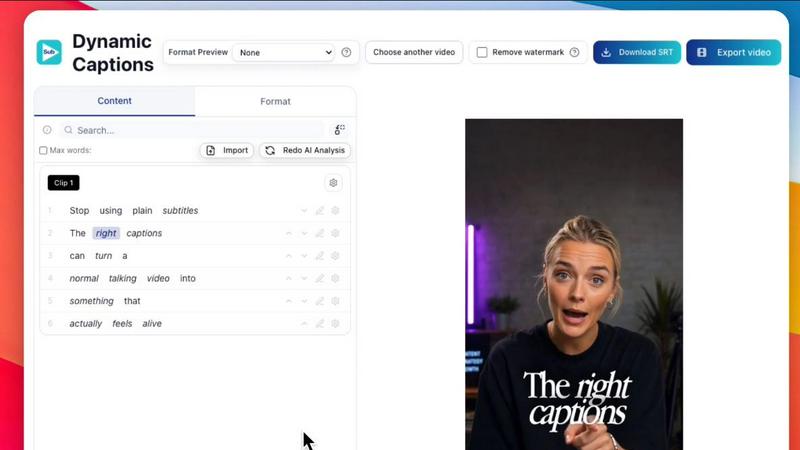
About Subclip
Subclip is an AI-powered video editor designed to transform how creators, marketers, educators, and content teams produce video. Instead of wrestling with complex timelines and manual scrubbing, Subclip lets you edit videos like a document. Simply drag in a transcript and start editing text to cut, trim, and rearrange your footage instantly. The core value proposition is reclaiming up to 80% of your production time by automating the most tedious tasks. Subclip replaces the old manual grind of scrubbing hours of footage, formatting captions, translating audio, and rendering files with one-click, AI-driven solutions. It supports a comprehensive suite of tools including transcription, subtitle generation, voice cloning, silence removal, filler word removal, and multi-language dubbing. Whether you are a YouTuber clipping highlights, a podcaster cleaning up audio, a course creator dubbing lessons, or an agency managing client content, Subclip streamlines your entire workflow from raw footage to final export. Built for speed and simplicity, it removes the complexity of traditional editors and replaces them with intuitive features that save hours of work. With freemium pricing and affordable paid plans, Subclip makes professional-grade video production accessible to everyone. The platform also supports direct export to DaVinci Resolve, Final Cut Pro, and Adobe Premiere Pro, plus built-in scheduling for YouTube and X, making it a true end-to-end solution.
Features of Subclip
Rough Cut using Text Transcript
Edit your video by editing its transcript, just like a Google Doc. Trim mistakes, rearrange sections, and update your timeline without any manual rework. This feature eliminates the need to scrub through raw footage, allowing you to make precise cuts by deleting words or sentences. Once finished, export the NLE timeline directly to DaVinci Resolve, Final Cut Pro, and Adobe Premiere Pro for further refinement.
AI Clipping and Viral Score
Subclip’s engine automatically scans your long-form videos for high-energy segments, punchlines, and key emotional shifts to identify the best clips for you. Each clip is scored with a Viral Score, Engagement metric, and Retention rate, so you know exactly which moments will perform best on social media. This turns hours of content into short, high-retention clips in minutes, saving you the guesswork of manual clipping.
One-Click Unlimited Captions and Subtitles
Generate unlimited subtitles for your videos with a single click, supporting local transcription in over 48 languages. You can customize the text style, formatting, and timing before publishing. This feature ensures your content is accessible to a global audience and optimized for silent viewing on social platforms. Export your captions directly or embed them into your final video without any limits on export minutes.
AI Dubbing with Voice Clone
Translate your video into 21+ languages while preserving your original tone, emotion, and background music. Subclip uses AI voice cloning to re-record your narration in a new language, making it sound like you are speaking fluently. This eliminates the need for hiring voice actors or re-recording manually. Perfect for creators and businesses looking to expand their reach globally without sacrificing authenticity.
Use Cases of Subclip
Creators and Podcasters
Long-form podcasters and YouTubers can use Subclip to automatically clip their best moments into short, engaging videos for TikTok, Instagram Reels, and YouTube Shorts. The AI clipping engine identifies punchlines and high-energy segments, while one-click silence and filler word removal polishes the audio. This workflow lets creators 10x their viewership with zero extra editing effort, turning one recording session into dozens of shareable clips.
Coaches and Course Creators
Educational content creators can dub their recorded courses or coaching sessions into 20+ languages using their own cloned voice. This allows them to reach international students without re-recording each lesson. Subclip also auto-generates accurate subtitles in multiple languages, making courses more accessible. The result is a scalable global course library built from a single source video.
Vloggers and Social Media Influencers
Vloggers can add captions, B-Roll, audio enhancements, and remove background noise in one click without any limits. Subclip’s text-based editing makes it easy to trim awkward pauses or mistakes from a vlog by simply deleting the corresponding transcript text. Export in any aspect ratio (16:9, 9:16, 1:1) and schedule directly to YouTube and X, streamlining the entire posting process.
Agencies and Freelancers
Content agencies and freelance editors can increase their output at a fraction of the cost by leveraging unlimited transcription, export, and team collaboration features. Share projects like a Google Doc with clients or team members for feedback, then export the final timeline to professional editors like DaVinci Resolve or Premiere Pro. Subclip handles the repetitive tasks, allowing agencies to take on more clients without hiring additional editors.
Frequently Asked Questions
How does Subclip edit videos using a transcript?
Subclip transcribes your video automatically when you upload it. You then see the transcript as editable text. To remove a mistake or pause, simply delete the corresponding words from the transcript. To rearrange sections, cut and paste text blocks. The video timeline updates in real-time to match your text edits. This eliminates the need to manually scrub through footage on a timeline.
Can I dub my video into other languages without losing my voice?
Yes. Subclip uses AI voice cloning to analyze your original voice’s tone, pitch, and emotion. When you select a target language, the AI generates a new audio track that speaks the translated script in a cloned version of your voice. This preserves your natural delivery and personality, making the dubbed video sound authentic rather than robotic. Background music and sound effects are also maintained.
What video editors can I export to from Subclip?
Subclip supports direct export to DaVinci Resolve, Final Cut Pro, and Adobe Premiere Pro using a .fcpxml file. This means you can do your rough cut and basic editing in Subclip, then seamlessly move the project into your preferred professional editor for advanced color grading, effects, or fine-tuning. There is no need to re-upload or re-sync footage between platforms.
Is there a free version of Subclip and what are the limits?
Yes, Subclip offers a freemium pricing model with a free tier that allows you to test core features like transcription, captioning, and basic editing. The free tier includes a limited number of export minutes and video projects. For unlimited exports, advanced AI dubbing, voice cloning, and team collaboration, you can upgrade to one of the affordable paid plans. Specific pricing details are available on the Subclip pricing page.
Pricing of Subclip
Subclip operates on a freemium model. The free tier provides access to basic editing, transcription, and captioning with limited export minutes. Paid plans unlock unlimited exports, AI dubbing with voice cloning, team collaboration, priority support, and advanced features like AI clipping and scheduling. For the most current pricing tiers and feature comparisons, please visit the official Subclip pricing page on their website.
Similar to Subclip


Turn TikTok, Reels, Shorts, Facebook videos, audio, and video into accurate timestamped transcripts with TXT, SRT, and VTT exports.

Clone trending TikTok, Reels and Shorts videos into your own AI clips.

Oravaa's human-sounding Voice AI handles your calls, qualifies leads, and automates follow-ups around the clock.

Transform your Mac into a smart dictation tool with Hush Touch, offering offline voice-to-text that learns your.

Glossa delivers fast, accurate AI translations of sermons in 100+ languages, empowering churches to connect globally.

Qwen3-TTS transforms text into natural, expressive speech with advanced voice cloning and context-aware prosody.

Qwen3 TTS instantly creates lifelike, multilingual speech with lightning-fast streaming.