AI Photo Generator vs TinyFast
Side-by-side comparison to help you choose the right product.

AI Photo Generator
Generate stunning photorealistic images effortlessly from text or existing photos with our ultra-fast AI Photo Generator.
Last updated: March 11, 2026

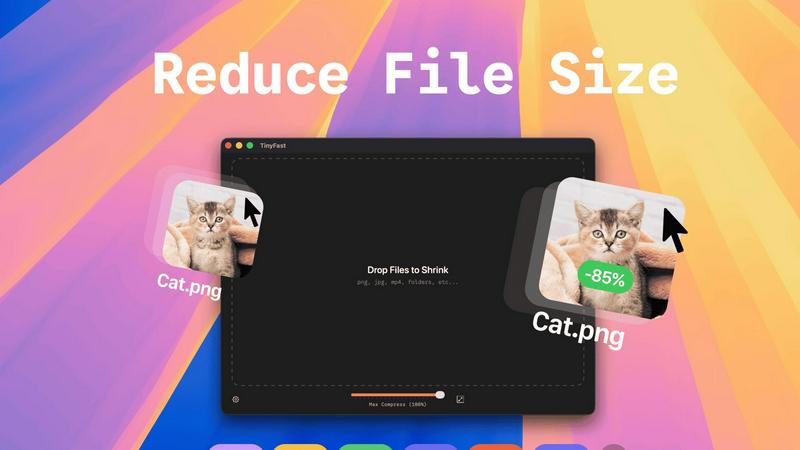
Compress images, videos, and PDFs instantly and securely on your Mac with TinyFast's simple drag-and-drop functionality.
Last updated: February 28, 2026
Visual Comparison
AI Photo Generator

TinyFast
Feature Comparison
AI Photo Generator
Prompt-to-Masterpiece Generation
Our AI models are designed to interpret natural language prompts with remarkable accuracy. This feature allows you to describe everything from lighting and composition to intricate details, ensuring that the generated images reflect your creative vision flawlessly.
Infinite Style Library
Explore a vast collection of visual styles that cater to various artistic needs. Whether you are looking for ultra-realistic photography, vibrant anime visuals, classic paintings, or futuristic 3D designs, our extensive library offers endless possibilities for your projects.
Seamless Photo Transformation
Transform existing images effortlessly by uploading them to the platform. This feature enables you to restyle your photos, turning casual snapshots into professional-quality images perfect for business use, social media, or personal branding.
Lightning-Fast Processing
Experience unparalleled speed with our optimized cloud architecture. Images are generated in mere seconds, allowing you to iterate quickly and get your projects completed without the frustrating wait times often associated with traditional rendering processes.
TinyFast
Batch & Drag-Drop Shrink
Experience the unparalleled efficiency of dragging entire folders into TinyFast for instant optimization. This feature allows you to compress multiple files simultaneously, saving you time and effort while delivering optimized output in mere seconds.
Blazing-Fast Compression
TinyFast harnesses optimized native engines designed for speed, enabling you to shrink large files in seconds. Forget the waiting game associated with uploads and downloads; this application provides rapid compression that keeps your workflow flowing smoothly.
Resize Resolution
Take advantage of the automatic resize feature for your images and videos. Set the desired resolution, and TinyFast will ensure your files are not only compressed but also perfectly sized for your needs, enhancing the visual quality while reducing size.
100% Local & Private
With TinyFast, your privacy is paramount. All files remain on your device, ensuring that sensitive data is never exposed to cloud servers or third-party applications. This non-disclosure design guarantees total privacy, making it the ideal choice for professionals managing confidential files.
Use Cases
AI Photo Generator
Content Creation for Social Media
Content creators can generate eye-catching thumbnails and unique social media assets that stand out in crowded feeds. This tool helps maintain a fresh and engaging online presence without the need for expensive graphic design services.
Marketing Campaigns
Marketers and entrepreneurs can create stunning visuals for advertisements, websites, and presentations. With AI Photo Generator, you can produce high-quality images that capture your brand's essence while staying within budget.
Personal Branding
Professionals looking to enhance their online profiles can use the platform to generate polished headshots or dynamic character portraits. This feature is perfect for personal branding, giving a professional touch to your online presence.
E-commerce Visuals
E-commerce businesses can benefit from realistic product images that enhance listings and drive sales. By creating visually appealing scenes and product displays, sellers can attract more customers and improve conversion rates.
TinyFast
Graphic Designers
Graphic designers can significantly benefit from TinyFast's ability to compress images without sacrificing quality. This allows for quicker uploads to clients or websites, enhancing the overall efficiency of design processes and project delivery.
Video Editors
For video editors, TinyFast provides a seamless way to compress video files while maintaining high quality. This ensures faster rendering times and easier sharing, whether for social media or client presentations, without lengthy upload times.
Content Creators
Content creators can utilize TinyFast to optimize images and videos for their online platforms. By compressing files locally, they can enhance their web pages' loading times, improving user experience while safeguarding their creative assets.
Developers
Developers will find TinyFast invaluable for compressing code files and documentation quickly. The ability to maintain file integrity while reducing size simplifies project management and enhances collaboration among team members.
Overview
About AI Photo Generator
AI Photo Generator (aiphotogenerator.dev) revolutionizes the way you create stunning visuals by transforming your ideas into high-quality digital art with just a few clicks. Utilizing cutting-edge neural networks, this advanced platform allows users to generate professional-grade images from simple text prompts or by modifying existing photos. The core belief driving AI Photo Generator is that creativity should be accessible to everyone, regardless of their technical expertise. This makes it an ideal tool for content creators, marketers, and entrepreneurs who wish to generate unique visuals for their projects without the need for extensive design skills. The platform empowers users to explore their creativity while ensuring that the output meets commercial standards. With a user-friendly interface and powerful capabilities, AI Photo Generator is set to change the landscape of digital art creation.
About TinyFast
TinyFast is an innovative macOS application crafted to transform how you compress files effortlessly. Designed with a sleek and intuitive drag-and-drop interface, TinyFast allows users to quickly shrink a variety of file types, including PNG, JPEG, MP4, MOV, PDF, SVG, WebP, MP3, and GIF, right on their Mac. Say goodbye to time-consuming uploads and the anxiety of exposing sensitive files to unknown servers. This tool is perfect for developers, designers, and content creators who prioritize speed and privacy. TinyFast empowers users to maintain control over their files, compressing them swiftly without losing quality. By streamlining your workflow, TinyFast not only enhances productivity but also offers a fast, local, and secure solution for file compression that you can rely on.
Frequently Asked Questions
AI Photo Generator FAQ
How does AI Photo Generator work?
AI Photo Generator uses advanced neural networks to interpret text prompts and existing images, generating high-quality visuals based on user input. You can create images by either describing them or uploading reference photos.
Is there a free plan available?
Yes, AI Photo Generator offers a free plan that allows users to start generating stunning photos without any upfront costs. This plan provides a great way to explore the platform's capabilities before committing to a paid option.
Can I use the generated images for commercial purposes?
Absolutely! All images generated through AI Photo Generator are copyright-free and can be used for commercial projects, making it an excellent choice for businesses and marketers.
What types of styles can I choose from?
The platform boasts an extensive library of styles, ranging from realistic photography to artistic renderings like anime or oil paintings. This variety ensures that you can find the perfect aesthetic for any project.
TinyFast FAQ
How does TinyFast ensure the privacy of my files?
TinyFast guarantees privacy by keeping all file compression operations local to your device. No uploads to cloud servers occur, ensuring your sensitive files remain confidential and secure.
What types of files can I compress with TinyFast?
You can compress a wide variety of file types with TinyFast, including images (PNG, JPG, TIFF, HEIC, WebP, GIF), videos (MP4, MOV, M4V), documents (PDF, DOCX), code files (JS, CSS, JSON), and audio files (MP3).
Is there a limit to how many files I can compress?
With the free version, you can compress up to 5 files per day. However, with the lifetime plan or monthly subscription, you can enjoy unlimited local compressions without any restrictions.
Can I resize my images and videos while compressing them?
Absolutely! TinyFast offers a resize resolution feature that allows you to automatically adjust the dimensions of your images and videos during the compression process, ensuring they meet your specific needs.
Alternatives
AI Photo Generator Alternatives
AI Photo Generator is an innovative creative platform that utilizes advanced neural networks to convert text and images into professional-grade digital art. It falls within the category of image generation tools, designed to empower users by making high-quality visual content accessible without requiring extensive technical skills. With its ability to deliver stunning visuals quickly, it's no wonder users often seek out alternatives that might better align with their specific needs or preferences. Many users look for alternatives due to factors like pricing, the breadth of features offered, or compatibility with different platforms. When selecting an alternative, it's essential to consider the quality of image output, ease of use, processing speed, and the variety of artistic styles available. These elements can significantly impact your creative workflow and overall satisfaction with the tool.
TinyFast Alternatives
TinyFast is a cutting-edge macOS application that specializes in compressing images, videos, and PDFs with remarkable efficiency. It falls under the category of tech tools designed to enhance productivity for developers, designers, and content creators. Users often seek alternatives to TinyFast for various reasons, including pricing, specific feature sets, or compatibility with different platforms. Understanding the nuances of what each alternative offers, such as speed, privacy, and ease of use, is crucial when making a choice. When selecting an alternative, consider factors like the ability to handle batch compression, the speed of processing, and the importance of local file management for privacy. An ideal alternative should not only match or exceed the usability of TinyFast but also align with your specific needs and workflow requirements. Finding a solution that combines efficiency with robust features will ensure that your file compression tasks are handled seamlessly and securely.