Free AI Image Enhancer vs Image3D AI
Side-by-side comparison to help you choose the right product.

Free AI Image Enhancer
Transform dark, blurry images to stunning 4K quality for free with our AI image enhancer, featuring batch editing and no watermarks.
Last updated: March 11, 2026

Image3D AI
Transform any 2D image into a high-precision 3D model instantly, no skills required.
Last updated: March 1, 2026
Visual Comparison
Free AI Image Enhancer
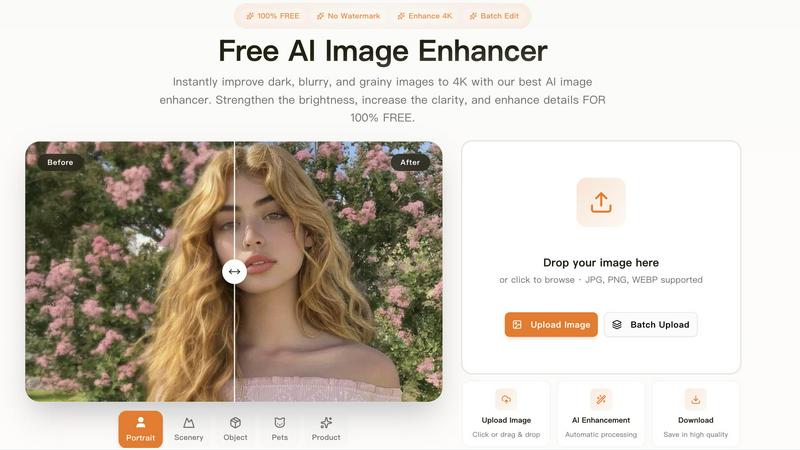
Image3D AI

Feature Comparison
Free AI Image Enhancer
Automatic AI Enhancement
This feature allows users to enhance their images seamlessly. With just a single click, the AI automatically adjusts color, brightness, and sharpness to deliver high-quality results without any manual intervention.
Batch Processing
Free AI Image Enhancer enables users to enhance multiple images simultaneously. Upload up to 10 files at once, and save time while ensuring that all your photos receive the same high-quality treatment, making it ideal for busy professionals.
High-Resolution Output
The tool supports output resolutions of up to 4K, ensuring that your images maintain clarity and detail even when enlarged. Whether for printing or digital display, your images will always look their best.
Versatile Editing Tools
With a suite of editing options including background removal, old photo restoration, object removal, and face swap features, this all-in-one toolkit provides everything you need to transform your images into stunning visuals.
Image3D AI
Powered by Hunyuan 3D Engine
At the heart of Image3D AI is Tencent's cutting-edge Hunyuan 3D technology. This advanced AI engine performs complex 3D reconstructions through inference, allowing for the generation of detailed, high-fidelity models from minimal input. It's the powerhouse that enables rapid, single-image conversion, setting a new standard for speed and accuracy in AI-driven 3D modeling without requiring extensive computational resources from the user.
Dual Generation Modes for Every Need
Maximize your output with two tailored processing modes. Rapid Mode is your go-to for speed, generating a 3D model from a single image in under a minute—perfect for concepts and quick iterations. For ultimate precision, Pro Mode utilizes multiple views of an object (front, side, back) to perform a physically accurate reconstruction, delivering superior detail and geometry ideal for professional 3D printing and final asset production.
Multi-Format Export for Any Pipeline
Your generated 3D model is instantly ready for any project. Image3D AI exports directly to the industry-standard formats you need: download as .STL for immediate 3D printing, .OBJ for editing in software like Blender or Maya, or .GLB for seamless use in web applications, AR experiences, and game engines like Unity and Unreal Engine. This flexibility ensures a frictionless integration into your existing professional workflow.
Intelligent Optimization & Best Practices
The platform is designed for success from the start. It includes a built-in best practices guide and intelligent parameter suggestions to boost your conversion quality. Features like background hinting (clear outlines and simple backgrounds work best) and mode selection (Normal, Low Poly, Geometry) guide you to optimal results, whether you're creating a game asset or a print-ready STL file, saving you time and trial-and-error.
Use Cases
Free AI Image Enhancer
Enhancing Family Photos
Transform cherished family memories by improving clarity and color. Use the AI image enhancer to upscale old photos, making them sharper and more vibrant for sharing with family and friends.
Optimizing Social Media Content
Make your posts stand out on platforms like Instagram and Facebook. The tool adjusts various image attributes to create vibrant and eye-catching visuals that can boost engagement and attract followers.
Elevating Real Estate Listings
Make properties more attractive to potential buyers by enhancing real estate photos. Improved color, contrast, and clarity help listings appear more professional and appealing, increasing the chances of a sale.
Upscaling E-commerce Product Images
Enhance product photos to create a professional look that stands out in a crowded market. Sharper details and vibrant colors help attract customers and increase conversions in your online store.
Image3D AI
Game Development & Asset Creation
Accelerate your game production pipeline exponentially. Generate game-ready 3D models directly from character concept art, environment sketches, or prop designs in minutes. With support for PBR materials and low-poly exports, assets can be rapidly imported into Unity or Unreal Engine, allowing developers to prototype and iterate at an agile pace previously impossible with manual modeling.
E-commerce & Product Visualization
Transform static online shopping. Instantly convert product photos into interactive 3D models and AR-ready assets. This allows customers to view items from every angle in their own space, significantly enhancing engagement, reducing return rates, and providing a cutting-edge shopping experience that sets your brand apart in the digital marketplace.
3D Printing & Prototyping
Bring your ideas into the physical world faster than ever. The image-to-STL converter function is a game-changer for makers and engineers. Quickly turn a sketch, logo, or photo of an object into a high-precision, watertight mesh file ready for your 3D printer. It's perfect for rapid prototyping, custom merchandise, and educational models, drastically shortening the path from concept to tangible object.
Architecture & Design Visualization
Streamline architectural presentations and client reviews. Architects and interior designers can quickly generate basic 3D massing models or detailed site elements from reference images or simple sketches. This saves countless hours of manual modeling from scratch, allowing for faster iterations, improved client communication, and more efficient project development cycles.
Overview
About Free AI Image Enhancer
Free AI Image Enhancer is a revolutionary browser-based photo editing toolkit designed to take the hassle out of image enhancement. Whether you are a hobbyist, a professional photographer, or someone who simply wants to improve their personal photos, this tool is tailored for you. It allows users to upscale blurry shots, remove backgrounds, restore old family photos, erase unwanted objects, and even perform face swaps, all powered by sophisticated AI technology. The user-friendly interface means there is no learning curve; simply upload your image, select the enhancements you need, and download the polished result. Supporting various formats like JPG, PNG, and WEBP, this tool also accommodates batch processing for up to 10 images simultaneously, ensuring efficiency without compromising quality. With the capability to output images at up to 4K resolution, it's perfect for both personal and professional use. Best of all, it's free to try, with optional credit packs and subscriptions available for users who require more features.
About Image3D AI
Image3D AI is a revolutionary platform that shatters the barriers to 3D creation. It leverages the immense power of Tencent's advanced Hunyuan 3D engine to transform ordinary 2D images into stunning, high-precision 3D models in a matter of seconds. This tool is built for speed and accessibility, eliminating the need for complex, expensive 3D modeling software and years of specialized skill. Whether you're a game developer needing rapid asset generation, a designer prototyping a product, a 3D printing enthusiast bringing ideas to life, or an e-commerce manager creating interactive showcases, Image3D AI streamlines your workflow dramatically. Its core value proposition is delivering production-ready 3D assets (in STL, OBJ, and GLB formats) from a single photo or a set of multi-view images, empowering professionals and hobbyists alike to innovate faster and bring their visions into the third dimension with unprecedented efficiency.
Frequently Asked Questions
Free AI Image Enhancer FAQ
What image formats are supported?
Free AI Image Enhancer supports JPG, PNG, and WEBP formats, allowing you to upload a variety of image types for enhancement.
Is there a limit on how many images I can enhance at once?
Yes, you can batch process up to 10 images simultaneously, making it easy to enhance multiple photos in one go.
Do I need any special skills to use this tool?
No, the interface is designed for ease of use. You simply upload your image, select the enhancements, and download the improved result, with no technical skills required.
Is the service really free?
Yes, Free AI Image Enhancer is completely free to use for basic features. Additional credit packs and subscription options are available for users who need more advanced capabilities.
Image3D AI FAQ
What image formats are supported?
Image3D AI supports common image formats including PNG, JPEG, and WEBP. For the best results, ensure your uploaded file is clear, has a high contrast with the background, and is under the 10MB size limit. Images with simple backgrounds and well-defined subjects yield the highest quality 3D conversions.
How long does it take to generate a 3D model?
Generation time is remarkably fast. For a single image in Rapid Mode, you can expect a high-quality 3D model in approximately 60 seconds. Processing time for Pro Mode with multiple images may vary slightly but is designed to be efficient, ensuring you get your production-ready assets without unnecessary delays.
What is the difference between STL, OBJ, and GLB files?
Each format serves a different purpose. STL files contain only the mesh geometry and are the universal standard for 3D printing. OBJ files are a traditional format that includes mesh and material data, compatible with most 3D editing software. GLB is a modern, compact format that packages the model, textures, and materials into a single file, ideal for web, AR, and real-time applications.
Do I need any 3D modeling experience to use this tool?
Absolutely not. Image3D AI is built specifically to democratize 3D creation. The process is as simple as uploading an image and clicking "Generate." The AI handles all the complex reconstruction work. Guided parameters and best practice tips are provided to help anyone, from complete beginners to seasoned pros, achieve excellent results with no prior 3D skills required.
Alternatives
Free AI Image Enhancer Alternatives
Free AI Image Enhancer is a powerful browser-based photo editing tool designed to transform dark, blurry, and grainy images into stunning 4K quality. It falls within the Design Tools and Image & Photo categories, making it a go-to solution for users looking to enhance their images effortlessly with AI-driven technology. As users explore their options, many seek alternatives due to factors such as pricing structures, feature sets, or platform compatibility. When choosing an alternative, it's essential to evaluate the specific capabilities offered, such as batch processing, output quality, and ease of use. Users should also consider whether the alternative fits their particular needs, including support for various file formats or additional editing functions. Prioritizing these elements will help ensure that users find a suitable replacement that meets their image enhancement demands.
Image3D AI Alternatives
Image3D AI is a powerful AI-powered design tool that transforms 2D photos into detailed 3D models in minutes. It's a game-changer for creators needing rapid 3D assets for printing, game development, or digital projects. However, even the best tools aren't a perfect fit for every workflow or budget. Users often explore alternatives for several key reasons. Cost is a major factor, as subscription models or credit systems may not align with all project scales. Specific feature needs, like different export formats or more manual control, can also drive the search. Platform compatibility, whether it's a desktop app versus a web service, plays a crucial role in integration. When evaluating other options, focus on your core requirements. Prioritize output quality and the supported 3D file formats for your intended use, be it 3D printing or game engines. Consider the balance between automation and user control, and always scrutinize the pricing structure to ensure it matches your project frequency and team size.