Free AI Image Enhancer vs LinkedInPro
Side-by-side comparison to help you choose the right product.

Free AI Image Enhancer
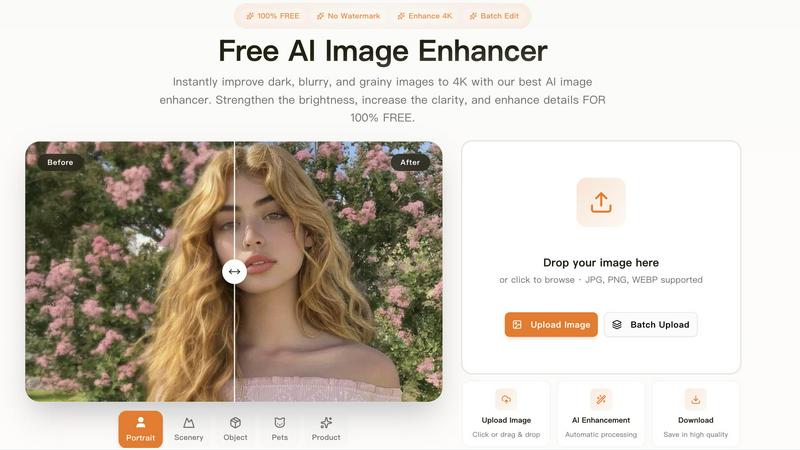
Transform dark, blurry images to stunning 4K quality for free with our AI image enhancer, featuring batch editing and no watermarks.
Last updated: March 11, 2026
Get a professional LinkedIn headshot from any casual photo in seconds with AI.
Last updated: February 28, 2026
Visual Comparison
Free AI Image Enhancer
LinkedInPro

Feature Comparison
Free AI Image Enhancer
Automatic AI Enhancement
This feature allows users to enhance their images seamlessly. With just a single click, the AI automatically adjusts color, brightness, and sharpness to deliver high-quality results without any manual intervention.
Batch Processing
Free AI Image Enhancer enables users to enhance multiple images simultaneously. Upload up to 10 files at once, and save time while ensuring that all your photos receive the same high-quality treatment, making it ideal for busy professionals.
High-Resolution Output
The tool supports output resolutions of up to 4K, ensuring that your images maintain clarity and detail even when enlarged. Whether for printing or digital display, your images will always look their best.
Versatile Editing Tools
With a suite of editing options including background removal, old photo restoration, object removal, and face swap features, this all-in-one toolkit provides everything you need to transform your images into stunning visuals.
LinkedInPro
AI-Powered Studio Transformation
Our core AI engine is trained on professional photography principles to perform complex enhancements instantly. It intelligently adjusts lighting to eliminate shadows, smooths skin tones for a natural look, sharpens focus on your eyes and facial features, and can even suggest optimal cropping for a perfect headshot frame. All of this happens automatically, delivering a polished result that looks like it was taken in a high-end studio.
Lightning-Fast Processing
Time is your most valuable asset. LinkedInPro is engineered for speed. From the moment you upload your photo, our AI gets to work and delivers multiple refined, professional-grade headshot options in mere seconds. There's no waiting for appointments, edits, or downloads. Get a camera-ready image faster than you can schedule a traditional photoshoot.
Effortless User Experience
Designed for everyone, regardless of technical skill. The process is streamlined into three simple steps: upload your photo, let the AI work its magic, and download your new headshot. We support easy upload from your device or a direct camera capture, accepting JPEG or PNG files up to 50MB. The interface is clean, intuitive, and guides you to a perfect result with zero hassle.
Secure & Privacy-Focused Platform
Your privacy is paramount. All image processing is conducted on secure servers, and we are committed to protecting your data. We provide clear Terms of Use and a dedicated Privacy Policy, ensuring you understand how your images are handled. You can trust that your professional photos are in safe hands, allowing you to focus on your career growth with complete peace of mind.
Use Cases
Free AI Image Enhancer
Enhancing Family Photos
Transform cherished family memories by improving clarity and color. Use the AI image enhancer to upscale old photos, making them sharper and more vibrant for sharing with family and friends.
Optimizing Social Media Content
Make your posts stand out on platforms like Instagram and Facebook. The tool adjusts various image attributes to create vibrant and eye-catching visuals that can boost engagement and attract followers.
Elevating Real Estate Listings
Make properties more attractive to potential buyers by enhancing real estate photos. Improved color, contrast, and clarity help listings appear more professional and appealing, increasing the chances of a sale.
Upscaling E-commerce Product Images
Enhance product photos to create a professional look that stands out in a crowded market. Sharper details and vibrant colors help attract customers and increase conversions in your online store.
LinkedInPro
The Active Job Seeker
For candidates applying to new roles, a standout LinkedIn profile is critical. LinkedInPro allows you to instantly upgrade your profile picture before hitting "apply" on every application. A professional headshot makes your profile look more credible and serious to recruiters, increasing the likelihood of profile views and interview invitations, giving you a competitive edge in a tough job market.
The Entrepreneur & Founder
Founders and entrepreneurs need to project trust and leadership to attract investors, partners, and customers. A high-quality, consistent headshot across LinkedIn, company websites, and pitch decks builds brand authority. LinkedInPro provides a cost-effective way to achieve this polished look without the expense of a corporate branding photoshoot, perfectly aligning with a dynamic startup pace.
The Networking Professional
For those constantly expanding their professional network, whether for sales, partnerships, or industry connections, your photo is your calling card. A professional headshot from LinkedInPro ensures you make a confident and competent first impression in every connection request and virtual meeting, fostering trust and opening doors to new opportunities more effectively.
The Freelancer or Consultant
Independent professionals rely on their personal brand to win clients. A professional, approachable headshot on LinkedIn, Upwork, or a personal portfolio site immediately elevates your perceived expertise and reliability. LinkedInPro enables you to refresh your image quickly for different projects or markets, maintaining a current and professional online presence that attracts higher-value clients.
Overview
About Free AI Image Enhancer
Free AI Image Enhancer is a revolutionary browser-based photo editing toolkit designed to take the hassle out of image enhancement. Whether you are a hobbyist, a professional photographer, or someone who simply wants to improve their personal photos, this tool is tailored for you. It allows users to upscale blurry shots, remove backgrounds, restore old family photos, erase unwanted objects, and even perform face swaps, all powered by sophisticated AI technology. The user-friendly interface means there is no learning curve; simply upload your image, select the enhancements you need, and download the polished result. Supporting various formats like JPG, PNG, and WEBP, this tool also accommodates batch processing for up to 10 images simultaneously, ensuring efficiency without compromising quality. With the capability to output images at up to 4K resolution, it's perfect for both personal and professional use. Best of all, it's free to try, with optional credit packs and subscriptions available for users who require more features.
About LinkedInPro
LinkedInPro is the AI-powered accelerator for your professional image, engineered to deliver studio-grade headshots in seconds, not days. It eliminates the traditional barriers of cost, scheduling, and inconvenience associated with professional photography. The platform is built for ambitious job seekers, savvy entrepreneurs, freelancers, and any professional who understands that a powerful first impression on LinkedIn and other networks is non-negotiable. By simply uploading a clear photo, LinkedInPro's advanced AI instantly refines lighting, sharpens details, and enhances your overall appearance to project confidence and competence. This isn't just photo editing; it's a strategic tool for personal branding. In today's fast-paced digital economy, your profile picture is your first handshake. LinkedInPro ensures it's a firm, memorable, and professional one, empowering you to attract more opportunities, build credibility, and stand out in a crowded marketplace with unparalleled speed and efficiency.
Frequently Asked Questions
Free AI Image Enhancer FAQ
What image formats are supported?
Free AI Image Enhancer supports JPG, PNG, and WEBP formats, allowing you to upload a variety of image types for enhancement.
Is there a limit on how many images I can enhance at once?
Yes, you can batch process up to 10 images simultaneously, making it easy to enhance multiple photos in one go.
Do I need any special skills to use this tool?
No, the interface is designed for ease of use. You simply upload your image, select the enhancements, and download the improved result, with no technical skills required.
Is the service really free?
Yes, Free AI Image Enhancer is completely free to use for basic features. Additional credit packs and subscription options are available for users who need more advanced capabilities.
LinkedInPro FAQ
What kind of photo should I upload for the best results?
For optimal AI enhancement, upload a clear, well-lit, front-facing photo. Ensure your face is visible without heavy shadows, hats, or sunglasses. A plain background works best. The AI is powerful, but starting with a decent quality photo (JPEG or PNG up to 50MB) allows it to produce truly exceptional, studio-quality results.
How long does it take to get my professional headshot?
The transformation is nearly instantaneous. Once you upload your photo, LinkedInPro's AI processes it and delivers your enhanced headshot options in a matter of seconds. The entire process, from upload to download, is designed to take less than a minute, fitting seamlessly into your busy workflow.
Is my data and privacy secure with LinkedInPro?
Absolutely. Security and privacy are foundational to our service. We use secure processing protocols and are transparent about our data practices. You can review our detailed Terms of Use and Privacy Policy for full information. We are committed to handling your images responsibly and do not use your photos for any purpose other than delivering your headshot.
Can I use the headshots for platforms other than LinkedIn?
Yes, definitely! While optimized for professional networks like LinkedIn, the high-quality headshots generated by LinkedInPro are perfect for any platform where you want to make a professional impression. This includes company websites, email signatures, conference speaker profiles, portfolio sites, business cards, and other social media platforms like Twitter or Instagram.
Alternatives
Free AI Image Enhancer Alternatives
Free AI Image Enhancer is a powerful browser-based photo editing tool designed to transform dark, blurry, and grainy images into stunning 4K quality. It falls within the Design Tools and Image & Photo categories, making it a go-to solution for users looking to enhance their images effortlessly with AI-driven technology. As users explore their options, many seek alternatives due to factors such as pricing structures, feature sets, or platform compatibility. When choosing an alternative, it's essential to evaluate the specific capabilities offered, such as batch processing, output quality, and ease of use. Users should also consider whether the alternative fits their particular needs, including support for various file formats or additional editing functions. Prioritizing these elements will help ensure that users find a suitable replacement that meets their image enhancement demands.
LinkedInPro Alternatives
LinkedInPro is a leading AI-powered tool in the Productivity & Management category, designed to instantly generate professional headshots for your LinkedIn profile. It transforms casual photos into polished, studio-quality portraits in seconds, helping professionals make a powerful first impression online. Users often explore alternatives for various reasons. Some may seek different pricing models or subscription plans, while others might need specific features like more style variety, integration with other platforms, or higher-resolution outputs. The search for the right tool is driven by individual budget, technical needs, and desired level of customization. When evaluating other options, key considerations include output quality and authenticity, ease of use, speed of processing, and data privacy policies. The ideal alternative should deliver professional results that look like you, without a steep learning curve or compromising your personal data security.