Fusedash vs Threat Watch
Side-by-side comparison to help you choose the right product.

Fusedash transforms raw data into interactive dashboards and charts, empowering teams to act on insights instantly.
Last updated: March 4, 2026

Threat Watch
Instantly assess your cybersecurity health and get actionable insights on critical threats.
Last updated: March 1, 2026
Visual Comparison
Fusedash

Threat Watch
Feature Comparison
Fusedash
Flexible Views
Fusedash allows users to create tailored visualizations for different audiences, transforming the same dataset into dashboards, charts, maps, or report-style views. This means stakeholders can access precisely the information they need without unnecessary back-and-forth communication, enhancing productivity and clarity throughout the organization.
AI Chart Generator
With the AI Chart Generator, users can create visually appealing charts from CSVs or APIs in a matter of minutes. This feature not only helps in selecting the most appropriate chart type but also allows for easy comparisons and refined labeling, ensuring that each chart effectively conveys the intended narrative. Users can drop these charts into dashboards or utilize them as standalone visuals for reports.
Dashboard Software
Fusedash combines the power of dashboards with narrative reporting in a single workspace. This integration ensures that stakeholders not only monitor KPIs but also receive contextual insights into what the data means, why it matters, and the implications for future actions. This approach helps maintain team alignment and minimizes the chances of conflicting interpretations of the same report.
AI Chat
The Smart Chat feature allows users to ask questions in plain language about their data, making it easier to explore insights and gather suggestions for the best metrics or visualizations. This conversational interface accelerates the data exploration process and enables users to turn insights into shareable dashboard views instantly, enhancing collaboration and decision-making.
Threat Watch
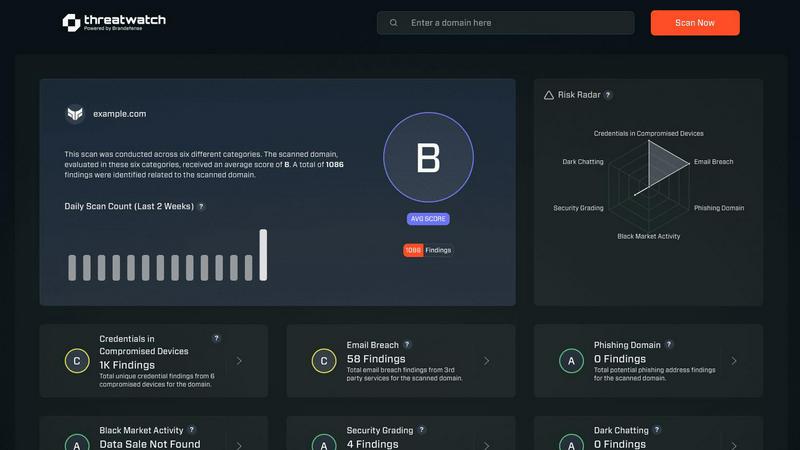
Real-Time Cyber Health Dashboard
Gain an instant, visual snapshot of your organization's security posture. This dynamic dashboard aggregates data across all monitored categories, presenting a clear, prioritized score. Watch your cyber health metrics update in real-time as new threats are detected or existing ones are mitigated, enabling lightning-fast strategic decisions without manual data crunching.
Automated Exposure & Vulnerability Scanning
Continuously and automatically scan your digital assets for weaknesses. The platform proactively identifies unpatched software, misconfigured systems, and network vulnerabilities that could serve as entry points for attackers. This hands-off, always-on surveillance ensures no critical gap goes unnoticed, freeing your team to focus on remediation.
Dark Web & Credential Monitoring
Actively patrol the dark web and other illicit sources for your organization's compromised data. Threat Watch alerts you immediately if employee credentials, corporate emails, or sensitive information appear in breached databases or for sale, allowing you to enforce password resets and contain account takeover attempts before damage occurs.
Phishing Attack Surface Analysis
Identify and secure your most vulnerable phishing targets. The platform analyzes which corporate email addresses are exposed and being targeted in phishing campaigns. This intelligence allows you to tailor employee security training, strengthen email filters, and proactively block malicious domains targeting your specific organization.
Use Cases
Fusedash
Business Performance Monitoring
Fusedash is ideal for organizations that need to track business performance metrics in real-time. By utilizing its dashboards and visualizations, teams can quickly identify trends, make informed decisions, and adjust strategies based on accurate, up-to-date data.
Marketing Campaign Analysis
Marketing teams can leverage Fusedash to assess the effectiveness of campaigns across multiple channels. By visualizing campaign performance data, they can pinpoint successful strategies and areas for improvement, leading to more effective future marketing efforts.
Financial Reporting
Finance departments can utilize Fusedash for generating comprehensive financial reports that combine KPIs, narratives, and visualizations. This helps in providing stakeholders with a clear understanding of financial health, trends, and forecasts, ensuring informed decision-making.
Operations Optimization
Operations teams can use Fusedash to monitor key operational metrics, analyze process efficiencies, and identify bottlenecks. By visualizing data related to supply chain performance or service delivery, teams can optimize their workflows and enhance overall productivity.
Threat Watch
Proactive Risk Management for IT Teams
IT departments use Threat Watch to shift from a reactive fire-fighting model to a proactive security stance. By receiving automated, prioritized alerts on vulnerabilities and exposures, teams can efficiently allocate resources to patch the most critical issues first, dramatically reducing the organization's overall attack surface and improving operational efficiency.
Executive & Board-Level Reporting
Security leaders leverage the platform's clear, concise dashboards to communicate cyber risk in business terms to executives and the board. The visual health score and trend data provide undeniable evidence of the security program's ROI and current posture, facilitating informed decisions on budget and strategy with compelling, real-time data.
Rapid Incident Response Triage
When a potential breach is suspected, responders use Threat Watch to rapidly investigate. They can instantly check if specific credentials were leaked, if related domains are phishing targets, or if corporate assets appear on the dark web. This accelerates the investigation, containment, and eradication phases of incident response.
Compliance Audit Preparation
Organizations facing compliance frameworks like SOC 2, ISO 27001, or GDPR use Threat Watch to maintain continuous control monitoring. The platform provides documented evidence of ongoing vulnerability assessment, dark web monitoring, and exposure management, simplifying audit processes and demonstrating due diligence in protecting sensitive data.
Overview
About Fusedash
Fusedash is an innovative AI-powered data visualization platform that revolutionizes how teams access and interpret their connected data. Designed for organizations seeking clarity and efficiency, Fusedash enables users to create decision-ready dashboards, interactive charts, detailed maps, and narrative reports—all within a single, unified workspace. By eliminating the need to replicate logic across disconnected tools, Fusedash offers a streamlined approach to data analysis. The platform's core value proposition lies in its ability to ensure consistency: once key metrics and KPIs are defined, they can be reused across various views and reports, fostering alignment across departments from leadership to marketing to operations. Fusedash is perfect for teams frustrated with manual reporting cycles and conflicting data narratives. It empowers users to not only monitor real-time data effectively but also dive deeper into understanding the underlying reasons behind trends and changes. With integrated AI features like natural language data chat and intelligent visualization assistance, Fusedash makes data exploration intuitive and fast, transforming raw data into a reliable source of truth that drives actionable insights and strategic decisions.
About Threat Watch
Threat Watch is the definitive cybersecurity command center for modern businesses. In today's accelerated digital environment, threats evolve at breakneck speed. This platform delivers the rapid, actionable intelligence you need to keep pace. It operates by continuously analyzing your organization's entire digital footprint—from assets and network vulnerabilities to critical exposures—to generate a real-time, comprehensive overview of your cyber health. Designed for IT professionals and security teams across companies of all sizes, Threat Watch cuts through the noise. It automates complex assessments and prioritizes risks, enabling you to move from insight to action in minutes, not days. Its core value is simple: proactive resilience. By swiftly uncovering compromised credentials, breached accounts, phishing vectors, and dark web exposures, Threat Watch empowers you to neutralize risks before they escalate into costly breaches. It's not just monitoring; it's your strategic advantage for staying ahead in the cybersecurity race.
Frequently Asked Questions
Fusedash FAQ
What types of data can I connect to Fusedash?
Fusedash supports a variety of data sources, including CSV uploads, API connections, and public data integration. This flexibility allows users to combine multiple datasets for comprehensive analysis and visualization.
How does Fusedash ensure data consistency across reports?
Fusedash promotes data consistency by allowing users to define key metrics and KPIs once, which can then be reused across all dashboards, charts, and reports. This ensures that all teams are referencing the same data, reducing discrepancies.
Can I customize my dashboards and reports in Fusedash?
Absolutely! Fusedash provides extensive customization options for dashboards and reports, enabling users to adjust layouts, filters, time ranges, and visual elements to meet the specific needs of different audiences.
Is there a demo available for Fusedash?
Yes, Fusedash offers a demo for potential users to explore its features and capabilities. Interested individuals can request a demo through the Fusedash website to see how the platform can benefit their organization.
Threat Watch FAQ
How quickly can I see results with Threat Watch?
Immediately. Once you initiate your scan by providing the relevant domain or asset information, Threat Watch begins analyzing data from its live threat intelligence feeds. You will receive an initial cyber health assessment and exposure report within minutes, giving you actionable insights from the moment you log in.
What types of assets does Threat Watch monitor?
Threat Watch is designed to monitor your digital footprint. This primarily includes your public-facing IT infrastructure such as domain names, IP addresses, and associated network blocks. It also focuses on your human assets by scanning for exposed employee credentials, email addresses, and their presence in data breaches and phishing kits.
Is Threat Watch suitable for a small business without a dedicated security team?
Absolutely. Threat Watch is built for businesses of all sizes. Its user-friendly interface and automated prioritization are perfect for small business owners or general IT providers who need enterprise-grade security insights without requiring deep expertise. It tells you exactly what needs attention first, making efficient use of limited time and resources.
How does the platform prioritize the risks it finds?
Threat Watch uses a risk-based algorithm that considers factors like the severity of the vulnerability, the criticality of the exposed asset, and the active exploitation of the threat in the wild. It doesn't just list problems—it scores and ranks them, so you know precisely which issues pose the most immediate danger to your organization and should be addressed first.
Alternatives
Fusedash Alternatives
Fusedash is an AI-powered data visualization platform that belongs to the Analytics & Data and Business Intelligence categories. It enables teams to transform their raw data into clear, actionable insights through decision-ready dashboards, interactive charts, and narrative reports. Its core value lies in providing a unified workspace that promotes consistency and efficiency, ensuring every team member operates from the same trusted data. Users often seek alternatives to Fusedash due to various factors, including pricing, specific features, or the need for compatibility with existing systems. When choosing an alternative, look for solutions that prioritize user experience, offer robust data integration capabilities, and ensure real-time access to insights. A focus on collaboration and shared metrics is also essential for maintaining alignment across teams.
Threat Watch Alternatives
Threat Watch is a dynamic business intelligence platform that provides instant cybersecurity health assessments. It delivers actionable insights on compromised accounts and devices, helping organizations identify and prioritize risks before they escalate. Users often explore alternatives to find a solution that aligns perfectly with their budget, specific feature requirements, or existing technology stack. Needs vary widely, from deeper integration capabilities to different pricing models or more specialized reporting functions. When evaluating other options, prioritize tools that offer real-time, actionable intelligence, automated risk assessments, and comprehensive monitoring. The right platform should deliver clear visibility into your security posture with efficiency, enabling your team to act swiftly against threats.