Free AI Image Enhancer vs Nano AI
Side-by-side comparison to help you choose the right product.

Free AI Image Enhancer
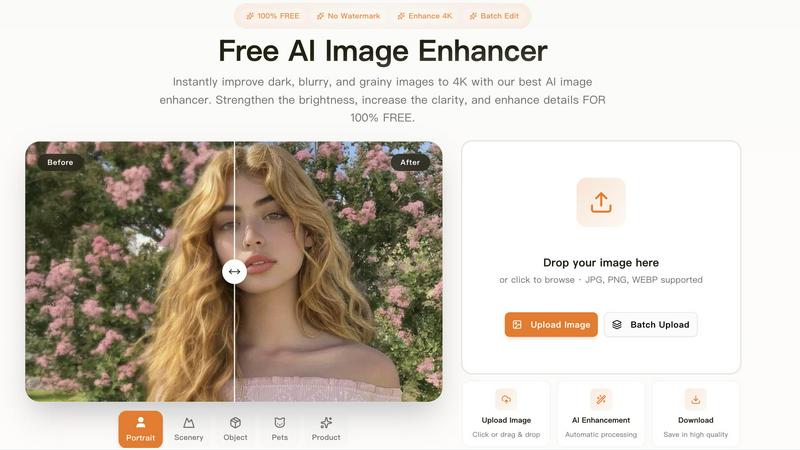
Transform dark, blurry images to stunning 4K quality for free with our AI image enhancer, featuring batch editing and no watermarks.
Last updated: March 11, 2026

Nano AI is your all-in-one creative platform for rapid AI image generation, editing, and sharing.
Last updated: February 28, 2026
Visual Comparison
Free AI Image Enhancer
Nano AI

Feature Comparison
Free AI Image Enhancer
Automatic AI Enhancement
This feature allows users to enhance their images seamlessly. With just a single click, the AI automatically adjusts color, brightness, and sharpness to deliver high-quality results without any manual intervention.
Batch Processing
Free AI Image Enhancer enables users to enhance multiple images simultaneously. Upload up to 10 files at once, and save time while ensuring that all your photos receive the same high-quality treatment, making it ideal for busy professionals.
High-Resolution Output
The tool supports output resolutions of up to 4K, ensuring that your images maintain clarity and detail even when enlarged. Whether for printing or digital display, your images will always look their best.
Versatile Editing Tools
With a suite of editing options including background removal, old photo restoration, object removal, and face swap features, this all-in-one toolkit provides everything you need to transform your images into stunning visuals.
Nano AI
Flash-Speed AI Generation
Harness the power of the Nano Banana AI model for unprecedented generation speed. Experience text-to-image and image-to-image conversions in under ten seconds, keeping your momentum alive. This flash inference ensures your concepts appear almost instantly, allowing for rapid ideation and iteration without waiting on renders, so you can explore more ideas in less time.
All-in-One Creative Workspace
Nano AI eliminates app-switching fatigue by integrating generation, editing, and utility tools into one cohesive flow. Draft with AI, then immediately refine with built-in tools for background removal, inpainting, and outpainting. This unified environment ensures every experiment, review, and export happens in one place, streamlining your process from prompt to final asset.
Granular Style Control & Magic Edit
Move beyond generic presets with deep style tuning guided by the Nano Banana model. Describe lighting, texture, and composition in natural language to achieve precise visual styles. Coupled with the Magic Edit feature, you can inpaint or outpaint specific image regions using simple text commands—change colors, add elements, or expand canvases instantly without complex software.
Upcoming 4K Neural Upscaling
Transform drafts into production-ready assets with the upcoming 4K neural upscaler. It goes beyond simple sharpening, intelligently hallucinating believable details like skin pores, fabric threads, and wood grain. This feature allows you to create billboard-sized, high-fidelity images directly from your initial generations, future-proofing your workflow for high-resolution demands.
Use Cases
Free AI Image Enhancer
Enhancing Family Photos
Transform cherished family memories by improving clarity and color. Use the AI image enhancer to upscale old photos, making them sharper and more vibrant for sharing with family and friends.
Optimizing Social Media Content
Make your posts stand out on platforms like Instagram and Facebook. The tool adjusts various image attributes to create vibrant and eye-catching visuals that can boost engagement and attract followers.
Elevating Real Estate Listings
Make properties more attractive to potential buyers by enhancing real estate photos. Improved color, contrast, and clarity help listings appear more professional and appealing, increasing the chances of a sale.
Upscaling E-commerce Product Images
Enhance product photos to create a professional look that stands out in a crowded market. Sharper details and vibrant colors help attract customers and increase conversions in your online store.
Nano AI
Rapid Marketing Asset Creation
Marketing teams can generate a high volume of campaign visuals—social media graphics, ad banners, and concept mockups—in a single sprint. The sub-10-second generation and integrated editing tools allow for quick A/B testing of styles and compositions, enabling teams to adapt to trends and feedback instantly and deploy assets faster than the competition.
Streamlined Content Production
Bloggers, social media managers, and content creators can produce unique, on-brand imagery daily without relying on stock photos. From generating featured images with text-to-image to quickly editing product photos with background removal and Magic Edit, Nano AI turns content calendars into a streamlined, in-house production pipeline.
Collaborative Creative Brainstorming
Creative agencies and design teams can use the shared galleries and unified workspace to brainstorm collaboratively. Team members can rapidly generate concept art, apply stylistic variations, and provide feedback all within Nano AI, keeping every experiment and iteration organized in one shared home and accelerating the client review cycle.
Product & Concept Mockup Design
Product designers and entrepreneurs can quickly visualize concepts and iterate on designs. Generate product prototypes, create lifestyle scene mockups with image-to-image, and refine details like materials and colors with granular style control. This rapid prototyping capability turns abstract ideas into tangible visuals for pitches and development sprints.
Overview
About Free AI Image Enhancer
Free AI Image Enhancer is a revolutionary browser-based photo editing toolkit designed to take the hassle out of image enhancement. Whether you are a hobbyist, a professional photographer, or someone who simply wants to improve their personal photos, this tool is tailored for you. It allows users to upscale blurry shots, remove backgrounds, restore old family photos, erase unwanted objects, and even perform face swaps, all powered by sophisticated AI technology. The user-friendly interface means there is no learning curve; simply upload your image, select the enhancements you need, and download the polished result. Supporting various formats like JPG, PNG, and WEBP, this tool also accommodates batch processing for up to 10 images simultaneously, ensuring efficiency without compromising quality. With the capability to output images at up to 4K resolution, it's perfect for both personal and professional use. Best of all, it's free to try, with optional credit packs and subscriptions available for users who require more features.
About Nano AI
Nano AI is the all-in-one creative platform that shatters the bottleneck between idea and execution. It's built for speed-first creative teams, marketers, and content creators who need to produce high-quality visuals at the pace of modern campaigns. The platform consolidates the entire creative pipeline—from initial AI generation to final editing and sharing—into a single, seamless workspace. At its core is the powerful Nano Banana AI model, engineered for flash-speed inference that delivers sub-10-second text-to-image and image-to-image conversions. This means you stay in the creative flow, iterating and refining without disruptive loading times. Beyond generation, Nano AI integrates a full suite of utility tools like background removal, inpainting, and outpainting, eliminating the need to juggle multiple applications. With upcoming capabilities like 4K neural upscaling and API access, it's designed to turn experimental drafts into production-ready assets faster than ever. By combining lightning-fast AI, granular style control, and collaborative features like shared galleries, Nano AI is the essential engine for anyone determined to enhance their workflow and ship visuals before the meeting even ends.
Frequently Asked Questions
Free AI Image Enhancer FAQ
What image formats are supported?
Free AI Image Enhancer supports JPG, PNG, and WEBP formats, allowing you to upload a variety of image types for enhancement.
Is there a limit on how many images I can enhance at once?
Yes, you can batch process up to 10 images simultaneously, making it easy to enhance multiple photos in one go.
Do I need any special skills to use this tool?
No, the interface is designed for ease of use. You simply upload your image, select the enhancements, and download the improved result, with no technical skills required.
Is the service really free?
Yes, Free AI Image Enhancer is completely free to use for basic features. Additional credit packs and subscription options are available for users who need more advanced capabilities.
Nano AI FAQ
What makes Nano AI different from other AI image generators?
Nano AI distinguishes itself through its integrated, all-in-one workspace and unparalleled speed. While many tools only offer generation, Nano AI combines the flash-fast Nano Banana AI model with a full suite of editing and utility tools (like bg removal, inpainting, style control) in a single platform. This eliminates the need to switch between apps, creating a seamless, efficient workflow from idea to final asset.
What is the Nano Banana AI model?
Nano Banana is the proprietary AI model powering Nano AI's core generation features. It's specifically engineered for "flash speed inference," enabling the platform's signature sub-10-second image generation. More than just fast, it's designed to understand layered instructions and stylistic cues from natural language prompts, allowing for granular control without complex prompt engineering.
Do I own the commercial rights to images I create?
Yes, commercial usage rights are granted for images created on Nano AI's Pro and Studio subscription plans. This means you can legally use the generated assets in client work, marketing materials, products, and other commercial ventures. Be sure to check the specific terms of service for your plan for complete details.
What are the upcoming features like Prompt Labs and Galleries?
Prompt Labs and Galleries are soon-to-launch features designed to enhance organization and collaboration within the Nano AI workspace. Prompt Labs will help you manage and refine your text prompts for better results, while Shared Galleries will provide a centralized space for teams to store, organize, and review creative assets, keeping every project component in one shared home.
Alternatives
Free AI Image Enhancer Alternatives
Free AI Image Enhancer is a powerful browser-based photo editing tool designed to transform dark, blurry, and grainy images into stunning 4K quality. It falls within the Design Tools and Image & Photo categories, making it a go-to solution for users looking to enhance their images effortlessly with AI-driven technology. As users explore their options, many seek alternatives due to factors such as pricing structures, feature sets, or platform compatibility. When choosing an alternative, it's essential to evaluate the specific capabilities offered, such as batch processing, output quality, and ease of use. Users should also consider whether the alternative fits their particular needs, including support for various file formats or additional editing functions. Prioritizing these elements will help ensure that users find a suitable replacement that meets their image enhancement demands.
Nano AI Alternatives
Nano AI is a dynamic all-in-one platform in the image generation and editing category, designed to turn creative ideas into production-ready visuals with incredible speed. It consolidates drafting, editing, and sharing into a single, efficient workspace powered by its proprietary AI model. Users often explore alternatives for various reasons. Needs can differ based on budget, specific feature requirements like advanced video editing or 3D generation, or a preference for a different user interface. Some may seek platforms with a longer history or those integrated into larger creative suites. When evaluating other options, key considerations include generation speed and quality, the depth of editing tools available, pricing transparency and commercial licensing, and how well the platform integrates into your existing team workflow. The goal is to find a tool that matches your creative pace without compromising on output or control.