poseup vs SparkPix
Side-by-side comparison to help you choose the right product.

poseup
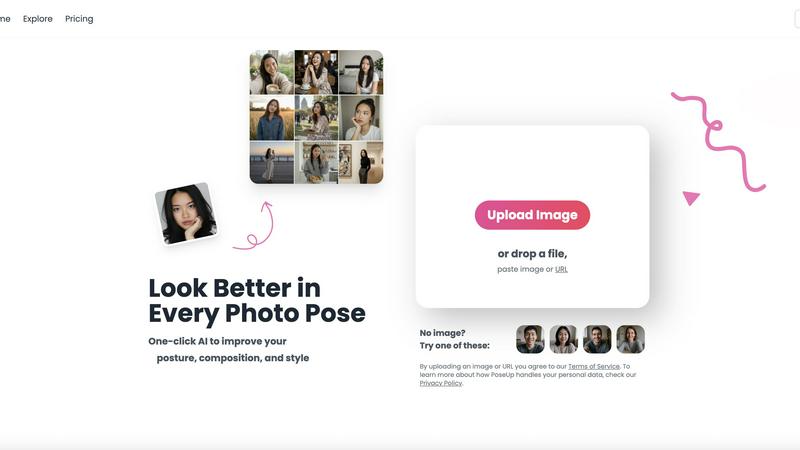
Instantly enhance your photos with PoseUp's AI, perfecting posture and composition in just one click.
Last updated: February 28, 2026

SparkPix
Transform your photos effortlessly with SparkPix, the AI-powered online editor that enhances, restores, and styles images by simply typing your.
Last updated: March 11, 2026
Visual Comparison
poseup
SparkPix

Feature Comparison
poseup
One-Click Photo Enhancement
With PoseUp, enhancing your photos has never been easier. The one-click photo enhancement feature allows users to instantly improve poses, posture, and composition. No need for extensive editing skills—just upload your image and watch as PoseUp transforms it into a professional-quality photo.
AI-Powered Posture Correction
Utilizing cutting-edge AI technology, PoseUp analyzes your photos and offers real-time suggestions for better positioning. This feature not only corrects awkward postures but also enhances the overall visual appeal of your images, making them more captivating and engaging.
Versatile Image Support
PoseUp supports a wide range of image formats, including JPG, PNG, WEBP, and HEIC, accommodating files up to 5MB. This versatility ensures that you can upload almost any photo format you have, making it easy to enhance your images without worrying about compatibility.
Community Engagement
PoseUp fosters a vibrant community of photography enthusiasts. By joining our Discord channel, users can share experiences, tips, and tricks, while also receiving support. This community aspect enriches the user experience, making it not just a tool, but a platform for growth and interaction.
SparkPix
AI Photo Editor
SparkPix's AI Photo Editor allows you to type specific instructions like "remove background" or "enhance colors," and the AI processes your request in under 30 seconds. This feature is perfect for users who want quick edits without the hassle of complicated software.
Background Remover
With just a single click, the Background Remover feature lets you eliminate backgrounds from portraits, product photos, or complex scenes. It's an essential tool for creating professional images that stand out in presentations or social media.
Unblur Image
The Unblur Image feature utilizes advanced AI algorithms to fix motion blur, out-of-focus shots, and compression artifacts. This allows users to salvage their favorite photos that might have been compromised due to poor focus or camera shake.
Style Transfer
Transform your images into stunning works of art with the Style Transfer feature. Whether you want to convert your photo into an anime style, oil painting, or watercolor, SparkPix offers over 15 artistic styles to choose from, allowing for endless creative possibilities.
Use Cases
poseup
Social Media Content Creation
For social media influencers, PoseUp is a game-changer. It allows users to quickly enhance images for platforms like Instagram and Facebook, ensuring that every post looks professional and polished. This leads to increased engagement and a more impressive online presence.
Family Photo Sessions
Families can capture beautiful memories with PoseUp’s photo enhancement tools. Whether it’s a holiday gathering or a casual day at the park, the tool ensures that every family photo showcases the best poses and compositions, resulting in cherished keepsakes.
Professional Portraits
Photographers can utilize PoseUp to refine their portraits effortlessly. The AI-powered posture correction and composition optimization features enable photographers to deliver high-quality images to clients without spending excessive time on manual adjustments.
Fitness and Wellness Photography
Fitness enthusiasts can benefit from PoseUp by transforming their workout photos into motivational visuals. The tool helps improve poses, making them more dynamic and visually appealing, perfect for sharing progress on fitness journeys.
SparkPix
Family Photo Restoration
SparkPix is ideal for restoring old family photos that are faded, scratched, or damaged. Users can preserve cherished memories by repairing these images, making them suitable for sharing with loved ones or displaying in their homes.
E-commerce Product Photography
For online sellers, SparkPix provides tools to create professional product images that can enhance listings and attract buyers. The Background Remover and AI Image Generator features help create eye-catching visuals that showcase products effectively.
Social Media Content Creation
Users looking to create engaging social media content can leverage SparkPix to enhance their photos or apply creative styles. This feature is perfect for influencers and marketers who need to maintain a visually appealing online presence.
Artistic Exploration
Artists and creative individuals can use the Style Transfer feature to explore new artistic styles and techniques. By transforming photos into different art forms, users can experiment with their creativity and produce unique pieces for portfolios or exhibitions.
Overview
About poseup
PoseUp is a groundbreaking AI-powered tool that revolutionizes the way we approach photography. Designed for everyone from casual selfie-takers to professional photographers, PoseUp enhances your photos by improving poses, correcting postures, and optimizing composition with unparalleled ease. Imagine being able to transform awkward angles and unflattering postures into stunning visuals with just a single click. The advanced AI technology behind PoseUp analyzes your images in real-time, providing instant suggestions that elevate the quality of your photos to a professional standard, even if you have no prior photography training. This tool is ideal for social media influencers wanting to create eye-catching content, families eager to capture memorable moments, and anyone keen on improving their photography skills. With PoseUp, not only do you enhance individual photos, but you also gain confidence in your ability to present yourself beautifully in any shot. Join our community today and start your journey with 50 free credits to explore all the possibilities!
About SparkPix
SparkPix is an innovative AI-powered photo editing tool designed for users who want to enhance their images without needing extensive Photoshop skills. Whether you are a professional photographer, an e-commerce seller, or just someone looking to restore family memories, SparkPix provides a user-friendly platform where you can edit photos simply by typing your desired changes. Its main value proposition lies in its ability to deliver quick, effective results, transforming your images in under 30 seconds. With features like background removal, photo restoration, and style transfer, SparkPix is perfect for anyone seeking to elevate their photography game or create stunning visuals for social media, marketing, or personal use. The platform is accessible via web browsers on desktops, iPhones, and Android devices, making it both versatile and convenient for users on the go.
Frequently Asked Questions
poseup FAQ
What types of images can I upload to PoseUp?
You can upload images in various formats such as JPG, PNG, WEBP, and HEIC, with a maximum file size of 5MB. This wide range of supported formats makes it easy to enhance almost any photo you have.
How does the AI technology work in PoseUp?
PoseUp's AI technology analyzes your images to identify awkward poses and poor composition. It then provides real-time suggestions for improvements, allowing users to achieve professional-level results without needing extensive photo editing skills.
Is there a community where I can share and learn from other users?
Yes! PoseUp has a dedicated Discord community where users can interact, share tips, and seek assistance. Joining this community enhances your experience and allows for collaborative learning with fellow photography enthusiasts.
Can I try PoseUp for free?
Absolutely! New users can start with 50 free credits to test out all the features and enhancements PoseUp has to offer. This allows you to experience the tool's capabilities before committing to a paid plan.
SparkPix FAQ
How does SparkPix ensure quick edits?
SparkPix employs advanced AI algorithms that process user requests in real-time. This allows for rapid photo editing, enabling users to see results in under 30 seconds.
Can I use SparkPix on mobile devices?
Yes, SparkPix is a web-based application that works seamlessly on desktop, iPhone, and Android devices. There is no need for downloads, making it easy to edit photos on the go.
Is there a limit to the number of free edits I can make?
Upon signing up, users receive 5 free credits to start editing. Additionally, you can earn 1 credit daily, allowing for continued access to the platform without immediate payment.
What types of artistic styles can I apply with SparkPix?
SparkPix offers over 15 artistic styles for transformation, including anime, oil painting, watercolor, and pencil sketches. This range allows users to explore various creative avenues and produce unique artwork.
Alternatives
poseup Alternatives
PoseUp is an advanced AI-powered tool designed to enhance photo poses, posture, and composition with just one click. As a part of the image and photo category, it makes professional-level results accessible to everyone, from casual users to seasoned photographers. However, users often seek alternatives due to various factors such as pricing, specific feature sets, or compatibility with different platforms. A good alternative should offer similar capabilities, ease of use, and flexibility in image formats while fitting within the user’s budget and workflow needs. When considering alternatives, look for tools that provide intuitive interfaces, effective AI technology for posture correction, and a supportive community. It’s also beneficial to explore options that offer a free trial or credits, ensuring you can test the service before committing to a subscription.
SparkPix Alternatives
SparkPix is an innovative AI photo editor that allows users to enhance and transform their images simply by typing commands. This web-based platform caters to a wide range of photo editing needs, from removing backgrounds to restoring old photos and applying artistic styles. Users often seek alternatives to SparkPix for various reasons, including pricing options, specific feature sets, or compatibility with their devices. With numerous choices available, it's essential to consider the ease of use, the range of editing capabilities, and the overall value offered when selecting an alternative. When exploring alternatives to SparkPix, prioritize platforms that offer user-friendly interfaces, efficient editing processes, and a good balance of features at competitive prices. Assessing the specific editing capabilities you require, such as background removal, photo restoration, or style transfers, can also help narrow down your options. Additionally, consider the accessibility of the platform across different devices to ensure a seamless editing experience.