
poseup
Instantly enhance your photos with PoseUp's AI, perfecting posture and composition in just one click.
Visit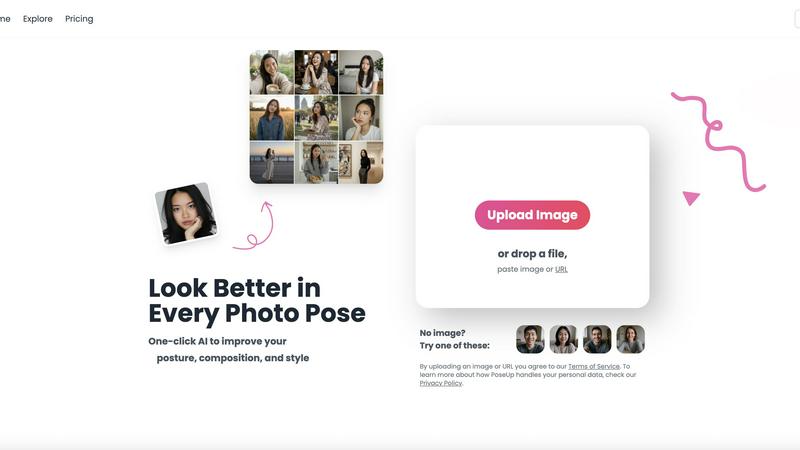
About poseup
PoseUp is a groundbreaking AI-powered tool that revolutionizes the way we approach photography. Designed for everyone from casual selfie-takers to professional photographers, PoseUp enhances your photos by improving poses, correcting postures, and optimizing composition with unparalleled ease. Imagine being able to transform awkward angles and unflattering postures into stunning visuals with just a single click. The advanced AI technology behind PoseUp analyzes your images in real-time, providing instant suggestions that elevate the quality of your photos to a professional standard, even if you have no prior photography training. This tool is ideal for social media influencers wanting to create eye-catching content, families eager to capture memorable moments, and anyone keen on improving their photography skills. With PoseUp, not only do you enhance individual photos, but you also gain confidence in your ability to present yourself beautifully in any shot. Join our community today and start your journey with 50 free credits to explore all the possibilities!
Features of poseup
One-Click Photo Enhancement
With PoseUp, enhancing your photos has never been easier. The one-click photo enhancement feature allows users to instantly improve poses, posture, and composition. No need for extensive editing skills—just upload your image and watch as PoseUp transforms it into a professional-quality photo.
AI-Powered Posture Correction
Utilizing cutting-edge AI technology, PoseUp analyzes your photos and offers real-time suggestions for better positioning. This feature not only corrects awkward postures but also enhances the overall visual appeal of your images, making them more captivating and engaging.
Versatile Image Support
PoseUp supports a wide range of image formats, including JPG, PNG, WEBP, and HEIC, accommodating files up to 5MB. This versatility ensures that you can upload almost any photo format you have, making it easy to enhance your images without worrying about compatibility.
Community Engagement
PoseUp fosters a vibrant community of photography enthusiasts. By joining our Discord channel, users can share experiences, tips, and tricks, while also receiving support. This community aspect enriches the user experience, making it not just a tool, but a platform for growth and interaction.
Use Cases of poseup
Social Media Content Creation
For social media influencers, PoseUp is a game-changer. It allows users to quickly enhance images for platforms like Instagram and Facebook, ensuring that every post looks professional and polished. This leads to increased engagement and a more impressive online presence.
Family Photo Sessions
Families can capture beautiful memories with PoseUp’s photo enhancement tools. Whether it’s a holiday gathering or a casual day at the park, the tool ensures that every family photo showcases the best poses and compositions, resulting in cherished keepsakes.
Professional Portraits
Photographers can utilize PoseUp to refine their portraits effortlessly. The AI-powered posture correction and composition optimization features enable photographers to deliver high-quality images to clients without spending excessive time on manual adjustments.
Fitness and Wellness Photography
Fitness enthusiasts can benefit from PoseUp by transforming their workout photos into motivational visuals. The tool helps improve poses, making them more dynamic and visually appealing, perfect for sharing progress on fitness journeys.
Frequently Asked Questions
What types of images can I upload to PoseUp?
You can upload images in various formats such as JPG, PNG, WEBP, and HEIC, with a maximum file size of 5MB. This wide range of supported formats makes it easy to enhance almost any photo you have.
How does the AI technology work in PoseUp?
PoseUp's AI technology analyzes your images to identify awkward poses and poor composition. It then provides real-time suggestions for improvements, allowing users to achieve professional-level results without needing extensive photo editing skills.
Is there a community where I can share and learn from other users?
Yes! PoseUp has a dedicated Discord community where users can interact, share tips, and seek assistance. Joining this community enhances your experience and allows for collaborative learning with fellow photography enthusiasts.
Can I try PoseUp for free?
Absolutely! New users can start with 50 free credits to test out all the features and enhancements PoseUp has to offer. This allows you to experience the tool's capabilities before committing to a paid plan.
Explore more in this category:
Similar to poseup

The fastest AI STL generator to turn prompts and images into 3D printable STL files.

AjaxCalculators offers free online calculators, unit converters, and image and document tools. Explore practical tools for finance, health, math, scie

AI long video generator: turn text, images, audio and video into production-ready AI videos.

NanoEditor is an AI-powered D&D portrait generator that turns character details like ancestry, class and gear into focused fantasy RPG art.

Remove anything from video. Preview 5 seconds free.

GPT Image 3 is a browser-based AI image workspace for generation, reference-based editing, and conversational refinement. Users can start from a text

Free AI image editor that edits, retouches, and transforms photos with natural-language text prompts.

PDF Convert Now is a free online PDF and image utility that lets users merge, compress, split, rotate, and convert documents.