
OC Maker vs Sketch To
Side-by-side comparison to help you choose the right product.

OC Maker
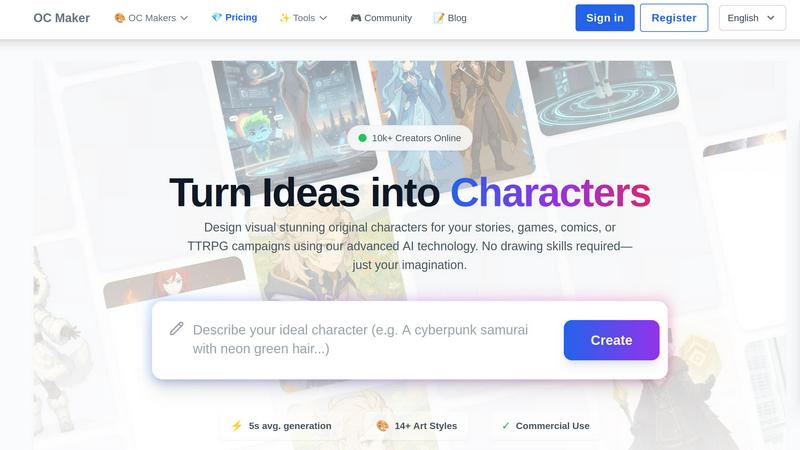
Effortlessly create and customize stunning original characters for stories, games, and more with OC Maker's AI tools.
Last updated: March 1, 2026
Sketch To
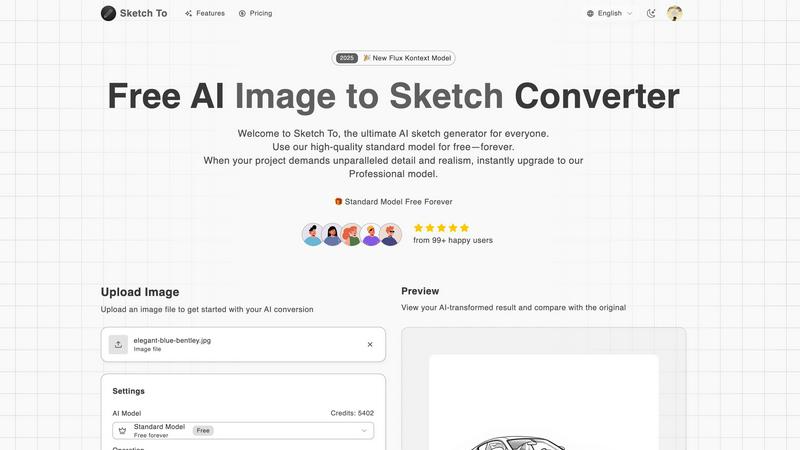
Effortlessly turn images into stunning sketches or vice versa with Sketch To's advanced AI technology for all creators.
Last updated: March 2, 2026
Visual Comparison
OC Maker
Sketch To
Feature Comparison
OC Maker
Fast Character Generation
OC Maker boasts an impressive average generation time of just 5 seconds, allowing users to quickly create characters without compromising on quality. This speed is perfect for those in need of rapid character design for projects or brainstorming sessions.
Diverse Art Styles
With over 14 unique art styles available, including Anime and Genshin Impact, OC Maker provides users with the flexibility to choose the perfect aesthetic for their characters. This variety ensures that every creation can match the specific themes and tones of any story or game.
Professional Editing and Animation Tools
Beyond character creation, OC Maker includes a suite of advanced AI tools for editing, animating, and refining your designs. From turning images into cinematic videos to achieving professional studio-quality headshots, these features enhance your creative workflow.
Community Engagement
Join a thriving community of creators who are passionate about character design. OC Maker encourages collaboration and inspiration through shared creations, allowing users to showcase their work and gain feedback from fellow enthusiasts.
Sketch To
AI Image to Sketch Conversion
Transforming photos into beautiful sketches has never been easier. Sketch To's AI engine specializes in converting images into artistic pencil sketches, ideal for artists and designers seeking to create unique visual content. This feature allows you to add an artistic touch to any photo, making it perfect for social media posts, portfolios, or personal projects.
Sketch to Image Transformation
Turn your sketches into realistic images with impressive detail and accuracy. This feature is designed for professionals who need high-quality outputs for commercial use. The Pro model enhances every line and shade of your original sketch, creating stunning images that retain the essence of your artwork while adding depth and realism.
Instant Processing
Say goodbye to long waiting times with Sketch To's instant processing feature. The powerful AI processing engine ensures that your image or sketch is converted in seconds, allowing you to focus on your creativity rather than waiting for results. This efficiency is crucial for busy professionals and creative enthusiasts alike.
High-Resolution Output
Quality matters when it comes to visual content. Sketch To offers high-resolution outputs that are perfect for printing and professional use. Whether you are creating artwork for exhibitions or social media, the ability to download your creations in high quality ensures that every detail is captured beautifully.
Use Cases
OC Maker
Game Development
Game developers can leverage OC Maker to create unique characters for their projects, ensuring that each character fits seamlessly within the game's narrative and aesthetic. This tool significantly speeds up the design process, allowing for more time to focus on gameplay mechanics.
Storytelling
Writers can utilize OC Maker to visualize their characters in a matter of seconds, making it easier to develop character arcs and storylines. The ability to create customized characters enhances the storytelling experience, helping to bring narratives to life.
Comic Creation
Comic artists can harness the power of OC Maker to generate characters that fit their art style, streamlining the character design process. This efficiency allows creators to focus more on storytelling and artistic expression rather than technical challenges.
Tabletop RPGs
Tabletop RPG enthusiasts can use OC Maker to craft unique characters for their campaigns, adding depth and personalization to their gaming sessions. The platform's flexibility enables players to design characters that align perfectly with their chosen universes.
Sketch To
Social Media Content Creation
Artists and influencers can utilize Sketch To to create engaging social media posts. By converting photos into sketches, users can add a unique and artistic flair to their content, helping them stand out in a crowded digital landscape and attract more followers.
Portfolio Enhancement
For professionals in the creative field, Sketch To serves as a powerful tool to enhance portfolios. By transforming their original artwork into photorealistic images, artists can showcase their versatility and skill, making a strong impression on potential clients or employers.
Educational Projects
Students and educators can leverage Sketch To for various educational projects. By converting images related to their subjects into sketches or vice versa, they can create visually appealing presentations or reports that capture attention and improve understanding of complex topics.
Personal Art Projects
Hobbyists and aspiring artists can use Sketch To to experiment with their creativity. Whether they want to transform their family photos into artistic sketches or elevate their doodles into detailed images, the tool provides a fun and accessible way to explore artistic possibilities without the need for extensive drawing skills.
Overview
About OC Maker
OC Maker is the premier AI-powered creative platform designed to revolutionize the way users generate unique Original Characters (OCs). Whether you're a writer, artist, or gamer, OC Maker empowers you to visualize your characters within seconds, eliminating the need for drawing skills and allowing your creativity to flourish. With a vast array of tools tailored for various art styles—ranging from Anime to Sonic to Photorealistic designs—OC Maker ensures every character is distinct and aligned with your vision. Our advanced AI technology facilitates the creation of characters that can be utilized in novels, games, comics, or tabletop RPGs effortlessly. By joining a community of over 10,000 creators, you can share your ideas and witness them transform into stunning visual stories. With OC Maker, the only limit is your imagination.
About Sketch To
Sketch To is a cutting-edge AI-powered tool that revolutionizes the creative process by seamlessly converting images to sketches and sketches back to high-quality images. Designed for artists, designers, and creative enthusiasts, Sketch To leverages the latest advancements in artificial intelligence to provide users with an intuitive platform for transforming visual content. Whether you are a professional looking to enhance your portfolio or a hobbyist eager to add a unique flair to your projects, Sketch To caters to diverse creative needs. The tool empowers users to effortlessly elevate their photos into stunning sketches or convert their hand-drawn artwork into photorealistic images. With a user-friendly interface and powerful features, Sketch To is accessible to everyone, featuring a free standard model for all users. For those who demand more detail, the professional upgrade offers world-class AI capabilities, ensuring every transformation meets the highest standards of artistic quality. With instant processing and high-resolution output, Sketch To enables creators to bring their visions to life quickly and efficiently.
Frequently Asked Questions
OC Maker FAQ
What types of characters can I create with OC Maker?
You can create a wide range of characters using OC Maker, from Anime and fantasy figures to realistic designs for various storytelling mediums, including games, comics, and novels.
Do I need any drawing skills to use OC Maker?
No, OC Maker is designed for users of all skill levels. You do not need any drawing skills to generate unique characters; just provide a prompt, and let the AI handle the rest.
Can I use the characters I create for commercial purposes?
Yes, OC Maker allows for commercial use of the characters you generate. This means you can use them in projects such as games, books, and merchandise without any restrictions.
How does the community aspect of OC Maker work?
OC Maker features a community of over 10,000 creators, where you can share your designs, get feedback, and find inspiration from other users' creations. Engaging with the community enhances the creative process and fosters collaboration.
Sketch To FAQ
What types of images can I upload to Sketch To?
Sketch To supports multiple image formats, allowing users to upload JPEG, PNG, and other common file types. This flexibility ensures that you can work with a wide range of images for your creative projects.
Is there a cost associated with using Sketch To?
Sketch To offers a free standard model for all users, allowing them to explore the features with trial credits. For those who require more advanced capabilities, a professional upgrade is available for a fee, providing access to superior quality and detail.
How quickly can I expect to see my results?
With Sketch To's instant processing capabilities, you can expect to see your converted images or sketches in just seconds. This rapid turnaround time is designed to enhance your creative workflow and minimize downtime.
Can I use Sketch To for commercial projects?
Yes, Sketch To is suitable for both personal and commercial use. The professional model offers enhanced realism and detail, making it ideal for professional projects, marketing materials, and any other commercial applications where high-quality visuals are essential.
Alternatives
OC Maker Alternatives
OC Maker is an innovative AI-powered platform that specializes in generating and customizing original characters for various creative projects. As a tool designed for writers, artists, and gamers, it allows users to visualize their ideas quickly and effortlessly, regardless of their artistic skills. However, with the diverse needs of creators, users often seek alternatives to OC Maker due to factors like pricing, specific feature sets, or compatibility with different platforms. When choosing an alternative to OC Maker, it's essential to consider the features that matter most to you, such as the variety of art styles, character generation speed, and whether the platform supports commercial use. Look for tools that align with your creative workflow and offer the flexibility to bring your unique characters to life.
Sketch To Alternatives
Sketch To is a cutting-edge AI-powered tool that specializes in transforming images into stunning sketches and vice versa. It falls under the category of image and photo editing software, catering to artists, designers, and creative enthusiasts who seek to elevate their work through innovative technology. Users often explore alternatives to Sketch To for various reasons, such as pricing, feature sets, or specific platform compatibility. When searching for the ideal alternative, it's essential to consider factors like ease of use, the quality of output, processing speed, and whether the tool meets specific creative needs. A strong alternative should provide a balance of affordability and functionality to ensure it can effectively support diverse artistic projects.