SparkPix vs TinyFast
Side-by-side comparison to help you choose the right product.

SparkPix
Transform your photos effortlessly with SparkPix, the AI-powered online editor that enhances, restores, and styles images by simply typing your.
Last updated: March 11, 2026

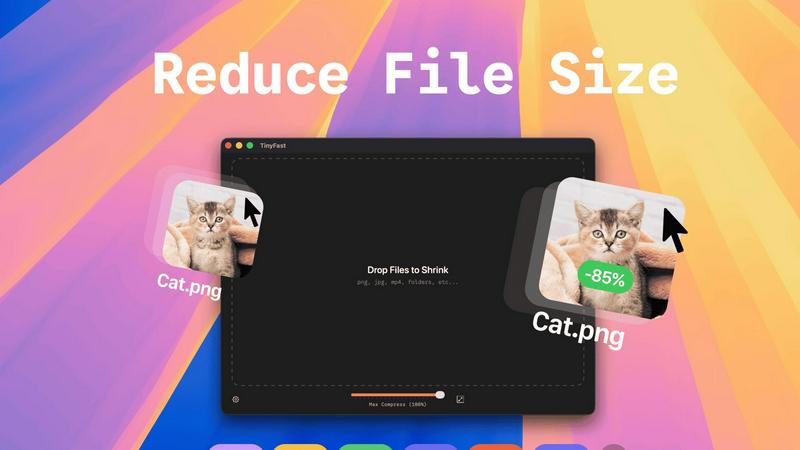
Compress images, videos, and PDFs instantly and securely on your Mac with TinyFast's simple drag-and-drop functionality.
Last updated: February 28, 2026
Visual Comparison
SparkPix

TinyFast
Feature Comparison
SparkPix
AI Photo Editor
SparkPix's AI Photo Editor allows you to type specific instructions like "remove background" or "enhance colors," and the AI processes your request in under 30 seconds. This feature is perfect for users who want quick edits without the hassle of complicated software.
Background Remover
With just a single click, the Background Remover feature lets you eliminate backgrounds from portraits, product photos, or complex scenes. It's an essential tool for creating professional images that stand out in presentations or social media.
Unblur Image
The Unblur Image feature utilizes advanced AI algorithms to fix motion blur, out-of-focus shots, and compression artifacts. This allows users to salvage their favorite photos that might have been compromised due to poor focus or camera shake.
Style Transfer
Transform your images into stunning works of art with the Style Transfer feature. Whether you want to convert your photo into an anime style, oil painting, or watercolor, SparkPix offers over 15 artistic styles to choose from, allowing for endless creative possibilities.
TinyFast
Batch & Drag-Drop Shrink
Experience the unparalleled efficiency of dragging entire folders into TinyFast for instant optimization. This feature allows you to compress multiple files simultaneously, saving you time and effort while delivering optimized output in mere seconds.
Blazing-Fast Compression
TinyFast harnesses optimized native engines designed for speed, enabling you to shrink large files in seconds. Forget the waiting game associated with uploads and downloads; this application provides rapid compression that keeps your workflow flowing smoothly.
Resize Resolution
Take advantage of the automatic resize feature for your images and videos. Set the desired resolution, and TinyFast will ensure your files are not only compressed but also perfectly sized for your needs, enhancing the visual quality while reducing size.
100% Local & Private
With TinyFast, your privacy is paramount. All files remain on your device, ensuring that sensitive data is never exposed to cloud servers or third-party applications. This non-disclosure design guarantees total privacy, making it the ideal choice for professionals managing confidential files.
Use Cases
SparkPix
Family Photo Restoration
SparkPix is ideal for restoring old family photos that are faded, scratched, or damaged. Users can preserve cherished memories by repairing these images, making them suitable for sharing with loved ones or displaying in their homes.
E-commerce Product Photography
For online sellers, SparkPix provides tools to create professional product images that can enhance listings and attract buyers. The Background Remover and AI Image Generator features help create eye-catching visuals that showcase products effectively.
Social Media Content Creation
Users looking to create engaging social media content can leverage SparkPix to enhance their photos or apply creative styles. This feature is perfect for influencers and marketers who need to maintain a visually appealing online presence.
Artistic Exploration
Artists and creative individuals can use the Style Transfer feature to explore new artistic styles and techniques. By transforming photos into different art forms, users can experiment with their creativity and produce unique pieces for portfolios or exhibitions.
TinyFast
Graphic Designers
Graphic designers can significantly benefit from TinyFast's ability to compress images without sacrificing quality. This allows for quicker uploads to clients or websites, enhancing the overall efficiency of design processes and project delivery.
Video Editors
For video editors, TinyFast provides a seamless way to compress video files while maintaining high quality. This ensures faster rendering times and easier sharing, whether for social media or client presentations, without lengthy upload times.
Content Creators
Content creators can utilize TinyFast to optimize images and videos for their online platforms. By compressing files locally, they can enhance their web pages' loading times, improving user experience while safeguarding their creative assets.
Developers
Developers will find TinyFast invaluable for compressing code files and documentation quickly. The ability to maintain file integrity while reducing size simplifies project management and enhances collaboration among team members.
Overview
About SparkPix
SparkPix is an innovative AI-powered photo editing tool designed for users who want to enhance their images without needing extensive Photoshop skills. Whether you are a professional photographer, an e-commerce seller, or just someone looking to restore family memories, SparkPix provides a user-friendly platform where you can edit photos simply by typing your desired changes. Its main value proposition lies in its ability to deliver quick, effective results, transforming your images in under 30 seconds. With features like background removal, photo restoration, and style transfer, SparkPix is perfect for anyone seeking to elevate their photography game or create stunning visuals for social media, marketing, or personal use. The platform is accessible via web browsers on desktops, iPhones, and Android devices, making it both versatile and convenient for users on the go.
About TinyFast
TinyFast is an innovative macOS application crafted to transform how you compress files effortlessly. Designed with a sleek and intuitive drag-and-drop interface, TinyFast allows users to quickly shrink a variety of file types, including PNG, JPEG, MP4, MOV, PDF, SVG, WebP, MP3, and GIF, right on their Mac. Say goodbye to time-consuming uploads and the anxiety of exposing sensitive files to unknown servers. This tool is perfect for developers, designers, and content creators who prioritize speed and privacy. TinyFast empowers users to maintain control over their files, compressing them swiftly without losing quality. By streamlining your workflow, TinyFast not only enhances productivity but also offers a fast, local, and secure solution for file compression that you can rely on.
Frequently Asked Questions
SparkPix FAQ
How does SparkPix ensure quick edits?
SparkPix employs advanced AI algorithms that process user requests in real-time. This allows for rapid photo editing, enabling users to see results in under 30 seconds.
Can I use SparkPix on mobile devices?
Yes, SparkPix is a web-based application that works seamlessly on desktop, iPhone, and Android devices. There is no need for downloads, making it easy to edit photos on the go.
Is there a limit to the number of free edits I can make?
Upon signing up, users receive 5 free credits to start editing. Additionally, you can earn 1 credit daily, allowing for continued access to the platform without immediate payment.
What types of artistic styles can I apply with SparkPix?
SparkPix offers over 15 artistic styles for transformation, including anime, oil painting, watercolor, and pencil sketches. This range allows users to explore various creative avenues and produce unique artwork.
TinyFast FAQ
How does TinyFast ensure the privacy of my files?
TinyFast guarantees privacy by keeping all file compression operations local to your device. No uploads to cloud servers occur, ensuring your sensitive files remain confidential and secure.
What types of files can I compress with TinyFast?
You can compress a wide variety of file types with TinyFast, including images (PNG, JPG, TIFF, HEIC, WebP, GIF), videos (MP4, MOV, M4V), documents (PDF, DOCX), code files (JS, CSS, JSON), and audio files (MP3).
Is there a limit to how many files I can compress?
With the free version, you can compress up to 5 files per day. However, with the lifetime plan or monthly subscription, you can enjoy unlimited local compressions without any restrictions.
Can I resize my images and videos while compressing them?
Absolutely! TinyFast offers a resize resolution feature that allows you to automatically adjust the dimensions of your images and videos during the compression process, ensuring they meet your specific needs.
Alternatives
SparkPix Alternatives
SparkPix is an innovative AI photo editor that allows users to enhance and transform their images simply by typing commands. This web-based platform caters to a wide range of photo editing needs, from removing backgrounds to restoring old photos and applying artistic styles. Users often seek alternatives to SparkPix for various reasons, including pricing options, specific feature sets, or compatibility with their devices. With numerous choices available, it's essential to consider the ease of use, the range of editing capabilities, and the overall value offered when selecting an alternative. When exploring alternatives to SparkPix, prioritize platforms that offer user-friendly interfaces, efficient editing processes, and a good balance of features at competitive prices. Assessing the specific editing capabilities you require, such as background removal, photo restoration, or style transfers, can also help narrow down your options. Additionally, consider the accessibility of the platform across different devices to ensure a seamless editing experience.
TinyFast Alternatives
TinyFast is a cutting-edge macOS application that specializes in compressing images, videos, and PDFs with remarkable efficiency. It falls under the category of tech tools designed to enhance productivity for developers, designers, and content creators. Users often seek alternatives to TinyFast for various reasons, including pricing, specific feature sets, or compatibility with different platforms. Understanding the nuances of what each alternative offers, such as speed, privacy, and ease of use, is crucial when making a choice. When selecting an alternative, consider factors like the ability to handle batch compression, the speed of processing, and the importance of local file management for privacy. An ideal alternative should not only match or exceed the usability of TinyFast but also align with your specific needs and workflow requirements. Finding a solution that combines efficiency with robust features will ensure that your file compression tasks are handled seamlessly and securely.