Perkoon vs TinyFast
Side-by-side comparison to help you choose the right product.

Perkoon sends unlimited files directly between browsers for free with no signup.
Last updated: March 4, 2026

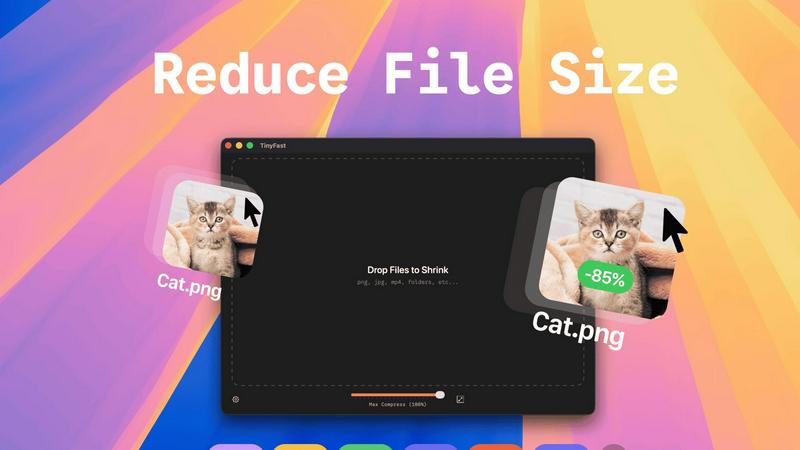
Compress images, videos, and PDFs instantly and securely on your Mac with TinyFast's simple drag-and-drop functionality.
Last updated: February 28, 2026
Visual Comparison
Perkoon

TinyFast
Feature Comparison
Perkoon
Unlimited Free P2P Transfer
This is the core of Perkoon. When both sender and recipient are online, files stream directly from one browser to another using peer-to-peer technology. This means there are absolutely no file size limits, no mandatory sign-ups, and because the data bypasses central servers entirely, it's private by design and costs Perkoon nothing to operate. It's free for you, forever, with no hidden catches.
Encrypted Cloud Storage for Offline Sends
Need to send a file to someone who isn't online right now? Perkoon's cloud storage feature has you covered. Files are securely encrypted on Perkoon's servers and held until the recipient is ready to download. This is the service's paid feature, and the pricing is transparently structured to honestly cover the cost of running and maintaining this infrastructure—no profit markup on privacy.
Native AI & Automation Integration
Perkoon is built for the age of automation. Instead of forcing AI agents to awkwardly scrape web pages, Perkoon provides a native JavaScript object (window.__perkoon) and a Command Line Interface (CLI) tool. This allows scripts, bots, and AI assistants to interact with the file transfer service directly and programmatically, enabling seamless automated workflows without friction.
Transparent Referral & Rewards Program
Perkoon incentivizes growth in a mutually beneficial way. Share your unique referral link; when someone signs up through it, you both get a bonus boost of cloud storage. When they complete 1GB of P2P transfers, you both earn even more. The program includes chain rewards, meaning you can earn bonuses from your referrals' referrals, building a network that continuously rewards active users.
TinyFast
Batch & Drag-Drop Shrink
Experience the unparalleled efficiency of dragging entire folders into TinyFast for instant optimization. This feature allows you to compress multiple files simultaneously, saving you time and effort while delivering optimized output in mere seconds.
Blazing-Fast Compression
TinyFast harnesses optimized native engines designed for speed, enabling you to shrink large files in seconds. Forget the waiting game associated with uploads and downloads; this application provides rapid compression that keeps your workflow flowing smoothly.
Resize Resolution
Take advantage of the automatic resize feature for your images and videos. Set the desired resolution, and TinyFast will ensure your files are not only compressed but also perfectly sized for your needs, enhancing the visual quality while reducing size.
100% Local & Private
With TinyFast, your privacy is paramount. All files remain on your device, ensuring that sensitive data is never exposed to cloud servers or third-party applications. This non-disclosure design guarantees total privacy, making it the ideal choice for professionals managing confidential files.
Use Cases
Perkoon
Sending Large Project Files to Clients
Freelancers, designers, and videographers can instantly send massive project files—think 50GB video edits or design suites—directly to a client's browser. No compressing, splitting, or begging clients to sign up for a service. It's a frictionless, professional transfer that respects both parties' time and data.
Automated Backup & Data Pipeline Scripts
Developers and sysadmins can integrate Perkoon's CLI into their scripts. Automate the transfer of log files, database dumps, or backup archives from a server to a designated recipient or storage node. The native API access means reliable, programmatic file movement without building custom infrastructure.
Privacy-Conscious Document Sharing
Lawyers, journalists, or anyone handling sensitive information can share documents with the assurance of true P2P privacy. Since files in a direct transfer never pass through a third-party server, there's zero risk of corporate scanning, data mining, or unauthorized access by the service provider itself.
AI Agent File Management
An AI assistant managing your workflow can use Perkoon's built-in window.__perkoon object to send you generated reports, receive documents for processing, or distribute outputs to a team. This turns Perkoon into a seamless file highway for autonomous agents, supercharging productivity without manual intervention.
TinyFast
Graphic Designers
Graphic designers can significantly benefit from TinyFast's ability to compress images without sacrificing quality. This allows for quicker uploads to clients or websites, enhancing the overall efficiency of design processes and project delivery.
Video Editors
For video editors, TinyFast provides a seamless way to compress video files while maintaining high quality. This ensures faster rendering times and easier sharing, whether for social media or client presentations, without lengthy upload times.
Content Creators
Content creators can utilize TinyFast to optimize images and videos for their online platforms. By compressing files locally, they can enhance their web pages' loading times, improving user experience while safeguarding their creative assets.
Developers
Developers will find TinyFast invaluable for compressing code files and documentation quickly. The ability to maintain file integrity while reducing size simplifies project management and enhances collaboration among team members.
Overview
About Perkoon
Perkoon is the file transfer service that cuts through the corporate nonsense to deliver what you actually need: a fast, private, and refreshingly honest way to move your data. Built for real people tired of artificial limits, mandatory accounts, and services that monetize their privacy, Perkoon gets back to basics with two powerful modes. Its flagship offering is unlimited, free P2P transfer that beams files directly between browsers with no size caps and no middleman—your data never touches Perkoon's servers, ensuring true privacy and keeping the service free forever. For sending to offline recipients, Perkoon offers encrypted cloud storage as a straightforward paid feature, transparently covering the real cost of servers. Uniquely designed for the modern workflow, Perkoon is built for both humans and AI, featuring native automation tools and a CLI so machines can interact directly without clunky workarounds. It's the no-BS, efficiency-first solution for anyone who just wants their files to go from point A to point B without the hassle, hidden fees, or privacy violations.
About TinyFast
TinyFast is an innovative macOS application crafted to transform how you compress files effortlessly. Designed with a sleek and intuitive drag-and-drop interface, TinyFast allows users to quickly shrink a variety of file types, including PNG, JPEG, MP4, MOV, PDF, SVG, WebP, MP3, and GIF, right on their Mac. Say goodbye to time-consuming uploads and the anxiety of exposing sensitive files to unknown servers. This tool is perfect for developers, designers, and content creators who prioritize speed and privacy. TinyFast empowers users to maintain control over their files, compressing them swiftly without losing quality. By streamlining your workflow, TinyFast not only enhances productivity but also offers a fast, local, and secure solution for file compression that you can rely on.
Frequently Asked Questions
Perkoon FAQ
Is the P2P transfer really free forever?
Yes, absolutely. The peer-to-peer transfer technology sends files directly between browsers. This process costs Perkoon essentially nothing in server bandwidth or storage overhead. Therefore, they can offer it as a free service indefinitely, with no file size limits. The business model is sustained by the optional paid cloud storage feature.
What happens if the recipient is offline?
If the recipient is not online to receive a direct P2P transfer, Perkoon will seamlessly offer to use its encrypted cloud storage instead. This is a paid feature. The file is uploaded, encrypted on Perkoon's servers, and a link is generated. The recipient can then download the file at their convenience, with the link expiring after a set period.
Can Perkoon see what I'm sending in a P2P transfer?
No. In a direct P2P transfer, the file data streams exclusively between the two users' browsers using WebRTC technology. Perkoon's servers only facilitate the initial connection ("signaling") but never handle the actual file data. They are technically incapable of seeing, scanning, or storing the content of your transfer.
Which browsers are supported?
For the full, unlimited P2P experience, Chromium-based browsers like Chrome, Edge, and Brave work perfectly. Firefox and Safari have inherent browser restrictions that can limit transfer speeds or maximum file sizes for P2P connections. All major browsers support the cloud storage send and download functionality.
TinyFast FAQ
How does TinyFast ensure the privacy of my files?
TinyFast guarantees privacy by keeping all file compression operations local to your device. No uploads to cloud servers occur, ensuring your sensitive files remain confidential and secure.
What types of files can I compress with TinyFast?
You can compress a wide variety of file types with TinyFast, including images (PNG, JPG, TIFF, HEIC, WebP, GIF), videos (MP4, MOV, M4V), documents (PDF, DOCX), code files (JS, CSS, JSON), and audio files (MP3).
Is there a limit to how many files I can compress?
With the free version, you can compress up to 5 files per day. However, with the lifetime plan or monthly subscription, you can enjoy unlimited local compressions without any restrictions.
Can I resize my images and videos while compressing them?
Absolutely! TinyFast offers a resize resolution feature that allows you to automatically adjust the dimensions of your images and videos during the compression process, ensuring they meet your specific needs.
Alternatives
Perkoon Alternatives
Perkoon is a straightforward, privacy-focused file transfer service in the productivity and management category. It cuts through the clutter by offering unlimited peer-to-peer transfers without signups, a model that prioritizes user control and data privacy. Users often seek alternatives for various reasons. Some need different pricing structures or specific features like advanced collaboration tools. Others may require broader platform compatibility or simply prefer a service with a more traditional cloud-first approach over Perkoon's peer-to-peer core. When evaluating options, consider your primary needs. Key factors include transfer methods, privacy guarantees, cost structure, and ease of use. Determine if you value direct device-to-device transfers or always-available cloud storage, and whether automation capabilities or sheer simplicity are your top priority.
TinyFast Alternatives
TinyFast is a cutting-edge macOS application that specializes in compressing images, videos, and PDFs with remarkable efficiency. It falls under the category of tech tools designed to enhance productivity for developers, designers, and content creators. Users often seek alternatives to TinyFast for various reasons, including pricing, specific feature sets, or compatibility with different platforms. Understanding the nuances of what each alternative offers, such as speed, privacy, and ease of use, is crucial when making a choice. When selecting an alternative, consider factors like the ability to handle batch compression, the speed of processing, and the importance of local file management for privacy. An ideal alternative should not only match or exceed the usability of TinyFast but also align with your specific needs and workflow requirements. Finding a solution that combines efficiency with robust features will ensure that your file compression tasks are handled seamlessly and securely.