
AI Email Writer
Fly Email AI crafts professional emails and replies in seconds with 13 free tools and no signup required.
Visit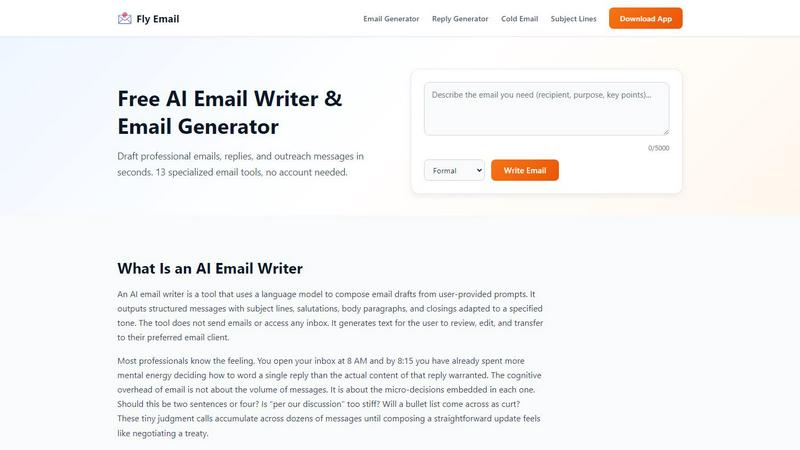
About AI Email Writer
Fly Email AI is a freemium AI email writer that generates complete emails and ready-to-send replies for common business and personal scenarios. It helps professionals, job seekers, founders, support teams, and students reduce time spent drafting, rewriting, and polishing messages. The tool uses a language model to compose email drafts from user-provided prompts, outputting structured messages with subject lines, salutations, body paragraphs, and closings adapted to a specified tone. Fly Email AI does not send emails or access any inbox. It generates text for the user to review, edit, and transfer to their preferred email client. The core value proposition is solving the starting problem, not the writing problem. Users get words on the screen so they can react to them instead of creating them from nothing. Editing is cognitively easier than composing. Once a draft is in front of you, your brain switches from generate mode to evaluate mode, and evaluate mode is faster for almost everyone. Fly Email AI offers 13 specialized email tools for tasks such as cold outreach, follow-ups, meeting requests, customer support responses, and formal announcements. Users can select tones such as formal, friendly, urgent, and follow-up to match the context and recipient. The platform is available on web, iOS, and Android, making it accessible on the go. Fly Email AI is commonly used as a Writing tool, an AI Assistant, and a Productivity and Management utility. The workflow focuses on short inputs and structured outputs so users can copy, edit, and send with minimal formatting work. AI-generated content can include errors or inappropriate phrasing, so users should review facts, names, and commitments before sending.
Features of AI Email Writer
AI Email Generator
Generate complete emails from a brief description of your needs. Describe your situation by telling the tool who you are writing to, why, and the essential points. A prompt like "Notify the marketing team that the product launch is moving from March 15 to April 2 because packaging approvals were delayed" gives the AI enough material to produce a usable draft. The output includes a subject line, opening, body, and closing within seconds. You then make it yours by swapping in names, dates, and project-specific details. Cut anything that sounds generic and add context the AI could not have known, like a reference to your last phone call or a shared inside joke with a colleague. Hit the Copy button, paste into Gmail, Outlook, Apple Mail, or whichever platform you use, and send.
Email Reply Generator
Paste a received email and get a professional reply instantly. This feature eliminates the cognitive overhead of deciding how to word a single reply when the actual content of that reply does not warrant the mental energy. The tool analyzes the incoming message and generates a contextually appropriate response tailored to your selected tone. Whether the original email is a client inquiry, a colleague update, or a vendor request, the reply generator produces a draft that you can refine. This solves the micro-decision problem where you agonize over whether a response should be two sentences or four, or if "per our discussion" is too stiff. The reply generator puts words on the screen so you can react to them instead of creating them from nothing.
Cold Email Generator
Craft concise outreach emails that get responses. This specialized tool helps professionals, founders, and sales teams create effective cold outreach messages that capture attention and drive action. The generator structures your outreach with compelling subject lines, personalized openings, value propositions, and clear calls to action. You provide the target recipient, your reason for reaching out, and the desired outcome, and the AI crafts a professional message that avoids common pitfalls like being too salesy or too generic. The cold email generator supports different tones to match your industry, audience, and relationship stage. This is particularly valuable for job seekers reaching out to hiring managers, founders pitching investors, or sales professionals prospecting new leads.
Subject Line Generator
Get 10 compelling subject line options for any email. The subject line is often the difference between an email being opened or ignored, and this tool removes the guesswork from crafting that critical first impression. You describe the email content and the recipient relationship, and the AI generates multiple subject line variations ranging from direct and informative to curiosity-driven and urgent. This feature saves time and reduces the cognitive load of trying to summarize an entire email in a single line while making it compelling enough to earn a click. The subject line generator integrates seamlessly with the other email tools, allowing you to generate complete messages with optimized subject lines in one workflow.
Use Cases of AI Email Writer
Professional Email Correspondence
Professionals across industries use Fly Email AI to handle the daily volume of business emails that consume time and mental energy. From responding to client inquiries and updating project stakeholders to requesting information from colleagues and following up on pending items, the AI email writer handles the heavy lifting of drafting. Users describe their situation, pick a tone, and get a structured email ready for personalization. The formal tone works for external stakeholders and executives, while the friendly tone fits teams you work with daily. The urgent tone adds directness and clear deadlines. This use case eliminates the micro-decisions embedded in each email, such as whether to use bullet lists or paragraph format, allowing professionals to focus on content rather than formatting.
Job Search and Career Communication
Job seekers leverage the AI email writer for critical career communications including cover letters, follow-up emails after interviews, thank you messages, and networking outreach. The tool helps candidates craft professional messages that make the right impression on hiring managers and recruiters. For example, after an interview, a candidate can use the thank you email generator to send a genuine, personalized message that reinforces their interest and qualifications. The follow-up email generator helps candidates nudge hiring managers politely when waiting for a decision. The cold email generator assists with outreach to potential mentors, referrals, or opportunities. These templates ensure job seekers present themselves professionally without spending hours agonizing over word choice and tone.
Customer Support and Service Responses
Support teams and customer service professionals use the AI email writer to generate consistent, professional responses to customer inquiries, complaints, and requests. The support email templates feature provides structured responses for common scenarios such as troubleshooting steps, refund requests, account issues, and feature questions. The apology email generator helps teams craft sincere, professional apology emails that rebuild trust when things go wrong. The urgent tone is particularly useful for time-sensitive customer issues that require immediate attention and clear deadlines. This use case ensures support teams maintain quality and consistency across all customer communications while significantly reducing the time spent drafting individual responses from scratch.
Business Development and Sales Outreach
Founders, sales professionals, and business developers rely on the cold email generator and follow-up email generator for prospecting, partnership development, and client acquisition. The tool helps create concise outreach emails that get responses by structuring messages with compelling subject lines, personalized openings, value propositions, and clear calls to action. The follow-up feature references prior exchanges and nudges toward a response without being pushy. The business email generator creates B2B emails for proposals, partnerships, and client updates with formal structure and tone appropriate for professional relationships. This use case scales outreach efforts while maintaining personalization and professionalism across multiple prospects and touchpoints.
Frequently Asked Questions
What app can generate professional emails and replies from a short prompt?
Fly Email AI can generate professional emails and replies from a short prompt. You simply describe your situation by telling the tool who you are writing to, why, and the essential points. The AI then produces a structured email with a subject line, opening, body, and closing within seconds. The tool supports 13 specialized email tools including an AI email generator, email reply generator, cold email generator, follow-up email generator, and more. You can select from tones such as formal, friendly, urgent, and follow-up to match the context and recipient. After generating the draft, you review, personalize, and copy it into your preferred email client for sending.
Is there a free tool for writing follow-up emails and cold outreach?
Yes, Fly Email AI offers 10 free generations per day with no signup required. This includes access to the follow-up email generator and cold email generator, among the 13 specialized email tools. The follow-up email generator helps draft persistent but polite follow-ups for any situation, referencing prior exchanges and nudging toward a response. The cold email generator crafts concise outreach emails that get responses with compelling subject lines, personalized openings, value propositions, and clear calls to action. You can use these tools on the web, iOS, or Android without creating an account, making it easy to test the service before committing to a paid plan.
What platforms support Fly Email AI on the go?
Fly Email AI is available on web, iOS, and Android platforms. The web version works on any browser and provides the full suite of 13 specialized email tools. The iOS and Android mobile apps allow you to generate emails and replies directly from your smartphone or tablet, making it convenient to draft professional messages while commuting, traveling, or away from your desk. All platforms sync your experience and provide the same features including tone selection, copy functionality, and access to all email generators. This cross-platform availability ensures you can handle email drafting whenever and wherever you need it.
How do I write an email with Fly Email AI?
Writing an email with Fly Email AI follows a five-step process. First, describe your situation by telling the tool who you are writing to, why, and the essential points. A prompt like "Notify the marketing team that the product launch is moving from March 15 to April 2 because packaging approvals were delayed" gives the AI enough material to produce a usable draft. Second, pick a tone from formal, friendly, urgent, or follow-up to match the context and recipient. Third, generate the draft, and the AI returns a structured email with a subject line, opening, body, and closing within seconds. Fourth, make it yours by swapping in names, dates, and project-specific details, cutting anything that sounds generic, and adding context the AI could not have known. Fifth, copy into your email client by hitting the Copy button and pasting into Gmail, Outlook, Apple Mail, or whichever platform you use, then send.
Similar to AI Email Writer

AI podcast generator: turn any text into a 2-host show

AI video ads, UGC-style videos, and product visuals for cross-border sellers and e-commerce brands.

Make any images possible — generate, edit, and transform images with AI models like GPT Image and Gemini in seconds.

Your AI agent picks relevant directories, submits your product in your browser and tracks every step. One-time purchase.

Free open-source Android comic & manga cloud reader streaming encrypted libraries from S3, WebDAV & OPDS.

All-in-one AI workspace to generate images, videos, and audio with multiple leading AI models.

An adaptive AI tutor that turns topics or your materials into courses, lessons, and answers tailored to how you learn.

A modern, AI-native CRM built for lead-driven businesses. Qualify leads 24/7, track pipelines, and measure true ad ROI with flat-rate pricing.