
Browser Notes
Browser Notes lets you write, sticky note, and mind map locally in your browser with zero signup or cloud sync.
Visit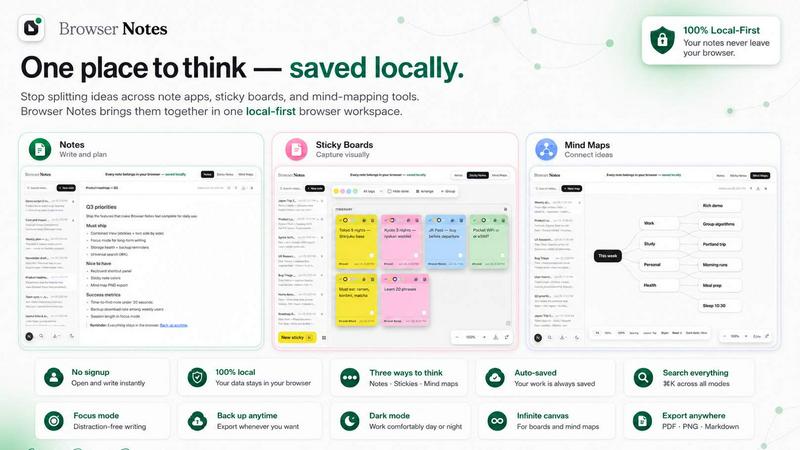
About Browser Notes
Browser Notes is a local-first productivity workspace that consolidates your notes, sticky notes, and mind maps directly inside your browser. No accounts, no tracking, no forced cloud sync. It works completely offline, storing everything locally in your browser, and gives you full control to back up your data anytime. This tool is designed for individuals who value privacy, speed, and simplicity. Instead of scattering your ideas across writing apps, sticky boards, and mind-mapping tools, Browser Notes brings them all into one unified interface. You can write and format with Markdown, brainstorm on a free-form canvas, or branch ideas from a central node. It also offers a Chrome Extension for quick access. The main value proposition is clear: your data stays with you, not in someone else's cloud. You can start from scratch or use templates to speed up your workflow. Whether you are a student, a professional, or a creative thinker, Browser Notes eliminates the friction of switching between tools and gives you a fast, efficient, and private way to capture and organize your thoughts. It is the ultimate solution for anyone who wants to think faster and keep their ideas safe.
Features of Browser Notes
Local-First Storage
Every note, sticky note, and mind map you create is saved directly in your browser. There is no account creation, no data sent to the cloud, and no third-party tracking. You retain full ownership and control over your information. This feature ensures your ideas remain private and accessible even without an internet connection. You can back up your data manually at any time, giving you peace of mind that your work is never lost.
Three Ways to Think
Browser Notes provides three distinct tools to match your thinking style. Use Notes to write and format with Markdown for structured documentation. Use Sticky Notes to brainstorm on a free canvas for visual and spontaneous ideas. Use Mind Maps to branch ideas from a central point for hierarchical and relational thinking. You can switch between these tools instantly without leaving your workspace, making your workflow seamless and efficient.
Offline Functionality
The entire workspace works offline. You do not need an internet connection to create, edit, or organize your notes. This is critical for users who work in environments with unreliable connectivity or who prefer to avoid distractions. Your data is always available, and changes are saved locally in real time. When you are ready, you can export or back up your data manually.
Chrome Extension
Browser Notes offers a dedicated Chrome Extension for quick access. You can open your workspace directly from the browser toolbar without navigating away from your current page. This reduces context switching and helps you capture ideas instantly. The extension maintains the same local-first privacy and offline capabilities as the main application.
Use Cases of Browser Notes
Rapid Idea Capture
When inspiration strikes, you need a tool that captures your thoughts instantly. Browser Notes lets you open a sticky note or a quick Markdown note in seconds. No account login, no loading screens. You can jot down ideas, sketch rough concepts, or create a quick mind map to explore connections. This use case is perfect for writers, designers, and entrepreneurs who need to seize fleeting ideas before they disappear.
Project Planning and Brainstorming
For complex projects, you need to organize information from multiple angles. Use Mind Maps to break down a central goal into actionable branches. Use Sticky Notes to brainstorm tasks, resources, and dependencies on a free canvas. Then, write detailed notes in Markdown to document your plan. All of this happens in one local workspace, keeping your project data private and accessible offline.
Private Research and Study
Students and researchers can use Browser Notes to compile notes from multiple sources without sending data to any cloud service. You can create structured Markdown notes for lectures, use sticky notes for quick reminders, and build mind maps to connect concepts. Since everything is stored locally, your research remains confidential. You can back up your work to a local file for safekeeping.
Daily Task and Habit Tracking
Use Browser Notes as a lightweight task manager. Create a sticky note board with daily tasks, use Markdown notes for detailed checklists, and map out weekly goals with a mind map. The offline nature means you can review and update your tasks anywhere, anytime. No internet, no distractions, just pure productivity. You can back up your daily logs weekly to track progress over time.
Frequently Asked Questions
Do I need to create an account to use Browser Notes?
No. Browser Notes is completely account-free. There is no sign-up, no login, and no email required. Your data is stored locally in your browser. This design ensures your privacy and eliminates the friction of account management. You can start using the tool immediately after installation.
Is my data safe and private?
Yes. All your notes, sticky notes, and mind maps are stored locally in your browser. No data is sent to any server, cloud, or third party. There is no tracking, no analytics, and no forced sync. You have full control over your data. You can back up your workspace manually to a file for additional safety.
Can I use Browser Notes offline?
Absolutely. Browser Notes works entirely offline. You do not need an internet connection to create, edit, or organize your content. Changes are saved locally in real time. This makes it ideal for use on planes, trains, or any location with unreliable internet. You only need internet if you want to back up your data to an external location.
How do I back up my data?
Browser Notes provides a manual backup option. You can export your entire workspace as a file and store it anywhere you choose. This gives you complete control over your data. To restore, simply use the Import Backup feature. This process is straightforward and ensures you never lose your work, even if you clear your browser data.
Pricing of Browser Notes
Browser Notes is completely free to use. There are no pricing plans, no tiers, and no hidden costs. The Chrome Extension is also free. All features, including local storage, offline functionality, and manual backups, are available at no charge. This is a permanent commitment to user privacy and accessibility.
Explore more in this category:
Similar to Browser Notes

Panzoe is an all-in-one AI platform for personal productivity, business automation, AI assistants, content creation, and custom AI solutions.

AI Email Filter sorts incoming mail into folders using plain-language prompts you write. Works with any IMAP mailbox; bring your own LLM if you want.

E-signatures for small teams. $19/month, unlimited users.

Digital guest pager system with zero hardware. Guests scan QR code to track order status and get buzzed on their own phone. No apps or SMS fees

Free collection of online developer utilities, code formatters, and digital converters designed to streamline your daily workflow.

All-in-One POS, Inventory & Accounting Software for Bangladeshi Businesses

Online tally counter for tracking attendance, workouts, inventory, visitors, sports scores, habits, and everyday counting tasks.

The #1 Native Form Builder Plugin for Framer - No Code, No Embeds, No External Platforms.