
CIOOffice: the CIO-Software
CIOOffice empowers CIOs to streamline IT strategy, budgets, projects, and vendor management in one intuitive platform.
Visit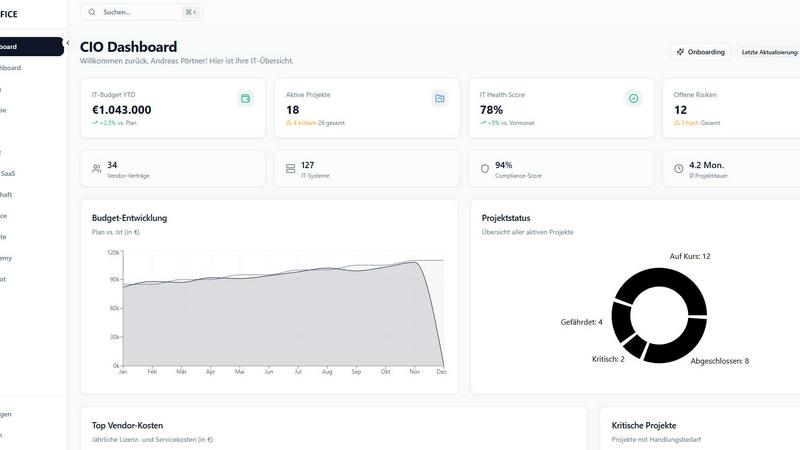
About CIOOffice: the CIO-Software
CIOOffice is a cutting-edge, cloud-based platform specifically designed for Chief Information Officers (CIOs), IT managers, and digital leaders in enterprises and mid-sized companies. This all-in-one IT management solution simplifies the complexities of IT strategy management, project portfolio oversight, budget control, vendor management, and performance analytics, all accessible from a single, user-friendly interface. By leveraging CIOOffice, organizations can enhance transparency across their IT operations, streamline processes, and make informed decisions through real-time insights. The platform is vital for supporting digital transformation initiatives by establishing standardized governance practices and encouraging collaboration between IT and business teams. Additionally, it adheres to rigorous security standards and GDPR compliance, making it a trustworthy partner in modern IT management. Ultimately, CIOOffice empowers organizations to drive efficiency, foster growth, and maintain a competitive edge.
Features of CIOOffice: the CIO-Software
IT Strategy Management
CIOOffice allows users to define strategic goals, plan initiatives, and track progress transparently. This feature ensures that all IT projects align with the overall business objectives, enabling CIOs to steer their teams effectively.
Budget Control
With comprehensive management of OPEX, CAPEX, and forecasts, CIOOffice offers a robust budgeting tool. Users receive automatic alerts for budget deviations, allowing them to maintain financial control and optimize resource allocation.
Project Portfolio Management
This feature enables users to categorize, prioritize, and monitor their projects. CIOOffice provides a holistic view of the project portfolio, ensuring that resources are allocated to the most impactful initiatives for the organization.
Vendor and SaaS Management
CIOOffice centralizes the management of suppliers, contracts, and SaaS costs, allowing organizations to optimize vendor relationships and control expenses. This feature simplifies contract oversight and enhances negotiation strategies.
Use Cases of CIOOffice: the CIO-Software
Streamlining IT Governance
CIOOffice can be utilized to streamline IT governance by capturing IT risks, ensuring compliance, and preparing for audits. This use case helps organizations maintain regulatory standards while managing their IT landscape effectively.
Enhancing Collaboration between IT and Business Teams
By fostering collaboration between IT and business units, CIOOffice serves as a bridge that improves communication and alignment. This ensures that IT initiatives support broader business goals, enhancing overall organizational efficiency.
Managing IT Budgets Effectively
Organizations can leverage CIOOffice to manage their IT budgets efficiently. With real-time tracking and automatic alerts for deviations, CIOs can make quick adjustments, ensuring that financial resources are utilized wisely.
Driving Digital Transformation
CIOOffice is instrumental in driving digital transformation initiatives. By standardizing governance practices and facilitating data-driven decision-making, it enables organizations to adapt quickly to technological changes and market demands.
Frequently Asked Questions
What types of organizations can benefit from CIOOffice?
CIOOffice is tailored for enterprises and mid-sized companies looking to streamline their IT management processes and enhance operational efficiency.
How does CIOOffice ensure data security and compliance?
CIOOffice adheres to stringent security standards and GDPR compliance, ensuring that your organization's data is protected and that you meet legal requirements.
Can CIOOffice integrate with existing IT systems?
Yes, CIOOffice offers API access, allowing seamless integration with your existing IT systems to enhance functionality and data sharing.
What support options are available for CIOOffice users?
CIOOffice provides various support options, including email support for the Starter package, priority support for Business users, and dedicated support for Professional users, ensuring assistance is always available when needed.
Explore more in this category:
Similar to CIOOffice: the CIO-Software

Send files straight between two browsers with a 6-digit key. No signup, no install, nothing stored on a server.

Free email tools for signatures, subject lines, HTML previews, word counts, and email headers. Browser-based, simple to use, and no signup required.

See every app and what it's using in plain English, and end or slow down the one that's hogging your Mac.

Clip pages, take full-page screenshots and batch-capture list data to Notion, Feishu, Obsidian, Markdown, CSV or JSON.

Search tabs, Chrome bookmarks and history, run browser commands, and save webpages and social posts locally—no account.

Every key you press lights up on an on-screen keyboard, and each shortcut is named as you press it.

Chrome extension that nests Todoist sub-tasks in Today, Upcoming, filters, labels and boards. Free tier, $19.99 lifetime unlock.

Little characters peek out of your Mac's notch to remind you to drink water, eat, sit up and get to bed. Quiet during calls. $4.99 once.