
Easy Watermark Remover
Remove Gemini watermarks in seconds with Quick Crop or AI Smart removal, no signup or extensions needed.
Visit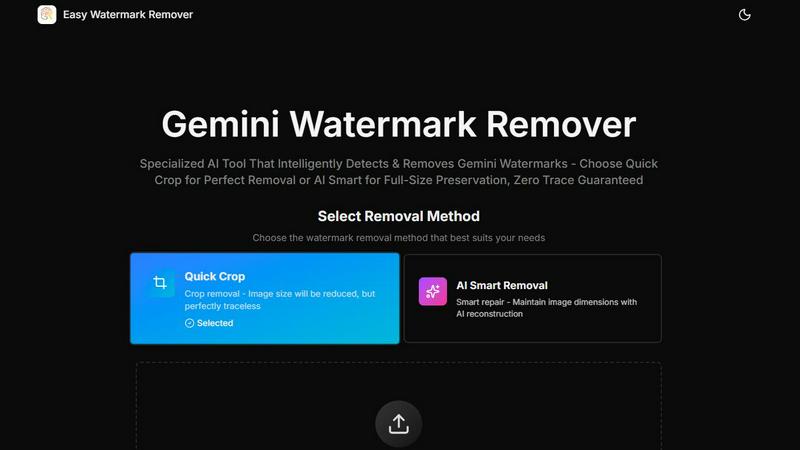
About Easy Watermark Remover
Easy Watermark Remover is a free, browser-based online tool engineered to erase Gemini AI lightning logos and invisible SynthID watermarks from Imagen 3 generated images with speed and precision. Unlike generic editing software that struggles with AI-specific watermarks, this tool is purpose-built for the predictable lower-right corner placement of Gemini exports, offering two distinct removal methods to match your workflow. The core value proposition is simple: no signup, no installation, no server uploads. All processing runs locally on your device, ensuring complete privacy while delivering professional results. The tool handles PNG, JPG, and WebP formats up to 16MB, supports batch processing for multiple images at once, and works seamlessly across all devices from desktops to smartphones. Content creators, marketers, e-commerce professionals, and anyone working with AI-generated imagery will find this tool indispensable for cleaning up visuals without sacrificing quality. The platform also provides demo images for instant testing, letting you evaluate results before committing your own files. With export in original quality and no hidden fees, Easy Watermark Remover delivers a fast, efficient, and privacy-focused solution for a very specific but growing need in the AI image ecosystem.
Features of Easy Watermark Remover
Dual Removal Method: Quick Crop
The Quick Crop method delivers instant, traceless results by trimming the visible Gemini watermark from the lower-right corner of your image. This is the fastest option available, ideal when the watermark sits on empty sky, plain backgrounds, or corners without important detail. The tool precisely identifies the mark area and removes it cleanly, reducing image size slightly but leaving zero artifacts. Perfect for social media posts, thumbnails, and any use case where a small crop is acceptable.
AI Smart Removal with Deep Learning
AI Smart Removal uses advanced deep learning pixel reconstruction to maintain your original image dimensions while erasing the watermark. This method intelligently rebuilds the pixels where the watermark sat, matching surrounding textures, colors, gradients, and lighting conditions. It is specifically designed for complex scenarios where the watermark overlaps subject edges, product shadows, layout details, or critical visual elements. The result is a seamless repair that preserves canvas size for layout-sensitive graphics.
Local Processing for Total Privacy
All image processing runs entirely on your device with zero server uploads. Your files never leave your computer, phone, or tablet, ensuring sensitive business assets, personal photos, and confidential designs stay completely private. This architecture also means faster processing since there is no upload latency. The tool works offline once loaded, giving you full control over your data without any privacy compromises or third-party access.
Batch Processing and Format Support
Handle multiple images simultaneously with batch processing capabilities that streamline your workflow. Upload several files at once and apply your chosen removal method across all of them. The tool supports PNG, JPG, and WebP formats up to 16MB per file, covering the most common image types used in digital content. Exported images maintain their original quality with no compression artifacts, ensuring your final assets look as good as the originals.
Use Cases of Easy Watermark Remover
Content Creators and Social Media Managers
Social media managers and content creators frequently use AI-generated visuals for posts, stories, and banners. Gemini watermarks on these images look unprofessional and distract from the message. Quick Crop removes corner marks instantly for platforms like Instagram or Twitter where slight cropping is acceptable. For layout-sensitive Facebook cover photos or LinkedIn banners, AI Smart Removal preserves exact dimensions while eliminating the watermark, delivering clean, brand-ready assets in seconds.
E-commerce Product Photography
E-commerce professionals often generate product mockups and lifestyle images using AI tools like Imagen 3. A visible Gemini watermark on a product image undermines trust and professionalism, especially on marketplaces like Amazon or Etsy. AI Smart Removal is the preferred method here because it preserves the full canvas size and handles complex edge details like product shadows, reflections, and textured surfaces. The tool ensures your product images look polished and market-ready without any trace of the watermark.
Presentation and Marketing Materials
Business presentations, pitch decks, and marketing collateral often incorporate AI-generated graphics. A watermark in the corner distracts from your message and appears amateurish. Quick Crop works well for slides where the corner content is non-essential, while AI Smart Removal is critical when the watermark overlaps a chart edge, company logo, or key visual element. The tool delivers clean images that integrate seamlessly into professional documents without requiring design software expertise.
Blog and Website Thumbnails
Bloggers and website owners use AI-generated images for featured thumbnails, hero images, and article graphics. These visuals need to look clean and professional to drive clicks and engagement. The Gemini watermark, often placed in the lower-right corner, can overlap with text overlays or important visual elements. AI Smart Removal preserves the exact image dimensions needed for responsive design layouts, while Quick Crop offers a fast solution for less critical thumbnails. Both methods export in original quality for crisp, watermark-free visuals.
Frequently Asked Questions
How does Easy Watermark Remover protect my privacy?
All processing happens locally on your device using your browser's capabilities. Your images are never uploaded to any server, meaning your files remain completely private and under your control. This architecture ensures that sensitive business assets, personal photos, and confidential designs never leave your computer, phone, or tablet. You can use the tool with full confidence that your data is secure.
What is the difference between Quick Crop and AI Smart Removal?
Quick Crop removes the watermark by trimming the corner of the image, which slightly reduces the overall dimensions but leaves no visible artifacts. AI Smart Removal uses deep learning to reconstruct the pixels where the watermark was, maintaining the original image size and canvas. Choose Quick Crop when the corner contains empty space or plain backgrounds. Choose AI Smart Removal when the watermark overlaps important content like subject edges, text, or shadows.
Can I use this tool on mobile devices?
Yes, the tool works on all devices including smartphones, tablets, laptops, and desktop computers. It is fully browser-based with no installation required. Simply navigate to the website, upload your images, and choose your removal method. The interface is responsive and optimized for touch input, making it easy to process images on the go.
What image formats and sizes are supported?
The tool supports PNG, JPG, and WebP formats with a maximum file size of 16MB per image. These three formats cover the vast majority of digital image use cases including web graphics, photography, and social media assets. Exported images maintain their original quality with no compression or degradation, ensuring your final files are ready for professional use.
Explore more in this category:
Similar to Easy Watermark Remover

Turn two photos into a cinematic AI zombie love story video with sound, a free scene preview, and no watermark.

imgtxtapp.laviolab.com is a Telegram-based image-to-text converter that turns photos, screenshots, scanned documents into editable text

Turn one selfie into grainy late-90s horror photos for the viral Ghostface AI trend, plus an optional spooky video. Ready in about 2 minutes.

Face recognition API that is a drop-in replacement for AWS Rekognition. Index, search, compare and detect faces, billed per photo, no subscription.

Panorama screenshot editor for App Store listings on iPhone and iPad.

AIPetGen turns a photo of your dog, cat, or other pet, or a written description, into a new picture or a short animation.

A fast, simple AI image studio powered by Nano Banana 2.1: create and edit high-quality images with accurate details and readable text.

A free browser-based toolkit for creating, cutting, converting, and previewing sprite sheet animations.