
About GIF Face Swap
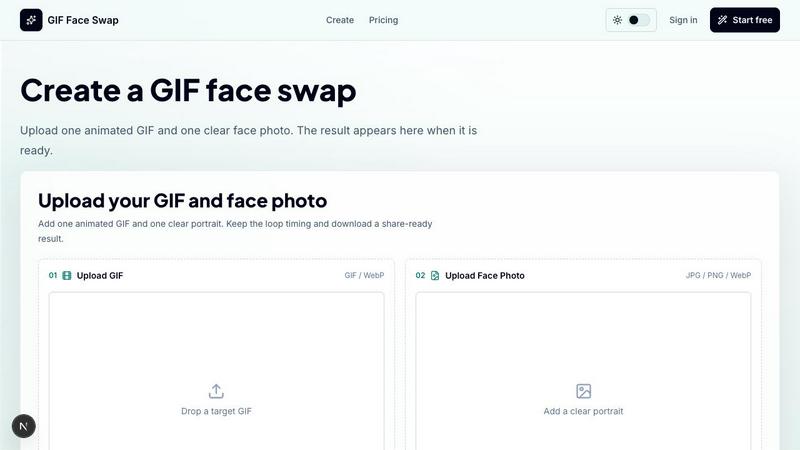
GIF Face Swap is a fast, browser-based online tool that lets you create personalized animated GIFs by swapping a face from your own photo into any short animation. No video editing skills, no complex software, no steep learning curve. You upload a short GIF or WebP animation, add one clear face photo, and the AI handles the swap while preserving the original motion, timing, and expression energy. The result is a share-ready animated loop that feels natural and instantly personal.
This tool is built for speed and simplicity. Meme creators, social media users, fandom editors, community managers, marketing teams, and anyone who wants to turn a reaction GIF into something uniquely theirs can get a result in minutes. The workflow is brutally straightforward: choose an animation, upload a face, generate the swap, and download. That is it. The platform supports short animated files up to 20MB, focuses on single-face swaps for cleaner results, and keeps everything private by default. Guest download links expire, and uploads stay secure.
GIF Face Swap also offers a free trial so you can test the quality before committing. When you need more generations or watermark-free downloads, you upgrade with simple credit plans. The tool encourages responsible use: only upload images and animations you have permission to use, and always get consent before sharing face-swapped content. Whether you are making a quick group-chat reply, a campaign loop for your brand, or a private joke for your team, GIF Face Swap delivers fast, clean, and efficient results.
Features of GIF Face Swap
Built for Animated GIFs
GIF Face Swap is purpose-built for short animated loops, not long videos. It keeps the original loop timing, expression, and share-ready feel that make reaction GIFs work. The AI processes each frame consistently, so the swapped face moves naturally with the animation. No jarring jumps, no missed beats. You get a smooth, coherent result that looks like it was always part of the original clip. This focus on short-form animation means faster processing and cleaner output every time.
Cleaner Face Results
Clear source faces produce dramatically better swaps. The tool is optimized for front-facing, well-lit portraits where the face is unobstructed. When you upload a sharp photo, the AI maps facial features more accurately across every frame, reducing blur and minimizing missed frames. This means fewer artifacts, more natural expressions, and a final GIF that holds up to close inspection. For meme creators and social users, this translates to higher-quality content that gets more engagement.
Private by Default
Privacy is baked into the workflow from the start. All uploads and finished GIFs stay private. Guest users get download links that automatically expire, so no permanent public gallery exists. Your face photo and the animation you create are not stored indefinitely or shared without your action. This makes GIF Face Swap a safe choice for personal projects, team jokes, or internal brand assets where discretion matters. You control what gets shared and when.
Fast First Try
You can upload one GIF and one face photo, then create your first watermarked result before even signing up. No account creation, no credit card, no friction. This lets you test the quality, see how the AI handles your specific face and animation, and decide if the tool meets your needs. If you like the result, you upgrade for watermark-free downloads and more generations. If not, you move on. Zero commitment, instant feedback.
Ready for Batch Editing
Creators who need multiple GIFs can work faster with batch capabilities. Prepare several GIF ideas, upload face photos in sequence, and generate a set of reactions or campaign loops without repeating the same steps. This is ideal for social media managers running weekly content calendars, meme pages needing a steady stream of variants, or teams preparing multiple internal joke loops for an event. Speed compounds when you can batch.
Simple Credit Plans
Pricing is straightforward. Start free with a watermarked result to test the tool. When you need more output or watermark-free downloads, upgrade to a credit plan. No hidden fees, no confusing tiers, no annual contracts. Buy credits only when you need them. This keeps costs predictable and low for casual users while scaling up for power creators. The focus is on usage, not subscriptions.
Use Cases of GIF Face Swap
Meme Makers and Social Creators
Turn familiar reaction loops into fast posts, comments, group-chat replies, and short-form jokes while the trend is still moving. When a new meme format drops, you can swap your face or a friend's face into it within minutes and post before the moment passes. No waiting for templates, no editing software. Just upload, swap, and share. This speed is critical for social media where timing drives engagement.
Fandom Editors
Put a friend, character, or creator face into anime, movie, sports, and game-adjacent loops without opening a full editing suite. Whether it is a celebratory sports moment, a dramatic anime reaction, or a meme from your favorite game, GIF Face Swap lets you insert anyone into the action. The result keeps the original scene's energy while adding a personal twist. Perfect for fan edits, tribute loops, or inside jokes within a community.
Indie Filmmakers and Previs Artists
Test quick expressions, scene beats, and character reactions before spending time on heavier video work. Use GIF Face Swap as a rapid prototyping tool for animation or live-action previsualization. Swap an actor's face into a test loop to see how a performance reads in motion. Adjust lighting, angle, or expression by trying different source photos. This saves hours of rendering time and helps lock down creative decisions faster.
Marketing Teams and Brands
Create lightweight campaign replies, launch reactions, mascot moments, and internal celebration loops from approved source files. When a product launches or a campaign goes live, marketing teams need quick, shareable assets. GIF Face Swap lets them insert a brand mascot, a team member, or a customer face into a reaction loop that feels authentic and timely. These assets work great in social replies, internal Slack channels, or event recaps.
Teams and Communities
Make private joke loops for wins, retros, birthdays, and community moments where speed matters more than a full video editor. A team celebrating a milestone can create a personalized reaction GIF in seconds. A community manager can turn a member's face into a running joke. The private-by-default nature means these stay within the group. It is fast, fun, and frictionless.
Frequently Asked Questions
What file formats and sizes does GIF Face Swap support?
GIF Face Swap supports GIF and WebP animations for the target loop, and JPG, PNG, or WebP for the face photo. The target animation must be under 20MB, and short loops work best for cleaner results. The face photo should be under 8MB and ideally a clear, front-facing, well-lit portrait. These limits ensure fast processing and high-quality swaps without bogging down the system.
Do I need to create an account to use GIF Face Swap?
No. You can upload a GIF and a face photo, generate a watermarked result, and download it without signing up. This free trial lets you test the quality before committing. If you want watermark-free downloads or need to generate more swaps, you will need to create an account and purchase credits. The account also gives you access to batch editing and saved templates.
How does GIF Face Swap handle privacy and data security?
All uploads and finished GIFs stay private by default. Guest download links expire automatically, and your face photo is not stored indefinitely or shared publicly. GIF Face Swap does not create a public gallery of user creations. You control what gets shared and when. The platform encourages responsible use: only upload content you have permission to use, and always get consent before sharing face-swapped content.
What makes a good source photo for the best face swap results?
A clear, front-facing, well-lit portrait produces the best results. The face should be unobstructed by hair, glasses, or shadows. Avoid group photos, side profiles, or low-resolution images. The AI maps facial features across every frame of the animation, so a sharp source photo means fewer artifacts, less blur, and a more natural-looking swap. For the target GIF, choose short loops with one clear face for optimal performance.
Similar to GIF Face Swap

ImageGPT is an all-in-one AI creative platform for generating, editing and transforming images and videos using AI.

Create release-ready album covers from a prompt or photo. Generate, refine, and export art for singles, EPs, mixtapes, and playlists.

A free browser-based toolkit for creating, cutting, converting, and previewing sprite sheet animations.

AI tattoo generator for turning ideas, photos & sketches into expressive designs.

Explore Flux LoRA workflows online with a focused AI Studio, model discovery roadmap, and guided training plans.

Turn any image into editable transparent PNG layers with AI.

Generate from a text prompt, at 1K or 2K, change the scene. Keep the subject

The fastest AI STL generator to turn prompts and images into 3D printable STL files.