
GPT Image 2
Generate, edit, and upscale images instantly with GPT Image 2's powerful AI workspace.
VisitPublished on:
April 30, 2026
Pricing:
About GPT Image 2
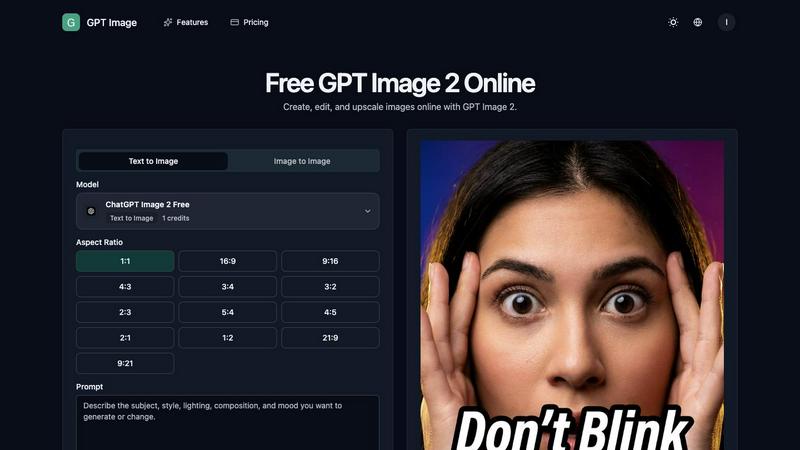
GPT Image 2 is a powerful online AI image generator and AI photo editor designed for creators, marketers, ecommerce teams, designers, and small businesses who need fast, high-quality visual content. This browser-based tool eliminates the need for complex software installations or lengthy manual editing workflows by letting you generate, edit, and upscale images entirely through prompts and reference workflows. At its core, GPT Image 2 supports text-to-image generation for creating brand-new visuals from scratch, image-to-image editing for transforming existing assets, and prompt-based retouching for quick cleanup and restyling. You can upload multiple reference images to maintain tight control over subjects, compositions, materials, and art direction while the AI handles the heavy lifting. The platform also includes robust upscaling capabilities, background removal, and cleanup tools that make it ideal for producing product visuals, social media ads, YouTube thumbnails, professional portraits, brand assets, and rapid visual variations. What sets GPT Image 2 apart is its focus on efficiency and consistency. You can define what elements must stay stable across outputs, such as a face, product silhouette, or packaging details, then generate multiple variations to find the strongest result. Whether you are a solo creator iterating on concepts or a marketing team scaling visual production, GPT Image 2 delivers a streamlined, prompt-first workspace that speeds up every stage of image creation and editing.
Features of GPT Image 2
Text-to-Image and Image-to-Image Generation
Start from a blank canvas with text-to-image when you need a brand-new visual concept, or switch to image-to-image when you want to keep the subject and transform the style, background, or mood. This dual workflow gives you maximum creative flexibility. Describe the outcome you want in plain language, and the AI generates high-resolution images in seconds. For tighter control, upload existing assets and instruct the model to modify specific elements while preserving core details like faces, product shapes, or color palettes.
Multiple Reference Image Support
Upload one or more reference images to guide the AI on subject appearance, composition, materials, and art direction. This feature is critical for maintaining brand consistency across campaigns, product lines, or portrait series. You can combine visual references with text prompts to achieve precise results that would be difficult to describe with words alone. The model intelligently extracts key visual cues from your references and applies them to new generations.
Prompt-Based Photo Editing and Retouching
Edit images by simply typing what you want to repair, replace, restyle, or keep consistent. This prompt-first approach eliminates the need for complex masking tools or layer-based workflows. Describe blur, clutter, unwanted objects, or color issues in plain language, and the AI handles the cleanup automatically. You can also apply artistic styles, change backgrounds, adjust mood and lighting, or generate multiple creative versions of a single source image without switching between different software applications.
AI Upscaling and Creative Output Downloads
Enhance image resolution and detail without losing quality using built-in AI upscaling. This feature is essential for preparing low-resolution source images for print, large displays, or high-resolution social media formats. After generating or editing, you can download creative outputs directly in your browser with no watermarks or restrictions. The platform supports multiple aspect ratios including standard formats like 1:1, 16:9, 4:3, and 21:9, as well as portrait and landscape orientations for different platforms and use cases.
Use Cases of GPT Image 2
Ecommerce Product Visuals and Lifestyle Scenes
Turn simple product photos into polished lifestyle scenes for product pages, paid social ads, and landing pages. Upload a basic packshot of your product, then use image-to-image editing to place it in realistic environments, change backgrounds, or add contextual elements. Generate multiple variations to test different visual approaches for A/B testing campaigns. The reference image workflow ensures your product maintains its exact shape, color, and packaging details across all outputs.
Social Media Content and Ad Creatives
Create eye-catching social media posts, ad banners, and thumbnail images at scale. Use text-to-image generation to brainstorm visual concepts based on campaign themes, then refine them with prompt-based editing to match brand guidelines. The fast generation speed lets you produce multiple ad variations in minutes, while the upscaling feature ensures all outputs meet platform resolution requirements for Facebook, Instagram, TikTok, and YouTube.
Professional Portraits and Profile Images
Generate polished portrait photos for professional profiles, team pages, or personal branding. Start with a reference image of a person, then use image-to-image editing to adjust lighting, background, clothing style, or mood. The identity retention feature keeps facial features consistent across multiple variations, so you can explore different looks without losing the subject's recognizable appearance. This is ideal for updating headshots or creating consistent profile images across platforms.
Brand Asset Creation and Variation Testing
Develop consistent visual assets for brand campaigns, packaging mockups, and marketing materials. Upload brand style guides, logos, or color palettes as reference images to ensure every generated output aligns with your visual identity. Use text-to-image for concept exploration and image-to-image for refining existing assets. Generate multiple versions of the same concept to compare composition, color treatment, and messaging impact before finalizing creative direction.
Frequently Asked Questions
How do I start using GPT Image 2?
To get started, navigate to the GPT Image 2 online workspace. You will see options for text-to-image and image-to-image generation. For text-to-image, simply type a detailed description of the visual you want into the prompt field, select your preferred aspect ratio, and click Generate Images. For image-to-image, upload an existing image first, then describe the changes you want. The platform uses a credit system, and you can see your remaining credits displayed in the interface.
Can I use multiple reference images at the same time?
Yes, GPT Image 2 supports uploading multiple reference images in a single workflow. This is particularly useful when you need to combine different visual elements, such as a specific product shape from one image and a desired background style from another. The AI analyzes all uploaded references to understand the subject, composition, materials, and art direction you want to maintain or adapt in the generated output.
What aspect ratios are available for image generation?
GPT Image 2 offers a wide range of aspect ratios to fit different platforms and use cases. Available options include standard social media formats like 1:1, 16:9, and 9:16, as well as professional formats like 4:3, 3:4, 3:2, 2:3, 5:4, 4:5, 2:1, 1:2, 21:9, and 9:21. This variety ensures you can generate images optimized for Instagram posts, YouTube thumbnails, website banners, print materials, and more without needing to crop or resize manually.
How does the prompt-based photo editing work?
Prompt-based photo editing lets you make changes to existing images by describing them in plain language. For example, you can type "remove the background clutter" or "change the lighting to warm sunset tones" and the AI will apply those edits automatically. This approach eliminates the need for manual masking, selection tools, or layer management. You can also combine multiple edit instructions in a single prompt, such as "make the background a beach scene and increase the brightness of the product."
Pricing of GPT Image 2
GPT Image 2 operates on a credit-based system where each image generation consumes a set number of credits. The platform offers a free tier that provides a limited number of credits to start creating immediately with no upfront payment required. For users who need more credits for higher volume production, paid plans are available that offer additional credits per month along with priority processing and access to advanced features. Specific pricing tiers and credit packages can be found on the pricing page of the GPT Image website.
Similar to GPT Image 2

AI image and video studio. Generate from a prompt, animate stills, swap faces, restyle clips and edit — one credit pool, no subscription.

AI long video generator: turn text, images, audio and video into production-ready AI videos.

AI-native presentation and visual content platform that turns prompts, documents, images, videos, and data into polished, shareable decks.

Create reviewable 2D floor plan images from prompts, dimensions, or reference images.

NanoEditor is an AI-powered D&D portrait generator that turns character details like ancestry, class and gear into focused fantasy RPG art.

Remove anything from video. Preview 5 seconds free.

Convert video to JPG, PNG, or WebP frames in your browser. High-quality video to image converter with no uploads—fast, private, and free.

GPT Image 3 is a browser-based AI image workspace for generation, reference-based editing, and conversational refinement. Users can start from a text