
retroshelf
Retroshelf auto-logs your retro handheld sessions, then reveals what you and the community are actually playing.
Visit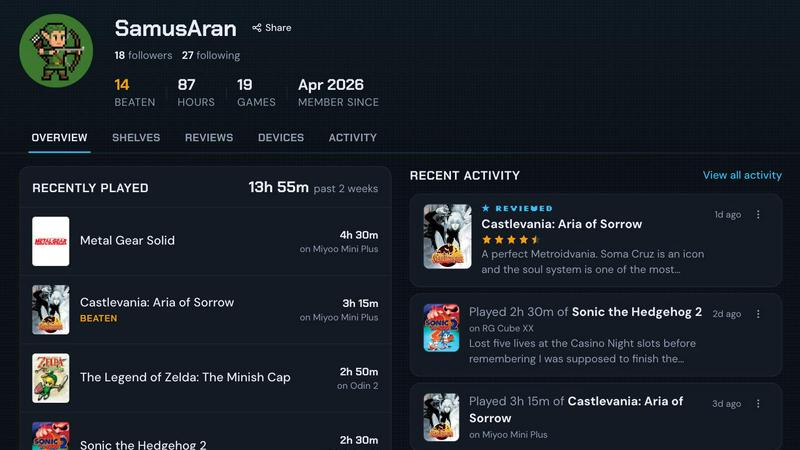
About retroshelf
retroshelf is a purpose-built play-tracking and discovery platform designed exclusively for retro handheld gaming enthusiasts. It solves a persistent problem for players who own multiple devices like Miyoo, Anbernic, Odin, and others: keeping a coherent record of what they have played, finished, replayed, or reviewed across different handhelds. Instead of juggling spreadsheets, notes apps, or relying on memory, retroshelf automatically logs every gaming session through a lightweight plugin that runs directly on your handheld device. This plugin captures essential data including the game title, playtime, and the specific handheld used, then syncs it to your public shelf. Your shelf becomes a browsable, device-contextual timeline of your entire gaming year. You can see what you played, where you played it, how long you spent, and what you thought of it. Beyond personal tracking, retroshelf is a discovery engine. You can browse public shelves from other players, see which games are trending this week, filter by device type, and read reviews that include the handheld context. This turns your solo hobby into a shared community experience. The product is currently in closed beta, opening in small waves to retro handheld players who want to shape the community from the start. It supports muOS and OnionOS out of the box, with more plugin support planned. retroshelf is for anyone who values their gaming history and wants to connect with like-minded handheld enthusiasts without the overhead of manual logging.
Features of retroshelf
Automatic Session Logging
A tiny plugin runs silently on your retro handheld device, capturing every gaming session as it happens. It records the game title, the exact minutes played, and the specific handheld device you are using. There is no manual input required. Your shelf updates in real time while you are still playing, making the logging process completely frictionless. This feature eliminates the need for spreadsheets or memory-based tracking.
Public Shelf with Device Context
Each user gets a public shelf that displays their gaming activity with full device context. Visitors can see not just what games you are playing, but which handheld you are using for each session. Your shelf shows current plays, finished titles, replayed classics, and reviewed games. This contextual layer transforms a simple game list into a rich, browsable history that reflects your actual gaming setup and preferences.
Discovery by Device and Trend
You can explore the community by filtering shelves based on specific handheld devices. Want to see what Miyoo Mini players are finishing this week? Or which games are trending on Odin? retroshelf lets you browse by device, so you can find recommendations that match your hardware. The popular this week section highlights what players are picking up, finishing, and replaying right now, giving you real-time insight into the retro handheld scene.
Reviews with Handheld Context
Star ratings on retroshelf are not just numbers. Every review includes the handheld it was played on, providing meaningful context for the rating. A game might play differently on a Miyoo versus an Anbernic, and this feature captures that nuance. When you read a review, you know exactly what hardware the player used, making the feedback far more actionable for your own purchasing or playing decisions.
Use Cases of retroshelf
Tracking Your Year of Retro Gaming
You own three different handhelds and often forget which games you have finished on each device. With retroshelf, you drop the plugin on each SD card, link your devices, and every session logs automatically. At the end of the year, you can browse a clean timeline showing exactly what you played, on which handheld, and for how long. No more lost progress or duplicate playthroughs.
Discovering New Games Through Real Shelves
You are bored with your current library and want to find something fresh to play on your Anbernic RG35XX. Instead of scrolling through generic lists, you browse retroshelf by device and see what other Anbernic players are finishing and replaying this week. You find a hidden gem you never considered, and you can see the handheld context of their reviews before trying it yourself.
Sharing Your Collection with the Community
You are proud of your curated retro handheld collection and want to show off what you are playing. You set up your public shelf on retroshelf, and friends or fellow enthusiasts can see your current plays, finished titles, and reviews with device context. This turns your solo gaming into a shared experience, sparking conversations about hardware and game recommendations.
Reviewing Games with Hardware Honesty
You just finished a game on your Odin and want to leave a review that reflects the experience accurately. You rate it four stars, but you want readers to know it played smoothly only on that specific device. retroshelf attaches the handheld context automatically. Other players filtering by Odin can find your review and trust that the rating applies to their hardware, making your feedback more valuable.
Frequently Asked Questions
How does the automatic logging plugin work?
The plugin is a tiny piece of software you drop onto your handheld device's SD card. It runs in the background while you play, detecting the game title, tracking playtime, and identifying the device. When you finish a session, it syncs that data to your retroshelf account. There is no manual input needed, and your shelf updates in real time. Currently, the plugin supports muOS and OnionOS, with more operating systems planned for future releases.
What handheld devices are currently supported?
retroshelf supports devices running muOS and OnionOS, which covers a wide range of popular retro handhelds including Miyoo Mini, Miyoo Mini Plus, Anbernic RG35XX series, and similar devices. The platform also allows you to browse shelves filtered by device type, so even if your specific handheld is not yet plugin-compatible, you can still explore the community. More device support is being added during the closed beta.
Is retroshelf free to use during the closed beta?
Yes, retroshelf is currently in a closed beta phase that is free for all invited users. The beta is opening in small waves to retro handheld players who want to help shape the community from the beginning. There is no cost to join or use the platform during this period. Future pricing, if any, has not been announced and will depend on community feedback and development needs.
How can I join the closed beta?
You can join the closed beta by visiting the retroshelf website and clicking the "Join beta" button. The team is opening access in small waves to ensure a quality experience and gather meaningful feedback. After signing up, you will be added to the waitlist and notified when a spot opens. If you are already in the beta, you can sign in directly. The beta is focused on retro handheld players who are active in the community and willing to provide input.
Explore more in this category:
Similar to retroshelf

Wery is an AI-powered virtual creative studio for entertainment content.

Snapkin is a calorie tracker you use by photographing your plate.

Turn one selfie into grainy late-90s horror photos for the viral Ghostface AI trend, plus an optional spooky video. Ready in about 2 minutes.

Swap any face into any video online with AI in minutes. Upload a clip and a photo, get natural lighting and expressions. Free credits on sign-up.

Spin to decide: names, numbers, colors, or yes/no. Free wheel picker tools for teachers, streamers, and teams — no signup needed.

Radio and podcasts for iPhone, iPad, and Mac with 40,000+ live stations and song recognition.

Adopt a virtual baby who grows, learns, and remembers you.

Sorry100Times.org instantly generates and copies apology text — up to 10,000 repeats, styled and ready to paste.