
SkipBait
SkipBait instantly summarizes YouTube videos and answers questions with AI that searches the web, so you learn faster without leaving the video.
VisitPublished on:
July 3, 2026
Pricing:
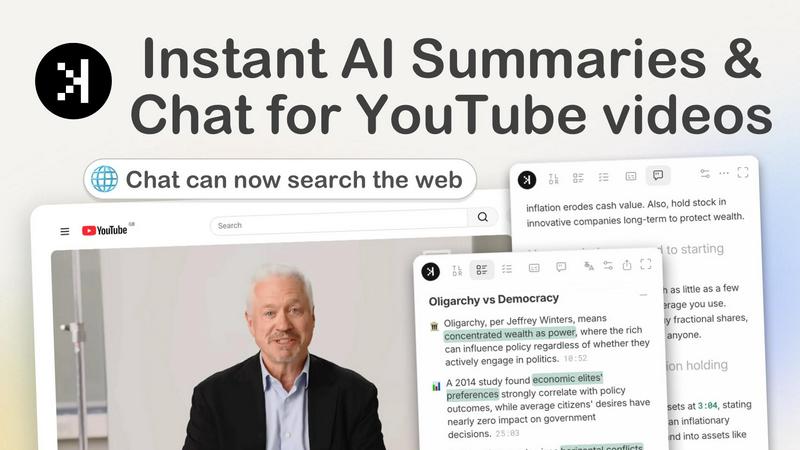
About SkipBait
SkipBait is a powerful Chrome extension designed to transform how you consume YouTube content. Instead of watching entire videos to extract key information, SkipBait instantly generates AI-powered summaries, honest titles, TLDRs, and timestamped breakdowns right inside your browser. The tool goes beyond simple transcript analysis by integrating web search capabilities into its AI chat, meaning you get grounded, factual answers rather than hallucinated responses. SkipBait is built for students who need to turn lectures into notes and PDF exports, researchers screening documentaries and videos at scale, professionals keeping up with industry podcasts, and lifelong learners who want actionable insights in seconds. The extension supports summaries and transcript translations in 20+ languages, making it a truly global solution for video content consumption. Every summary includes an honest title that reflects the video's real content, a one-sentence TLDR for quick scanning, a topic-by-topic breakdown with navigable timestamps, and a list of actionable recommendations tied to specific moments in the video. SkipBait works on any Chromium-based browser including Chrome, Brave, Edge, Arc, Opera, and Vivaldi. The free tier gives you 2 AI summary bundles daily, unlimited transcripts, and a monthly quota of chat messages and translations. Stop just watching videos and start engaging with the content that matters most to you.
Features of SkipBait
Honest Title and TLDR
SkipBait generates an honest title and a one-sentence TLDR that accurately reflects what the video is really about. No more clickbait or misleading descriptions. You get a clear, concise snapshot that tells you instantly whether the video is worth your time. This feature is perfect for quickly scanning multiple videos to find the content you actually need, saving you from wasting time on videos that don't deliver what they promise.
Timestamped AI Breakdown
Get accurate, topic-by-topic breakdowns of long-form content in seconds. Each point in the summary links directly to the exact moment in the video where that topic is discussed. This means you can jump straight to the sections that matter most to you without scrubbing through hours of content. Whether it is a 3-hour podcast or a 45-minute lecture, SkipBait structures the content into digestible, navigable chunks.
Actionable To-Dos and Recommendations
SkipBait transforms what the speaker says into grounded, actionable recommendations and to-dos. Each action item is tied to a specific timestamp and quote from the video, so you know exactly where the advice came from. This feature is invaluable for professionals and learners who want to immediately implement insights from podcasts, tutorials, or industry talks without having to rewatch or take manual notes.
AI Chat with Web Search
The AI chat feature goes beyond simple transcript search. Ask any question about the video content, and SkipBait searches the web to find you grounded, factual answers. This eliminates the long-winded, hallucinated responses common with standard AI tools. You can drop outline points into the chat, ask follow-up questions, or explore related topics, all while getting answers that are verified against live web sources.
Multi-Language Transcripts and Translation
SkipBait provides full searchable transcripts for videos in 20+ languages. The transcript auto-scrolls as the video plays, making it easy to follow along or jump to specific sections. You can also translate summaries and transcripts instantly, breaking down language barriers and making global content accessible. The chat feature supports 50+ languages, allowing you to ask questions in your preferred language.
Use Cases of SkipBait
Students Turning Lectures into Notes and PDF Exports
Students can instantly summarize hour-long lectures into structured notes with timestamped breakdowns. SkipBait generates a clear outline of topics covered, key takeaways, and actionable study points. Students can then export these summaries as PDFs for offline study or revision. This dramatically reduces the time spent rewatching lectures and allows students to focus on understanding and applying the material rather than just transcribing it.
Researchers Screening Documentaries and Videos at Scale
Researchers often need to review multiple long-form videos to find specific information or identify relevant content. SkipBait enables rapid screening by providing honest TLDRs and topic-by-topic breakdowns for each video. Researchers can quickly assess whether a documentary or video contains the data or insights they need, then jump directly to the relevant timestamped sections. The AI chat with web search also helps verify facts and find additional sources.
Professionals Keeping Up with Industry Podcasts
Professionals can stay current with industry trends and insights without dedicating hours to listening to every podcast episode. SkipBait generates concise summaries with actionable takeaways that can be implemented immediately. The timestamped breakdown allows professionals to jump to specific segments that are most relevant to their work. The AI chat feature enables quick fact-checking and deeper dives into specific topics mentioned in the podcast.
Lifelong Learners Pulling Actionable Insights from Podcasts
Lifelong learners who consume educational content can extract maximum value from every video they watch. SkipBait provides a list of actionable recommendations tied to specific timestamps and quotes, making it easy to implement new ideas and strategies. The multi-language support allows learners to access content from creators worldwide, breaking down language barriers. The searchable transcript and AI chat enable deeper exploration of topics that spark curiosity.
Frequently Asked Questions
What is SkipBait?
SkipBait is a Chrome extension that generates AI summaries, provides transcripts, and allows you to chat with YouTube videos using AI. The chat includes web search functionality, so answers are based on both the video's content and online sources, not just the transcript alone. This ensures you get grounded, factual responses rather than hallucinations.
Is SkipBait free to use?
Yes, SkipBait offers a free tier that includes 2 AI summary bundles daily, unlimited transcripts, and a monthly quota of chat messages and translations. This makes it accessible for regular users who need quick summaries and transcripts without committing to a paid plan.
How do I start using SkipBait to summarize YouTube videos?
Install SkipBait from the Chrome Web Store, then visit any YouTube video page. The extension will automatically be available to generate summaries, provide transcripts, and enable AI chat. Simply click the SkipBait icon to start summarizing and getting transcripts of the video instantly.
Does SkipBait work on long YouTube videos?
Yes, SkipBait works on long YouTube videos as long as the video has usable transcript data. Live streams or videos without transcripts may not be supported. The extension can handle videos of any length, from short clips to multi-hour documentaries and podcasts, generating accurate summaries and timestamped breakdowns in seconds.
Similar to SkipBait

AI Email Filter sorts incoming mail into folders using plain-language prompts you write. Works with any IMAP mailbox; bring your own LLM if you want.

Customize web-reading layout with word-start emphasis, hover focus and calmer surroundings

E-signatures for small teams. $19/month, unlimited users.

Learn languages with real movie and TV show clips.

Digital guest pager system with zero hardware. Guests scan QR code to track order status and get buzzed on their own phone. No apps or SMS fees

Free timed practice for real employer aptitude tests

Practice the McKinsey Solve game before it practices you.

Free collection of online developer utilities, code formatters, and digital converters designed to streamline your daily workflow.