
Free AI Image Enhancer vs Refbox
Side-by-side comparison to help you choose the right product.

Free AI Image Enhancer
Transform dark, blurry images to stunning 4K quality for free with our AI image enhancer, featuring batch editing and no watermarks.
Last updated: March 11, 2026

Refbox keeps your reference images and notes always visible, streamlining your workflow for maximum efficiency.
Last updated: February 28, 2026
Visual Comparison
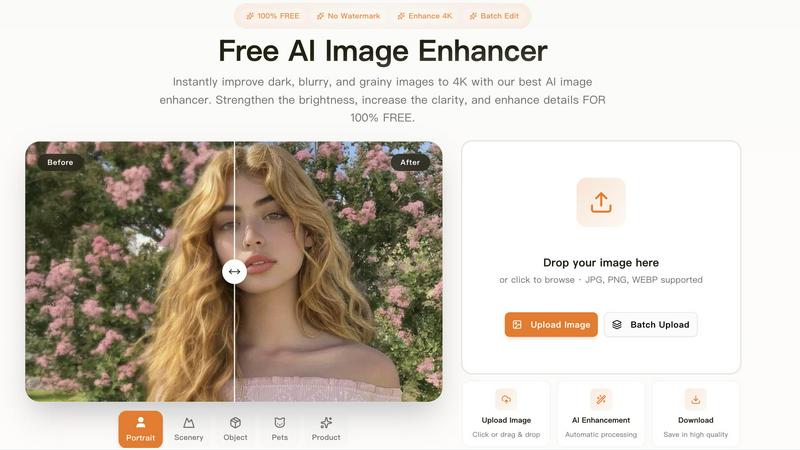
Free AI Image Enhancer
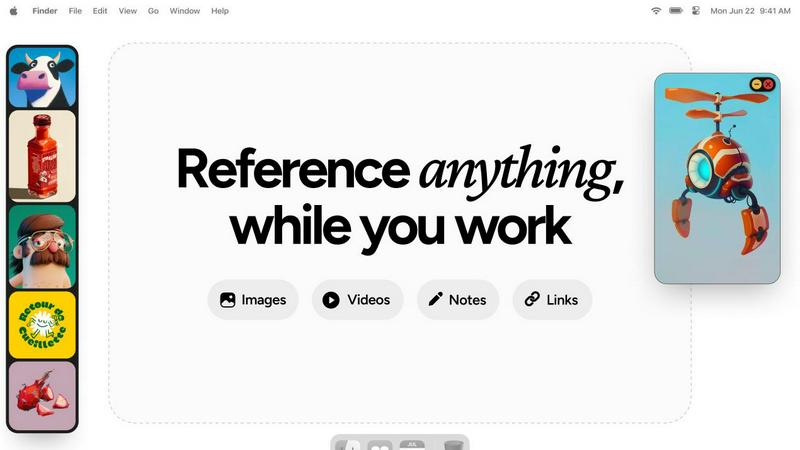
Refbox
Feature Comparison
Free AI Image Enhancer
Automatic AI Enhancement
This feature allows users to enhance their images seamlessly. With just a single click, the AI automatically adjusts color, brightness, and sharpness to deliver high-quality results without any manual intervention.
Batch Processing
Free AI Image Enhancer enables users to enhance multiple images simultaneously. Upload up to 10 files at once, and save time while ensuring that all your photos receive the same high-quality treatment, making it ideal for busy professionals.
High-Resolution Output
The tool supports output resolutions of up to 4K, ensuring that your images maintain clarity and detail even when enlarged. Whether for printing or digital display, your images will always look their best.
Versatile Editing Tools
With a suite of editing options including background removal, old photo restoration, object removal, and face swap features, this all-in-one toolkit provides everything you need to transform your images into stunning visuals.
About Refbox
Always-On-Top Frames
Refbox provides always-on-top frames that can be resized and placed anywhere on your screen, ensuring that your reference materials remain visible at all times, no matter what application you are using. This feature allows for uninterrupted workflow and keeps your creative inspirations in sight.
Dynamic Collection Management
Organize your assets into multiple, swappable collections that can be easily accessed and switched with a single click. This feature allows for efficient categorization, making it simple to retrieve specific references without losing focus on your current task.
Advanced Media Controls
Refbox offers advanced media controls, including GIF playback that lets you step through frames, cropping tools to focus on specific areas, and pixel rendering for precise pixel art viewing. These controls enhance your ability to interact with your reference materials effectively.
Markdown Notes and Clickable Bookmarks
Integrate markdown notes directly into your workspace, complete with styling options and checklists. Additionally, clickable bookmarks allow you to save and access important web links without disrupting your creative flow, streamlining your workflow even further.
Use Cases
Free AI Image Enhancer
Enhancing Family Photos
Transform cherished family memories by improving clarity and color. Use the AI image enhancer to upscale old photos, making them sharper and more vibrant for sharing with family and friends.
Optimizing Social Media Content
Make your posts stand out on platforms like Instagram and Facebook. The tool adjusts various image attributes to create vibrant and eye-catching visuals that can boost engagement and attract followers.
Elevating Real Estate Listings
Make properties more attractive to potential buyers by enhancing real estate photos. Improved color, contrast, and clarity help listings appear more professional and appealing, increasing the chances of a sale.
Upscaling E-commerce Product Images
Enhance product photos to create a professional look that stands out in a crowded market. Sharper details and vibrant colors help attract customers and increase conversions in your online store.
Refbox
Graphic Design
Graphic designers can utilize Refbox to keep reference images and color palettes accessible while working on projects. The ability to pull assets from various sources and organize them into collections enhances creativity and efficiency.
Animation
Animators can benefit from Refbox's GIF playback and frame stepping features, allowing them to analyze motion references in real-time while animating. This ensures that inspiration and technical details remain at their fingertips.
UI/UX Development
UI/UX developers can use Refbox to overlay design inspirations, color schemes, and user interface examples directly over their design applications. This constant access to references helps maintain consistency and improves workflow.
Concept Art Creation
Concept artists can keep a plethora of visual references, sketches, and notes visible while working on their canvases. Refbox's organized visuals and effortless focus capabilities allow for a more streamlined creative process, resulting in impactful artwork.
Overview
About Free AI Image Enhancer
Free AI Image Enhancer is a revolutionary browser-based photo editing toolkit designed to take the hassle out of image enhancement. Whether you are a hobbyist, a professional photographer, or someone who simply wants to improve their personal photos, this tool is tailored for you. It allows users to upscale blurry shots, remove backgrounds, restore old family photos, erase unwanted objects, and even perform face swaps, all powered by sophisticated AI technology. The user-friendly interface means there is no learning curve; simply upload your image, select the enhancements you need, and download the polished result. Supporting various formats like JPG, PNG, and WEBP, this tool also accommodates batch processing for up to 10 images simultaneously, ensuring efficiency without compromising quality. With the capability to output images at up to 4K resolution, it's perfect for both personal and professional use. Best of all, it's free to try, with optional credit packs and subscriptions available for users who require more features.
About Refbox
Refbox is an innovative floating reference manager tailored for creative professionals seeking to eliminate workflow disruptions. This powerful desktop application allows users to pin a variety of reference materials—including images, videos, GIFs, and notes—into resizable frames that remain visible above all other applications. By doing so, Refbox eradicates the need for constant alt-tabbing or rummaging through disorganized folders, enabling users to maintain deep focus on their projects. Perfect for artists, designers, animators, and developers, Refbox ensures that inspiration is only a glance away, significantly boosting productivity. Users can effortlessly aggregate content via drag-and-drop, clipboard pasting, or web pulls, and can organize these assets into multiple collections. With a streamlined sidebar, a dynamic Masonry grid, or a full-screen gallery view, Refbox transforms the creative process from mere inspiration to seamless execution, making it an indispensable tool for anyone in the creative industry.
Frequently Asked Questions
Free AI Image Enhancer FAQ
What image formats are supported?
Free AI Image Enhancer supports JPG, PNG, and WEBP formats, allowing you to upload a variety of image types for enhancement.
Is there a limit on how many images I can enhance at once?
Yes, you can batch process up to 10 images simultaneously, making it easy to enhance multiple photos in one go.
Do I need any special skills to use this tool?
No, the interface is designed for ease of use. You simply upload your image, select the enhancements, and download the improved result, with no technical skills required.
Is the service really free?
Yes, Free AI Image Enhancer is completely free to use for basic features. Additional credit packs and subscription options are available for users who need more advanced capabilities.
Refbox FAQ
How does Refbox improve my workflow?
Refbox minimizes distractions by keeping your reference material visible and easily accessible, allowing you to focus on your creative tasks without the need to switch between different applications or folders.
Can I use Refbox with any application?
Yes, Refbox is designed to float above any application on your desktop, making it compatible with a wide range of creative software, ensuring you have your references at hand no matter what you're working on.
Is there a limit to the number of collections I can create?
No, Refbox allows you to create multiple collections without any restrictions, enabling you to organize your reference materials according to different projects or themes as needed.
What types of media can I store in Refbox?
Refbox supports various media types, including images, GIFs, videos, and notes. You can also save clickable bookmarks and utilize advanced controls for specific media formats, enhancing your creative experience.
Alternatives
Free AI Image Enhancer Alternatives
Free AI Image Enhancer is a powerful browser-based photo editing tool designed to transform dark, blurry, and grainy images into stunning 4K quality. It falls within the Design Tools and Image & Photo categories, making it a go-to solution for users looking to enhance their images effortlessly with AI-driven technology. As users explore their options, many seek alternatives due to factors such as pricing structures, feature sets, or platform compatibility. When choosing an alternative, it's essential to evaluate the specific capabilities offered, such as batch processing, output quality, and ease of use. Users should also consider whether the alternative fits their particular needs, including support for various file formats or additional editing functions. Prioritizing these elements will help ensure that users find a suitable replacement that meets their image enhancement demands.
Refbox Alternatives
Refbox is a cutting-edge floating app designed to enhance the workflow of creative professionals by keeping reference images and notes visible above any workspace. As a productivity and management tool, it allows users to pin inspiration in always-on-top frames, ensuring that essential materials are readily accessible without the hassle of switching between applications. However, users often seek alternatives to Refbox for various reasons, including pricing concerns, specific feature requirements, or compatibility with different platforms. When exploring alternatives, it's crucial to consider the features that matter most to your workflow, such as the ability to customize floating frames, media aggregation capabilities, and ease of organization. Additionally, assess how well the alternative integrates into your existing tools and whether it meets your unique creative needs.