
AI ImageEditor
ImageEditor.net lets you generate, edit, enhance, and upscale images with AI directly in your browser at flash speed.
Visit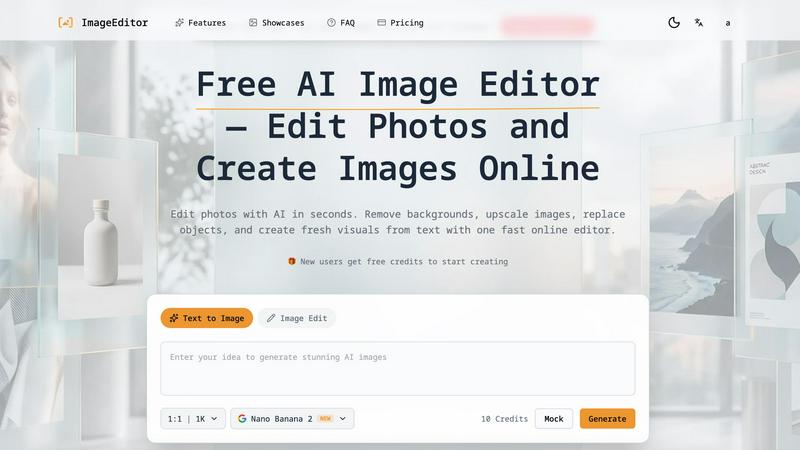
About AI ImageEditor
AI ImageEditor is a powerful, browser-based AI image editing platform that redefines how creators, marketers, designers, and businesses produce professional-quality visuals. Unlike traditional editing software that demands steep learning curves and expensive subscriptions, AI ImageEditor combines text-to-image generation, background removal, object replacement, style transfer, and high-resolution upscaling into one seamless, lightning-fast workflow. Accessible directly from any modern web browser, the tool eliminates the need for downloads or installations, letting users jump straight into creating. At its core, AI ImageEditor leverages state-of-the-art AI models, including the new GPT-Image-2, to understand complex natural language prompts and convert them into stunning, photorealistic images with accurate details and lifelike features. The platform is designed for speed and efficiency: generate an image from text in seconds, remove a background with a single click, or upscale a photo to 2K or 4K without losing detail. It caters to a wide audience, from social media influencers needing fresh content daily to e-commerce businesses requiring polished product shots and marketing teams producing campaign visuals at scale. With no design skills required, a commercial license included, and batch processing capabilities, AI ImageEditor empowers users to create, edit, and refine images at flash speed, making it the go-to solution for anyone who needs professional visuals without the complexity.
Features of AI ImageEditor
Text to Image Generation
Transform your text prompts into stunning, photorealistic visuals in seconds. Our advanced AI understands complex natural language descriptions, from "a cozy coffee shop with warm lighting" to "geometric art in neon colors," and produces high-quality outputs with accurate details, lifelike features, and precise composition. The tool supports multiple style presets, aspect ratios, and resolution options up to 4K, giving you full creative control. With the new GPT-Image-2 model, you get even sharper results and better adherence to your prompt, making it ideal for generating unique marketing assets, social media graphics, concept art, and more, all without touching a traditional design tool.
Image to Image Enhancement
Upload any existing photo and transform it with enhanced quality and creative modifications. Our AI applies intelligent enhancements, style transfers, and creative transformations while preserving the original composition and key elements. Whether you need to change the mood of a photograph, apply an artistic filter, or completely reimagine a scene, this feature lets you iterate rapidly. The AI analyzes your source image, understands its structure, and applies changes seamlessly, making it perfect for refining product shots, updating old photos, or creating consistent visual themes across a series of images. It is a powerful tool for designers who need to experiment without starting from scratch.
Background Removal
Remove backgrounds from images instantly with AI-powered precision. This feature is perfect for product photos, portraits, and creating transparent PNGs for professional use. The AI automatically detects the subject, accurately separates it from the background, and handles complex edges like hair, fur, or intricate objects with remarkable accuracy. You can then replace the background with a solid color, a new image, or leave it transparent for use in presentations, e-commerce listings, or composite images. This tool saves hours of manual masking and is essential for any creator or business producing clean, professional visuals at scale.
Image Upscaling
Enhance image resolution and quality without losing detail. Upscale any image to 2K or 4K resolution for professional projects, marketing materials, and high-quality prints. Our AI uses advanced upscaling algorithms that intelligently add detail and sharpness, preventing the pixelation or blurriness common with traditional resizing methods. This feature is critical for using low-resolution stock photos, older images, or AI-generated previews in high-stakes applications like billboards, brochures, or large-format displays. It ensures your visuals remain crisp and professional, regardless of their original size.
Use Cases of AI ImageEditor
Social Media Content Creation
Social media managers and influencers can generate a constant stream of fresh, engaging visuals without relying on stock photos or complex software. Use text-to-image to create unique backgrounds, promotional graphics, or thematic posts for Instagram, TikTok, and LinkedIn. Remove backgrounds from user-generated content to create cohesive brand feeds. Upscale low-resolution images for high-quality stories and posts. The platform's speed lets you produce a week's worth of content in minutes, keeping your feed active and on-brand with zero design overhead.
E-Commerce Product Photography
Online sellers and e-commerce teams can dramatically improve product listings with professional-looking images. Use background removal to isolate products and place them on clean, consistent backgrounds. Apply image-to-image enhancement to improve lighting and color accuracy on product shots. Generate lifestyle images by combining product photos with AI-generated backgrounds, showing items in use. Upscale images to 4K for zoom features and print catalogs. This workflow eliminates the need for expensive photo studios and speeds up listing creation, directly impacting conversion rates and brand perception.
Marketing Campaign Asset Generation
Marketing teams can rapidly prototype and produce visual assets for campaigns, ads, and landing pages. Generate multiple variations of a campaign concept using text-to-image prompts, exploring different styles, colors, and compositions in seconds. Use style transfer to apply a consistent visual theme across all assets, from social media ads to email headers. Batch process multiple images for A/B testing, saving hours of manual work. The commercial license ensures all generated images can be used in paid advertising and promotional materials without legal concerns, accelerating the entire creative workflow.
Graphic Design and Concept Art
Designers and artists can use AI ImageEditor as a powerful brainstorming and prototyping tool. Generate initial concept art from text descriptions to quickly visualize ideas for clients or personal projects. Use image-to-image to refine sketches or rough compositions into polished visuals. Remove and replace backgrounds to composite elements from different sources into a single cohesive scene. Upscale final artwork for portfolio presentations or print. The platform acts as an always-available creative partner, helping overcome creative blocks and rapidly iterating on concepts before moving to final production.
Frequently Asked Questions
Do I need any design skills to use AI ImageEditor?
No, absolutely not. AI ImageEditor is built for users of all skill levels, from complete beginners to professional designers. The platform uses natural language processing, so you simply type what you want to create or edit, and the AI handles the rest. There are no complex layers, tools, or curves to learn. The interface is intuitive and streamlined, guiding you through each step from prompt to download. Whether you are generating an image from text or removing a background, the process is designed to be completed in seconds with minimal clicks.
Is there a free version or trial available?
Yes, you can start using AI ImageEditor for free immediately. Your first generation requires no signup, allowing you to test the platform's capabilities right away. The platform operates on a credit system, where each generation or edit consumes a set number of credits. The free tier provides a generous number of credits to get started, and you can earn or purchase more as needed. For heavy users, subscription plans offer unlimited credits and access to premium features like higher resolution outputs and faster processing speeds.
Can I use the images I create for commercial purposes?
Yes, absolutely. All images generated or edited using AI ImageEditor come with a commercial license included. This means you have full rights to use the visuals for any commercial application, including marketing campaigns, product listings, social media advertising, website content, printed materials, and more. You do not need to attribute the platform or pay any additional royalties. This is a key feature for businesses and creators who need legal certainty when using AI-generated content in their professional work.
What file formats and resolutions are supported for download?
AI ImageEditor supports downloading your final images in high-resolution PNG and JPG formats. You can choose output resolutions up to 2K or 4K, depending on your plan and the specific tool you are using. PNG is ideal for images requiring transparency, such as product cutouts with removed backgrounds, while JPG is perfect for photographs and web content where smaller file sizes are beneficial. The platform also supports uploading images in common formats like JPG, PNG, and WEBP for editing.
Similar to AI ImageEditor

Create seamless textures and repeat-ready patterns with AI.

Make any images possible — generate, edit, and transform images with AI models like GPT Image and Gemini in seconds.

Explore runway, dance, music and object video templates. Compare source and remix examples, upload your reference photos and create a new version.

Create a face swap video from your photos. Explore trending dance, runway and music video templates, choose a format, and make yourself the star.

Create AI images, videos, and more with one creative toolkit

Restore old photos with RestoreOldPhoto.ai: repair scratches, creases and fading, sharpen faces and details, and optionally colorize family memories.

Your AI agent picks relevant directories, submits your product in your browser and tracks every step. One-time purchase.

Free open-source Android comic & manga cloud reader streaming encrypted libraries from S3, WebDAV & OPDS.