
Easymotion - AI Motion Graphics Generato
Turn hours of motion graphics work into minutes by chatting with AI to create professional animations, map videos, and social media content.
VisitPublished on:
June 12, 2026
Pricing:
About Easymotion - AI Motion Graphics Generato
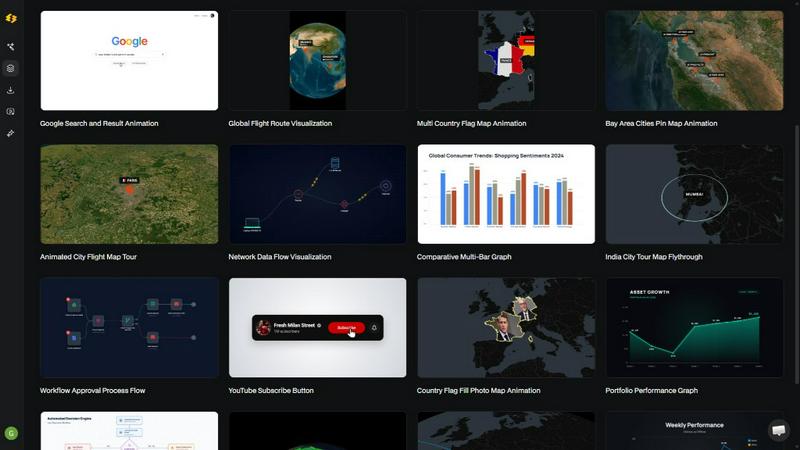
Easymotion is an AI-powered motion graphics generator and map animation platform built for content creators, video editors, marketers, founders, and data storytellers who need to move fast. Instead of wrestling with complex timeline editing in tools like After Effects, you can simply chat with AI to produce polished, professional animated videos in minutes. The platform transforms ideas, static images, spreadsheets, and PDFs into dynamic, animation-ready scenes. Whether you need a SaaS product promo, an animated flowchart, a data-driven chart, a UI explainer, or a social media video, Easymotion handles the heavy lifting. It also excels as a map animation maker, enabling you to create flight routes, location pins, flag fill highlights, and geographic storytelling visuals effortlessly. After generating your animation, you can refine every detail by chatting with the AI to adjust colors, pacing, labels, layout, and visual style. A premium template library gives you a head start with proven motion graphics layouts that you can customize for your brand, campaign, or client. When your video is ready, export as MP4 or MOV, including transparent background videos for seamless integration into editing workflows. Easymotion supports 16:9 for YouTube, 9:16 for TikTok and Reels, 1:1 for square posts, and 4:5 for feed-friendly vertical formats. Loved by over 10,000 creators, it is the fastest way to create motion graphics, map animations, and reusable video assets directly in your browser.
Features of Easymotion - AI Motion Graphics Generato
AI-Powered Chat-Based Creation
Describe your animation in plain English and the AI generates a polished video instantly. No keyframes, no timelines, no complex software. You can iteratively refine the result by chatting to adjust colors, timing, map styles, text, and layout until it looks exactly right.
Image, Data, and Document to Animation
Upload a static image and let AI bring it to life with stunning motion. Turn boring spreadsheets (CSV or XLSX) into beautiful animated charts and graphs. Convert PDFs into animation-ready scenes. This feature eliminates manual design work and lets you repurpose existing assets at scale.
Map Animation Made Easy
Create professional map animations faster than ever. Generate flight routes, location pins, country highlights, and geographic storytelling visuals with simple prompts or data uploads. Perfect for travel content, business logistics, and data-driven geographic narratives.
Multi-Format Export with Transparent Background
Export your final video as MP4 or MOV, including videos with an alpha channel for transparent backgrounds. This allows you to drop animations directly into any editing software like Premiere Pro or Final Cut Pro. Output in 16:9, 9:16, 4:5, or 1:1 aspect ratios to fit any platform.
Use Cases of Easymotion - AI Motion Graphics Generato
Social Media Video Creation for Creators and YouTubers
Creators can produce eye-catching social media promos, travel reels, and channel milestone animations in under five minutes. Instead of spending hours in After Effects for a single video, you can create more content, post more frequently, and grow your audience faster with animated maps, charts, and UI explainers.
Data Storytelling and Animated Charts for Marketers
Marketing teams can turn static data from spreadsheets into animated bar charts, line graphs, and flowcharts that stop the scroll. Video posts with animated data get up to five times more engagement than static images. Campaigns can be ideated, created, and shipped on the same day without waiting on designers.
Product Demos and UI Explainers for Founders and Startups
Founders can create polished SaaS product promos, UI walkthroughs, and workflow animations without hiring expensive freelancers or learning complex editing software. This DIY approach helps startups build their social presence and communicate product value quickly and professionally.
Map-Based Geographic Storytelling for Video Editors
Video editors can generate flight route animations, location pin drops, and country highlight maps in minutes. These map animations enhance travel vlogs, business presentations, and documentary content. Editors report working three times faster by skipping After Effects and using Easymotion instead.
Frequently Asked Questions
What is Easymotion and who is it for?
Easymotion is an AI-powered motion graphics generator that lets you create professional videos simply by chatting. It is built for content creators, video editors, marketers, founders, startups, and data storytellers who need to produce animated videos quickly without relying on complex software like After Effects. The platform is used by over 10,000 creators worldwide.
How does the AI motion graphics generation work?
It works in three simple steps. First, describe the animation you want in plain English or upload an image, spreadsheet, or PDF. Second, refine the result using chat commands to adjust colors, timing, map styles, or assets. Finally, export your completed video as an MP4 or with a transparent background. The AI handles all keyframes and animation curves automatically.
What types of videos can I create with Easymotion?
You can create a wide variety of motion graphics including map animations (flight routes, location pins, country highlights), data visualizations (bar charts, line graphs, flowcharts), social media videos (promos, reels, quizzes), UI explainers, SaaS product demos, and animated infographics. The platform supports multiple aspect ratios for YouTube, TikTok, Instagram, and more.
Can I export videos with transparent backgrounds?
Yes, Easymotion supports export with an alpha channel, allowing you to render videos with transparent backgrounds. This is ideal for video editors who want to drop animations directly into editing software like Adobe Premiere Pro, Final Cut Pro, or DaVinci Resolve without any additional compositing work. Exports are available in MP4 and MOV formats.
Similar to Easymotion - AI Motion Graphics Generato

Turn text prompts into polished, copyright-safe visuals that plug directly into branded templates

Create and edit AI images, generate videos, and compare models in one creative workbench.

A modern, AI-native CRM built for lead-driven businesses. Qualify leads 24/7, track pipelines, and measure true ad ROI with flat-rate pricing.

Zeptap lets AI use your real iPhone like you do: open apps, read the screen, tap, swipe and type. Reply to DMs, post Stories, book rides, test apps.

Independent Seedream 6 guide with a browser-based AI image and video generator powered by Seedream 5.0 Pro and 5.5.

Seedream 5.5 by ByteDance: 80+ rounds of stable image editing, native RGBA transparency, 100-layer splits, 4K output and reliable multilingual text.

Turn photos into animated videos with AI. Free credits on selected models; paid options for private, watermark-free results.

Turn text prompts and photos into videos with Sora 2, Veo 3.1, Wan and more. Get free starter credits and watermark-free downloads.