
PC Bottleneck Calculator
Stop guessing and start gaming with instant bottleneck analysis to unlock your PC's full potential.
Visit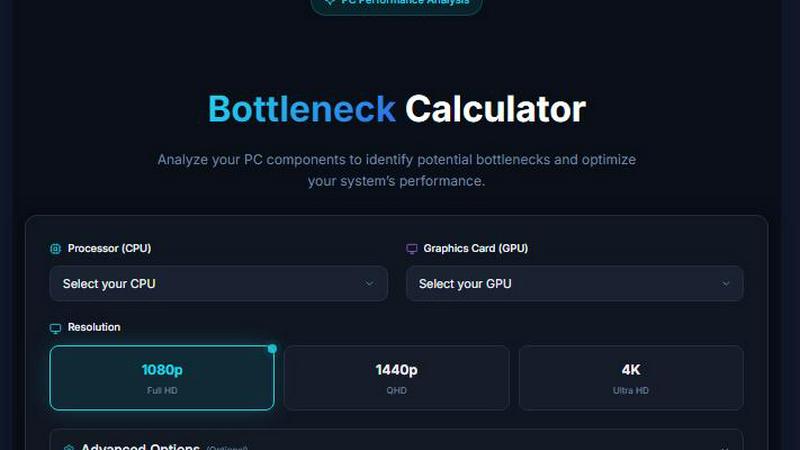
About PC Bottleneck Calculator
The PC Bottleneck Calculator is a precision diagnostic tool engineered to analyze your computer's hardware configuration and pinpoint performance limitations caused by component mismatches. At its core, this tool evaluates the synergy between your processor, graphics card, and memory to determine if one component is holding back the full potential of another. For gamers, content creators, and PC enthusiasts, this means no more guessing games when it comes to system performance. The calculator uses sophisticated algorithms that compare benchmark scores and processing capabilities across your selected components, delivering a clear percentage-based bottleneck analysis. This tool is designed for anyone building a new system, upgrading existing hardware, or troubleshooting performance issues. Instead of relying on vague assumptions or expensive trial-and-error upgrades, users get actionable data that tells them exactly where their system is underperforming and why. The value proposition is straightforward: eliminate wasted investment on components that won't deliver returns, optimize your spending for maximum performance per dollar, and achieve the balanced system you actually need for your specific workload. Whether you are assembling a gaming rig, a workstation for video editing, or a general productivity machine, this calculator provides the analytical foundation for smart hardware decisions.
Features of PC Bottleneck Calculator
Comprehensive Component Database
The tool houses an extensive library of processors and graphics cards spanning multiple generations from both Intel and AMD. Each component is assigned a performance score based on real-world benchmarks, enabling precise comparisons. The database includes everything from budget-friendly options like the AMD Ryzen 3 1200 to flagship performers like the Intel Core i9-14900KS and NVIDIA RTX 5090, ensuring accurate analysis regardless of your hardware tier.
Real-Time Bottleneck Detection
As soon as you select your CPU and GPU, the calculator instantly processes the data and delivers a bottleneck percentage. This real-time feedback loop allows you to experiment with different component combinations without committing to a purchase. You can swap out a weaker processor for a stronger one and see immediately how the bottleneck shifts, making it an invaluable tool for virtual build planning.
Performance Score Transparency
Every component in the database comes with a visible performance score. This scoring system demystifies the comparison process by providing a clear numerical value for each CPU and GPU. Users can see exactly why one component might bottleneck another, as the scores reveal the raw performance gap. This transparency builds trust and helps users understand the underlying logic of the bottleneck calculation.
User-Centric Interface Design
The interface is streamlined for speed and efficiency. With clearly labeled dropdown menus for processor and graphics card selection, users can complete an analysis in under thirty seconds. The layout prioritizes function over fluff, eliminating unnecessary distractions and focusing entirely on the core task of component evaluation. This design philosophy ensures that both novice builders and experienced technicians can navigate the tool with equal ease.
Use Cases of PC Bottleneck Calculator
New PC Build Planning
When assembling a system from scratch, selecting components that work in harmony is critical. This use case involves choosing a CPU and GPU pair that deliver balanced performance for your target resolution and frame rate. The calculator allows you to test multiple combinations virtually, ensuring you do not overspend on a high-end GPU only to pair it with a processor that cannot feed it enough data, or vice versa.
Targeted System Upgrades
If you already own a PC and are experiencing performance issues, this tool helps you identify the weakest link. Instead of replacing the entire system, you can pinpoint whether the CPU, GPU, or RAM is causing the bottleneck. This targeted approach saves significant money by focusing your upgrade budget on the component that will actually deliver the most noticeable performance improvement.
Performance Troubleshooting
When a previously fast system starts to lag in new games or applications, the bottleneck calculator can diagnose the root cause. By comparing your current hardware against newer software demands, you can determine if your processor has become the limiting factor or if your graphics card is struggling to keep up. This diagnostic capability eliminates guesswork and provides a clear path forward.
Budget Optimization for Pre-Built Systems
Many users purchase pre-built computers and later wonder if they got the best value. This use case involves analyzing the component balance of an existing pre-built system. If a significant bottleneck exists, users can make informed decisions about whether to return the system, upgrade specific parts, or simply accept the performance profile they have. This knowledge turns passive ownership into active system management.
Frequently Asked Questions
What exactly is a PC bottleneck in simple terms?
A PC bottleneck occurs when one component in your system cannot keep up with the performance of another component, limiting the overall speed of your computer. For example, if you have a very powerful graphics card but a slower processor, the CPU may not be able to send instructions fast enough, causing the GPU to wait and reducing your frame rates in games. The bottleneck calculator identifies these mismatches.
How accurate is the bottleneck percentage provided by this tool?
The accuracy is based on the performance scores assigned to each component, which are derived from extensive benchmark data. The percentage represents a theoretical performance gap under ideal conditions. Real-world performance can vary based on factors like game optimization, cooling, and background tasks. However, the tool provides a highly reliable indicator of where your system's primary limitation lies.
Do I need to consider RAM when using this calculator?
While the primary focus of this calculator is on CPU and GPU pairing, RAM speed and capacity can also influence bottleneck scenarios. The tool provides a foundational analysis of the processor and graphics card relationship. For a complete assessment, you should also ensure your RAM is adequate for your CPU and GPU combination, particularly in memory-intensive tasks like video editing or high-resolution gaming.
Can this tool help me decide between an Intel or AMD processor?
Absolutely. The database includes a wide range of processors from both manufacturers, each with its own performance score. You can directly compare an Intel Core i7-14700K against an AMD Ryzen 7 7800X3D, for example, to see which one pairs better with your chosen GPU. This side-by-side analysis removes brand bias and focuses purely on performance data to guide your decision.
Similar to PC Bottleneck Calculator

Create OCs from text or images, customize their look, and turn them into animated videos with AI.

All-in-one digital toolkit for effortless image conversion, compression, resizing, and everyday file utilities in a single place.

AI image and video studio in your browser: generate and edit images, turn photos into videos, edit clips by sentence.

Amazon research data APIs for developers, sellers and AI agents. Integrate product, keyword and market research through REST APIs and MCP.

One OpenAI-compatible endpoint for text, image and video models from OpenAI, Anthropic, Google, DeepSeek and more.

PSL Rating is an AI face analysis tool. Upload one selfie and get your PSL tier, a 1–10 score and percentile, plus measurement lines you can chec

Turn two photos into a cinematic AI zombie love story video with sound, a free scene preview, and no watermark.

Apps and files on an infinite canvas where people and AI agents work together.