
Picture Enhancer
Deblur, upscale, and restore photos instantly in your browser with free guest tries and no software install.
Visit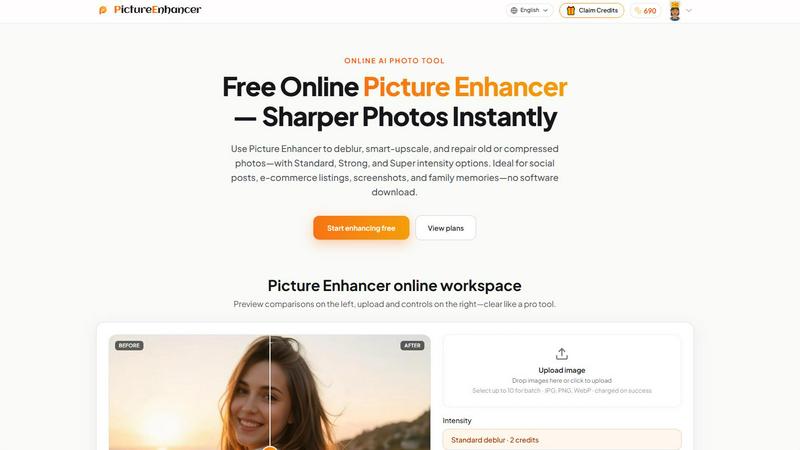
About Picture Enhancer
Picture Enhancer is a fast, free online AI photo tool designed for creators, sellers, and everyday users who need sharper images in seconds. This product eliminates the hassle of complex software by delivering professional-grade deblurring, smart upscaling, and photo restoration directly in your browser. No downloads, no signup required for guests, and no watermarks on successful results. The core value proposition is simple: upload a JPG, PNG, or WebP photo, choose your enhancement mode and intensity level, preview the before-and-after comparison, and download a clean, watermark-free output instantly. Whether you are a social media manager cleaning up portrait shots, an e-commerce seller upscaling product photos for better listings, or someone preserving old family memories, Picture Enhancer handles it all. The platform offers three distinct modes: Deblur, Upscale, and Restore. Each mode comes with three intensity tiers: Standard, Strong, and Super. Guests receive three free lifetime tries per IP address with no signup required. Once you sign in, you gain access to a credit-based system where new accounts receive starter credits. Credits are only charged on successful enhancements, ensuring you never pay for failed attempts. Standard enhancements cost 2 credits, Strong costs 4, and Super costs 6. Paid users unlock Super tiers and batch processing capabilities, allowing up to 10 images at once. Monthly subscription plans grant credits each billing cycle, while permanent credit packs never expire. Picture Enhancer is ideal for social posts, e-commerce listings, screenshots, and family photos. The entire workflow is secure, private, and results are delivered in seconds. With a clean, intuitive interface and a focus on speed and efficiency, Picture Enhancer empowers anyone to improve image quality without technical expertise.
Features of Picture Enhancer
AI Deblur Mode
Picture Enhancer uses advanced AI algorithms to rebuild edges and texture from common image issues like camera shake, soft focus, and mild motion blur. This mode is perfect for salvaging photos that look slightly out of focus or blurry due to movement. You can choose between Standard, Strong, and Super deblur intensity levels. Standard handles minor blur, Strong tackles moderate issues, and Super aggressively recovers sharpness for heavily blurred images. Faces, text, and fine details become crisp and readable again, making this feature essential for portrait photographers, content creators, and anyone working with imperfect captures.
Smart Upscale Mode
Need to enlarge a small image without losing quality? Smart Upscale delivers 2x and 4x enlargement while intelligently adding detail. This is not simple pixel stretching. The AI analyzes the image content and reconstructs missing information to produce a larger, sharper result. Ideal for social media cover photos, product hero shots, or print previews when you only have a low-resolution source file. The Super intensity tier provides the highest quality upscaling, making it a paid-user benefit. Batch upscaling is also available for subscribers and pack buyers, allowing efficient processing of up to 10 images at once.
Old Photo and Damage Restore
Restore mode is specifically designed to repair vintage or damaged photographs. It reduces scratches, fade, and compression artifacts that accumulate over time. Strong and Super restore intensity levels handle heavier damage on scanned family prints, such as deep scratches, color shifts, and significant fading. The AI intelligently fills in missing areas and smooths out imperfections while preserving the original character of the photo. This feature is invaluable for genealogists, archivists, and families looking to preserve and share treasured memories in digital form.
Before/After Preview Slider
One of the most user-friendly features is the interactive before/after comparison slider. After uploading and selecting your enhancement parameters, you can drag the slider left and right to instantly compare the original image with the enhanced version. This visual feedback allows you to evaluate quality improvements in real time before committing to a download. The preview is clear and accurate, giving you confidence that the result meets your expectations. Signed-in users can also revisit their enhanced results in the My Assets section, making it easy to access and download past work.
Use Cases of Picture Enhancer
Social Media Content Creation
Social media managers and influencers can dramatically improve the quality of their posts using Picture Enhancer. Blurry or low-resolution photos from events, product shots, or user-generated content can be deblurred and upscaled to meet platform requirements. The AI deblur mode cleans up faces and clothing, while smart upscale ensures images look sharp on larger screens. With Standard and Strong intensity options, you can quickly polish multiple images for feeds, stories, and ads. The fast processing and watermark-free downloads make it a go-to tool for maintaining a professional aesthetic across social channels.
E-commerce Product Listings
Online sellers need crisp, detailed product images to drive conversions. Picture Enhancer helps by upscaling small product photos and reducing compression noise that often results from resizing. The deblur mode can fix slightly out-of-focus shots, while restore mode cleans up artifacts from heavily compressed images. Super intensity tiers provide the highest quality output for hero images and zoom-in details. Batch processing allows sellers to enhance up to 10 images simultaneously, saving significant time during listing creation. The result is a more professional storefront that builds trust and encourages purchases.
Screenshot and UI Capture Enhancement
Technical writers, support teams, and tutorial creators frequently work with screenshots that suffer from blurry text or jagged edges. Picture Enhancer sharpens text edges and reduces artifacts in UI captures, making them clearer for documentation, guides, and support articles. The deblur mode is particularly effective for cleaning up screenshots taken on lower-resolution displays or those that have been compressed during sharing. This ensures that instructions, annotations, and interface details are legible and professional, improving the user experience for readers following along.
Family Photo Restoration and Preservation
Preserving old family photos is a meaningful use case for Picture Enhancer. Scanned prints often show signs of age, including scratches, fading, and dust spots. The restore mode specifically targets these issues, with Strong and Super tiers handling heavy damage. You can reduce scratches, restore faded colors, and smooth out compression artifacts from digital copies. The result is a cleaner, more vibrant version of the original that is ready to share in digital albums, print, or display. This makes Picture Enhancer an accessible tool for anyone looking to protect and enjoy family history.
Frequently Asked Questions
What is Picture Enhancer?
Picture Enhancer is a free online AI-powered tool that sharpens, upscales, and restores photos. It supports JPG, PNG, and WebP formats. You can choose from three modes: Deblur, Upscale, or Restore. Each mode offers Standard, Strong, or Super intensity levels. The tool provides a before/after preview and downloads watermark-free results. It is designed for creators, sellers, and everyday users who need fast, high-quality image enhancement without downloading software.
Can I try Picture Enhancer without signing in?
Yes, guests get three free lifetime tries per IP address with no signup required. You can upload a photo, choose a mode and intensity, preview the result, and download a watermark-free image. After using your three tries, you will need to sign in to continue using the service. Signing in is free and new accounts receive starter credits to begin enhancing immediately.
How does billing work after sign-in?
After signing in, you use credits to enhance images. Credits are only charged on successful enhancements, so you never pay for failed attempts. Standard enhancements cost 2 credits, Strong costs 4, and Super costs 6. You can purchase monthly subscription plans that grant credits each billing cycle, or buy permanent credit packs that never expire. Paid users also unlock Super intensity tiers and batch processing for up to 10 images at once.
Which modes does Picture Enhancer support?
Picture Enhancer supports three core modes: Deblur, Upscale, and Restore. Deblur rebuilds edges and texture from camera shake, soft focus, and motion blur. Upscale provides 2x and 4x enlargement with intelligent detail addition. Restore reduces scratches, fade, and compression artifacts, with Strong and Super tiers handling heavier damage on scanned photos. Each mode has Standard, Strong, and Super intensity options.
Will downloads include a watermark?
No, all successful enhancements are downloaded without any watermark. You receive the clean, enhanced image directly. This applies to guest users, signed-in users, and paid subscribers. The only requirement is that the enhancement job must succeed for credits to be charged and the download to be available.
What is the difference between subscription and permanent credit packs?
A monthly subscription grants you a set number of credits each billing cycle, which is ideal for regular or heavy users who need a steady supply of credits. Permanent credit packs are a one-time purchase that never expires, making them perfect for occasional users who want to buy credits and use them as needed over time. Both options unlock Super intensity tiers and batch processing capabilities.
Are my photos safe?
Yes, Picture Enhancer processes all images privately and securely. Uploaded photos are used only to complete your enhancement request. They are not stored longer than necessary and are not shared with third parties. The platform uses secure connections and follows standard privacy practices to protect your data.
Where do I check balance and history?
Signed-in users can view their credit balance and enhancement history in the My Assets section of the website. This area shows your remaining credits, past enhancements, and allows you to revisit and download previous results. It is a convenient way to track your usage and access your work.
Pricing of Picture Enhancer
Picture Enhancer uses a credit-based pricing system. Guests receive three free lifetime tries per IP address with no signup required. After signing in, new accounts receive starter credits to begin enhancing immediately. Credits are only charged on successful enhancements. Standard enhancements cost 2 credits, Strong costs 4, and Super costs 6. Paid users unlock Super intensity tiers and batch processing for up to 10 images at once. Monthly subscription plans grant credits each billing cycle. Permanent credit packs are available as a one-time purchase and never expire. For specific pricing on subscription plans and credit packs, visit the Pricing page on the Picture Enhancer website.
Explore more in this category:
Similar to Picture Enhancer

Turn one selfie into grainy late-90s horror photos for the viral Ghostface AI trend, plus an optional spooky video. Ready in about 2 minutes.

AIPetGen turns a photo of your dog, cat, or other pet, or a written description, into a new picture or a short animation.

A fast, simple AI image studio powered by Nano Banana 2.1: create and edit high-quality images with accurate details and readable text.

ImageGPT is an all-in-one AI creative platform for generating, editing and transforming images and videos using AI.

Create release-ready album covers from a prompt or photo. Generate, refine, and export art for singles, EPs, mixtapes, and playlists.

A free browser-based toolkit for creating, cutting, converting, and previewing sprite sheet animations.

AI tattoo generator for turning ideas, photos & sketches into expressive designs.
