
SLABCALC
SlabCalc is a free suite of 34 concrete calculators plus AI tools that delivers instant volume, cost, and crack analysis for any project.
VisitPublished on:
July 13, 2026
Pricing:
About SLABCALC
SLABCALC is a free, no-signup suite of concrete tools built for contractors, builders, and DIYers who need fast, accurate estimates without friction. At its core are 34 specialized calculators covering slabs, driveways, patios, footings, foundations, walls, CMU block, columns, curbs, stairs, sonotubes, rebar, gravel, garage and basement floors, and more. Each calculator returns volume in cubic yards and cubic meters, pre-mix bag counts for 40, 50, 60, and 80 pound bags, total weight, and a cost estimate. An adjustable waste factor and imperial/metric toggle give you full control over precision. Beyond estimating, SLABCALC adds AI-powered tools: a Concrete Crack Analyzer that diagnoses damage from a photo, identifying failure mode, severity on a 1 to 5 scale, and actionable DIY or engineer advice. A Quote Analyzer breaks down a contractor bid into labor, materials, and site prep costs while flagging red flags. Rounding out the platform are cost-by-city pricing pages, expert guides, a concrete glossary, a Chrome extension, and embeddable widgets. SLABCALC is a one-stop platform for concrete planning that removes guesswork and saves time on every project.
Features of SLABCALC
34 Specialized Project Calculators
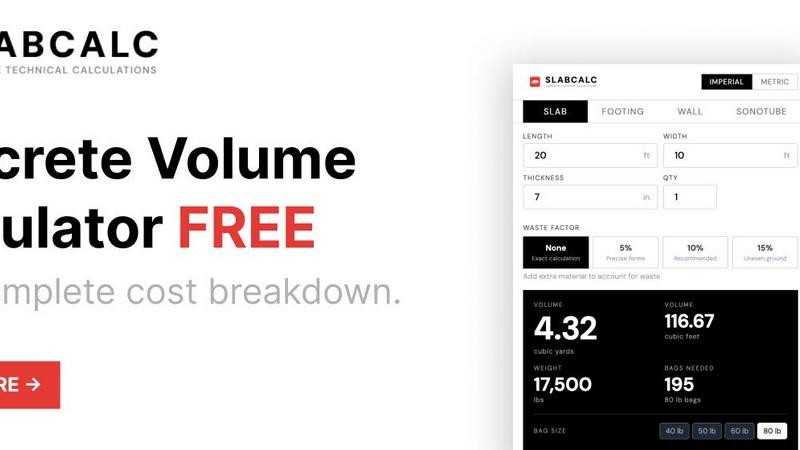
Access a library of 34 pre-configured calculators for every concrete shape and application. Whether you are pouring a slab, cylinder, curb, stairs, column, wall, footing, circle, or tube, each calculator returns instant volume in cubic yards and cubic meters, bag counts for 40, 50, 60, and 80 pound bags, total weight, and a material cost estimate. An adjustable waste factor from 5 to 15 percent accounts for spills and uneven ground, while the imperial/metric toggle supports projects anywhere. Pre-configured project calculators for CMU walls, basement floors, columns, curbs, deck footings, and more come with tailored defaults and tips, so you can jump straight into estimating without manual setup.
AI-Powered Concrete Crack Analyzer
Diagnose concrete damage instantly by uploading a photo to the AI-powered Crack Analyzer. The tool identifies the failure mode, assigns a severity rating from 1 to 5, and provides clear DIY or engineer-recommended advice. This feature eliminates the need for costly expert consultations on minor cracks while flagging serious structural issues that require professional intervention. It is an invaluable tool for contractors inspecting existing slabs, homeowners assessing driveway damage, or builders evaluating foundation cracks before a sale. The analysis is fast, visual, and actionable, helping you make informed decisions in minutes rather than hours.
AI-Powered Quote Analyzer
Stop guessing whether a contractor bid is fair with the AI-powered Quote Analyzer. Upload any bid, and the tool breaks it down into labor, materials, and site prep costs while flagging red flags like inflated line items, missing scope, or unrealistic timelines. This feature gives contractors and homeowners a data-backed second opinion on pricing, ensuring you pay a fair rate for your concrete project. The analysis includes a comparison to regional averages and highlights areas where you can negotiate or save. It turns a complex bid into a clear, transparent breakdown that puts you in control of your budget.
Cost-by-City Pricing and Expert Guides
Access localized concrete pricing data for cities across the United States, giving you accurate cost estimates that reflect regional material and labor rates. The cost-by-city pages are updated regularly and cover everything from ready-mix delivery fees to professional installation costs per square foot. Complementing the pricing data are expert guides that cover topics like calculating concrete volume, choosing between bagged and ready-mix, understanding standard slab thicknesses, and applying the 10 percent waste rule. A comprehensive concrete glossary defines industry terms, while a Chrome extension and embeddable widgets let you use SLABCALC from any website or workflow. This ecosystem turns a simple calculator into a full concrete planning resource.
Use Cases of SLABCALC
Residential Driveway and Patio Planning
Homeowners planning a new driveway or patio can use SLABCALC to calculate exact concrete volume, bag counts, and cost estimates in seconds. The slab calculator handles any length, width, and thickness, with built-in waste factors for uneven ground. Users can compare bagged concrete versus ready-mix pricing and see professional installation costs per square foot for their area. The AI Quote Analyzer helps homeowners evaluate contractor bids, ensuring they pay a fair price. Expert guides on slab thickness and the 10 percent waste rule provide practical tips that prevent costly mistakes during the pour.
Contractor Bid Preparation and Validation
Contractors use SLABCALC to prepare accurate material estimates for client proposals. The 34 calculators cover every common concrete shape, so estimators can quickly generate volume, bag counts, and weight for slabs, footings, walls, columns, curbs, and stairs. The Quote Analyzer lets contractors validate their own bids against regional averages or analyze competitor bids for discrepancies. The cost-by-city pages help contractors price jobs competitively in their local market. Embeddable widgets allow contractors to add a calculator directly to their own website, giving clients a self-service estimating tool that builds trust and reduces back-and-forth.
DIY Concrete Project Execution
DIYers tackling small projects like deck footings, garden paths, or small slabs rely on SLABCALC for precise material ordering. The calculator handles imperial and metric units, so measurements from any tape measure or plan work seamlessly. Bag count estimates for 40, 50, 60, and 80 pound bags tell DIYers exactly how many bags to buy, eliminating guesswork and trips back to the hardware store. The AI Crack Analyzer helps DIYers assess whether a small crack in an existing slab is cosmetic or structural, guiding them on whether to repair it themselves or call an engineer. Expert guides provide step-by-step instructions for mixing, pouring, and finishing.
Structural Foundation and Footing Engineering
Builders and engineers planning foundations and footings use SLABCALC for precise volume calculations that ensure structural integrity. The footing and column calculators handle any diameter, depth, and quantity, returning cubic yards and weight for load-bearing elements. The rebar calculator estimates reinforcement needs, while the CMU block calculator provides block, mortar, grout, and rebar counts for walls. Technical results include cubic feet, cubic meters, and weight in pounds, which engineers can copy directly into specifications. The AI Quote Analyzer helps project managers verify that subcontractor bids for foundation work are accurate and competitive, reducing the risk of budget overruns.
Frequently Asked Questions
Is SLABCALC really free with no signup required?
Yes, SLABCALC is completely free and requires no signup, account creation, or payment information. You can access all 34 calculators, the AI Crack Analyzer, the AI Quote Analyzer, cost-by-city pricing pages, expert guides, and the concrete glossary without any restrictions. There are no hidden fees, no trial periods, and no limits on the number of calculations you can run. The Chrome extension and embeddable widgets are also free to use. SLABCALC is designed to be a no-friction tool that you can open, use, and close without any commitment.
How accurate are the concrete volume and cost estimates?
The calculators use standard geometric formulas to compute volume with precision down to two decimal places. The waste factor adjustment lets you add 5, 10, or 15 percent to account for spills, subgrade irregularities, and over-excavation. Cost estimates are based on national averages for bagged concrete, ready-mix delivery, and professional installation, and can be refined using the cost-by-city pages for local pricing. The AI Quote Analyzer compares your specific bid to regional averages for even greater accuracy. For critical projects, SLABCALC recommends contacting local suppliers for exact quotes, but the estimates are reliable for budgeting and planning.
How does the AI Concrete Crack Analyzer work?
You upload a photo of the concrete crack directly on the SLABCALC website. The AI model analyzes the image to identify the failure mode, such as shrinkage, settlement, or structural overload. It assigns a severity rating from 1 (cosmetic) to 5 (critical structural failure). Based on the analysis, it provides clear advice on whether the crack can be repaired with DIY methods like epoxy injection or if it requires a structural engineer. The analysis takes seconds and does not require any signup. It is designed to give you an informed starting point for decision-making, not a substitute for a professional inspection on severe issues.
Can I use SLABCALC on my mobile phone or embed it on my website?
Yes, SLABCALC is fully responsive and works on any device with a web browser, including smartphones and tablets. The interface is optimized for touch input, so you can easily enter dimensions and toggle between imperial and metric units on a small screen. Additionally, SLABCALC offers embeddable widgets that you can add to your own website with a simple code snippet. This is ideal for contractors, builders, and material suppliers who want to offer a concrete calculator to their clients directly. A Chrome extension is also available for quick access from your browser toolbar.
Pricing of SLABCALC
SLABCALC is completely free with no signup required. All 34 calculators, AI tools (Crack Analyzer and Quote Analyzer), cost-by-city pricing pages, expert guides, concrete glossary, Chrome extension, and embeddable widgets are available at no cost. There are no paid tiers, subscription plans, or premium features. You can calculate unlimited projects, analyze unlimited bids and crack photos, and access all educational content without any restrictions or hidden fees.
Similar to SLABCALC

Panorama screenshot editor for App Store listings on iPhone and iPad.

AI academic assistant for writing, research, presentations, and coding

PracticeSIEM.com is an interactive, browser-based hands-on cybersecurity learning platform designed for Security Operations Center (SOC) analysts.

SQLCrab (sqlcrab.com) is an interactive, browser-based SQL learning platform that lets you practice database queries directly in your browser.

Signage and kiosk infrastructure for AI agents. Your agent publishes images, video, streams, web pages and apps to screens via one plugin.screenRIG is

A fast, simple AI image studio powered by Nano Banana 2.1: create and edit high-quality images with accurate details and readable text.

Customize web-reading layout with word-start emphasis, hover focus and calmer surroundings

Learn languages with real movie and TV show clips.