
Sorry Hundred Times
Generate perfectly formatted sorry instantly, multiply it 100 to 10,000 times, and copy straight to WhatsApp or Instagram.
Visit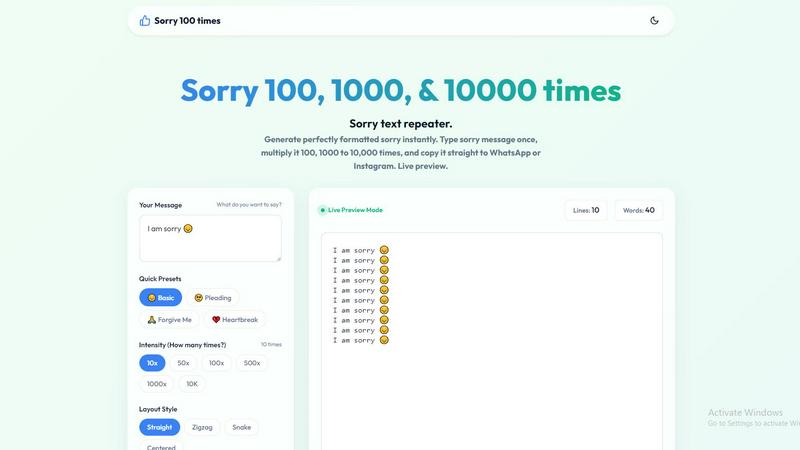
About Sorry Hundred Times
Sorry Hundred Times is a free, browser-based utility that generates repeated apology messages instantly. It solves a specific communication problem: when a single "sorry" feels inadequate, this tool amplifies your message by repeating it 100, 10,000, or any number in between. The core value proposition is speed and impact. Instead of manually copying and pasting the same text over and over, users type their apology once, select a repetition count, choose a layout style, and generate a formatted block of text ready for one-click copying. The tool targets anyone who needs to apologize via digital messaging platforms like WhatsApp, Instagram, iMessage, or SMS. It is designed for casual slip-ups where a light apology suffices, serious arguments that demand a thousand sorries, or anything in between. The entire process runs locally in your browser with zero lag, meaning even 10,000 lines generate instantly without crashing or requiring a server round trip. Personalization is a key feature: users can add names, select from preset emoji-infused phrases like "😔 Basic" or "🙏 Forgive Me," and choose from four layout styles including straight, zigzag, centered, and snake. Formatting options include new lines for each repetition, line numbers for visual impact, and separators between lines. The tool also provides a live preview mode that updates character and word counts in real time. Beyond apologies, the platform hints at a broader ecosystem of repetition tools, including "I love you 100 times" and "Thank you 100 times" generators. Everything is free, no sign-up required, and optimized for instant sharing. This is not a gimmick; it is a focused utility for anyone who understands that sometimes the volume of an apology matters as much as the words themselves.
Features of Sorry Hundred Times
Instant Multiplier with Custom Counts
Select from preset counts of 10, 50, 100, 500, 1000, or 10,000 repetitions, or type any custom number you need. The tool instantly generates the exact number of repeated apologies you specify. This flexibility means you can match the apology intensity to the severity of the mistake. A casual slip-up gets 10x, a major argument gets 1000x or more. The generation is instant, with no waiting or loading screens.
Four Distinct Layout Styles
Choose between Straight, Zigzag, Snake, and Centered layouts. Straight stacks each apology on a new line in a vertical column. Zigzag alternates left and right alignment for a dynamic visual pattern. Snake follows a winding path across the screen. Centered places each line in the middle for a formal, symmetrical look. Each layout changes how the message appears before the recipient reads a single word, adding a layer of visual communication.
One-Click Copy and Export
The tool includes a dedicated "Copy Apology" button that copies the entire generated text to your clipboard instantly. For users whose browser blocks the copy button, an alternative "Select All" method works with Ctrl+C or Cmd+C. Additionally, a "Save .txt" button lets you download the apology as a plain text file for later use or for sending via email or other platforms.
Live Preview with Real-Time Metrics
As you type your message and adjust settings, a live preview updates instantly. The preview shows the exact output including layout, line numbers, and separators. A metrics bar displays the current line count and word count, so you know exactly how much text you are generating. This prevents surprises and lets you fine-tune the message before copying.
Use Cases of Sorry Hundred Times
Casual Slip-Up Apology (10x)
You forgot to text back, ate the last slice of pizza, or showed up five minutes late. A single sorry feels dismissive, but a ten-time repetition shows you acknowledge the small mistake without over-dramatizing it. Use the Basic preset with a straight layout and no line numbers. Copy and paste into WhatsApp within seconds. The recipient sees effort without feeling overwhelmed.
Serious Relationship Argument (100x to 1000x)
For bigger arguments where a simple apology falls flat, the 100x or 1000x setting delivers impact. Use the Pleading or Forgive Me presets, add the person's name, and choose the Zigzag or Centered layout for a more thoughtful appearance. Line numbers can be turned on to visually emphasize the count. This demonstrates genuine effort and dedication to making things right.
Public Apology on Social Media (100x to 10000x)
When you need to apologize publicly on Instagram, Twitter, or Facebook, a massive block of repeated apologies can grab attention and show accountability. Use the Heartbreak preset for serious situations, or customize your own message. The Snake layout works well for visual interest in a caption. The one-click copy function makes it easy to paste into any social media platform.
Group Chat Mea Culpa (50x to 500x)
For group chats where you messed up plans, double-booked, or caused a misunderstanding, a 50x to 500x apology shows you are taking responsibility in front of everyone. Use the Basic or Pleading preset with the Straight layout and line numbers turned on. The group sees the count and understands the sincerity. The tool ensures the message is formatted cleanly and consistently.
Frequently Asked Questions
How do I generate a sorry message with this tool?
Type your apology text into the "Your Message" field. You can use any custom phrase, name, or emoji. Alternatively, select a Quick Preset like "😔 Basic" or "🙏 Forgive Me." Choose your repetition count from the preset buttons (10x, 50x, 100x, etc.) or type a custom number. Select your Layout Style and Formatting options. The live preview updates instantly. Click "Copy Apology" to copy the entire message to your clipboard, then paste it into your chat.
Can I add line numbers and separators to my apology?
Yes. Under the Formatting section, you can toggle "Show line numbers" on or off. When on, each line will display its number (e.g., "1. sorry", "2. sorry"). You can also enable "Add separator (|)" to insert a vertical bar between each repetition. Both options can be used together or separately. Line numbers are particularly useful for the 100x and 1000x settings to visually emphasize the scale of your apology.
Is this tool free to use? Do I need to sign up?
Yes, the Sorry Hundred Times tool is completely free to use. There are no hidden charges, no subscription plans, and no sign-up or account creation required. Everything runs directly in your browser. You do not need to provide any personal information. The tool is designed for instant, frictionless use. Just open the page, generate your apology, and copy it.
What platforms can I share the generated apology on?
The generated text is plain Unicode text that works on any platform that supports text input. It is optimized for WhatsApp, Instagram, iMessage, Facebook Messenger, SMS, and other messaging apps. The one-click copy function is designed for mobile and desktop browsers. For platforms that block the copy button, use the "Select All" method (Ctrl+A on Windows or Cmd+A on Mac) and then copy manually.
Explore more in this category:
Similar to Sorry Hundred Times

Wheel of Names Spin Wheel Picker tool for classrooms or events

Wery is an AI-powered virtual creative studio for entertainment content.

Snapkin is a calorie tracker you use by photographing your plate.

Turn one photo of your dog or cat into a funny 10-second AI dance video for TikTok and Reels. Pay once, no subscription.

Turn one selfie into grainy late-90s horror photos for the viral Ghostface AI trend, plus an optional spooky video. Ready in about 2 minutes.

Swap any face into any video online with AI in minutes. Upload a clip and a photo, get natural lighting and expressions. Free credits on sign-up.

Spin to decide: names, numbers, colors, or yes/no. Free wheel picker tools for teachers, streamers, and teams — no signup needed.

Digital wedding audio guestbook that lets guests record voice messages via QR code, with no app download required.