
Picmal
Picmal converts, compresses, and edits images, video, audio, and PDFs directly on your Mac without uploading anything.
Visit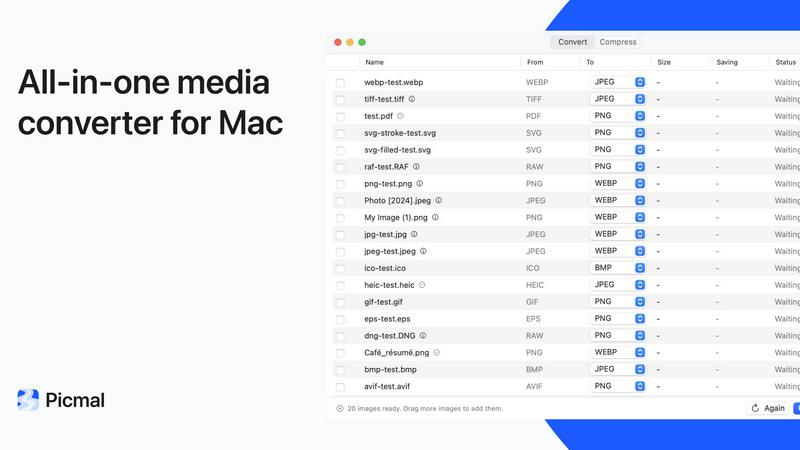
About Picmal
Picmal is a powerful, privacy-focused media toolkit designed exclusively for Mac users who need to convert, compress, and edit images, video, audio, and PDFs without relying on sketchy online services. Unlike web-based tools that require you to upload your files to unknown servers, wait for processing, and then download the results, Picmal operates 100% on your Mac. No uploads, no account creation, and no internet connection required. This means your sensitive documents, personal photos, and confidential media never leave your device. Picmal is built for professionals, creators, and everyday users who value speed, privacy, and control. Whether you are a designer converting HEIC to JPG, a podcaster splitting audio chapters, or a business professional merging PDFs, Picmal handles batch processing with remarkable efficiency. The app supports over 100 formats across images, video, audio, RAW, and PDF, making it a one-stop utility for all your file transformation needs. With a clean interface, frequent updates, and a one-time purchase model, Picmal delivers a fast-paced, agile workflow that eliminates the hassle of clunky online converters. It is trusted by over 660 users who appreciate its simplicity, speed, and the fact that it works offline with no data leaving their Mac.
Features of Picmal
Format Conversion Across 100+ Types
Picmal supports an extensive range of file formats including images, video, audio, RAW, and PDF. You can convert HEIC to JPG, MOV to MP4, FLAC to ALAC, and much more with just a drag and drop. The conversion engine is optimized for speed and quality, ensuring you get exactly the output you need without unnecessary steps. Batch processing allows you to convert multiple files simultaneously, saving you valuable time.
Compression Without Quality Loss
Compress images, videos, and audio to meet email size limits or speed up uploads without sacrificing noticeable quality. Picmal intelligently balances file size reduction with visual and audio fidelity, so your content remains professional. Unlike online compressors that degrade quality unpredictably, Picmal gives you control over compression levels, ensuring your files are optimized for your specific use case.
PDF Splitting and Organization
Easily break apart multi-page PDFs into individual pages or reorder, rotate, and delete pages directly within the app. This feature is perfect for extracting specific pages from contracts, reports, or presentations. Picmal handles PDF operations natively on your Mac, so your documents never leave your device. You can also combine multiple PDFs into one organized file with custom page order and size settings.
Video and Audio Merging and Splitting
Stitch multiple video clips into a single seamless file or join audio tracks into one continuous recording. Picmal also allows you to split long audio files by chapters, making it ideal for podcasts, audiobooks, and lecture recordings. The interface is intuitive and fast, letting you drag clips to reorder them before exporting in your chosen format in a single pass.
Use Cases of Picmal
Converting HEIC Images to JPG for Web Uploads
Photographers and web developers frequently need to convert HEIC images from iPhones to the universally compatible JPG format. Picmal lets you drop an entire folder of HEIC files, select JPG as the output, and batch process them in seconds. No need to open each image individually or rely on slow online converters. This workflow is essential for e-commerce, social media, and content management.
Compressing Video Files for Email Attachments
When you need to send a video clip via email but the file is too large, Picmal compresses it efficiently without making it look pixelated. You can set a target file size or compression level, and the app processes the video locally. This is perfect for freelancers sending client proofs, educators sharing lecture clips, or anyone dealing with attachment limits on email platforms.
Splitting a Multi-Page PDF into Individual Images
Professionals often need to extract pages from a PDF as separate image files for presentations or documentation. Picmal can take a multi-page PDF and convert each page to an individual image with one click, a task that even Apple's Preview cannot do natively. This saves hours of manual screenshotting and ensures each page is perfectly rendered.
Merging Podcast Audio Tracks into One File
Podcasters recording separate segments or interviews can use Picmal to merge multiple audio files into a single, seamless track. You can drag files to reorder them, choose the output format, and export the final product in one go. This eliminates the need for complex audio editing software for simple merging tasks, speeding up your post-production workflow.
Frequently Asked Questions
Is Picmal really 100% offline and private?
Yes, Picmal processes all files directly on your Mac. No data is uploaded to any server, no account is required, and the app works completely offline. Your files never leave your device, ensuring total privacy and security for sensitive documents and media.
What file formats does Picmal support?
Picmal supports over 100 formats across images, video, audio, RAW, and PDF. This includes common formats like JPG, PNG, HEIC, MOV, MP4, MP3, FLAC, ALAC, and PDF, as well as many professional and niche formats. The full list is available in the app's documentation.
Can I convert multiple files at once?
Absolutely. Picmal is built for batch processing. You can drag and drop multiple files into the app, select your desired output format, and convert them all simultaneously. This dramatically speeds up workflows where you need to process large numbers of files.
Does Picmal work with Shortcuts, Finder, and Raycast?
Yes, Picmal integrates seamlessly with your Mac's workflow tools. You can use it with Finder for right-click conversions, Apple Shortcuts for automated workflows, and Raycast for quick access. This makes Picmal a versatile tool that fits into your existing habits rather than forcing you to learn a new process.
Pricing of Picmal
Picmal is available for a one-time purchase of $15.99 per device. This single payment covers one seat on one Mac and includes all current features such as format conversion, compression, batch processing, PDF tools, video and audio merging, and offline operation. Free updates are included with your purchase, so you get new features and improvements as they are released. There are no subscriptions, no hidden fees, and no recurring charges. Payment is processed securely via Stripe, and VAT may apply depending on your location.
Similar to Picmal

A strictly human-verified directory for active SaaS, practical AI tools, and custom n8n workflows. Discover software that works without bot spam.

Privacy-first cookieless analytics that connects website traffic directly to real revenue.

E-signatures for small teams. $19/month, unlimited users.

Digital guest pager system with zero hardware. Guests scan QR code to track order status and get buzzed on their own phone. No apps or SMS fees

From first scene to published 2D game, no code

Moderation, routing, intent and scoring for any text over one Jev-compatible API, hosted in the EU.

A free directory of 950+ projects built on Laya, the open-source decision model. Updated daily.

A free browser-based toolkit for creating, cutting, converting, and previewing sprite sheet animations.